
Open source · MIT licence
Edit the page where you see it.
The client clicks what they see on the page and edits the right field straight away — instead of hunting for it in a form next to the preview.
- Version
- 1.1.0
- Compatibility
- Payload 3.x
pnpm add @digitalvantage/payload-visual-editor @digitalvantage/payload-visual-editor-reactWe took over the plugin's development, keeping the MIT licence and the author credits.
// Challenge
Form on the left, preview on the right
We hand clients websites built on Payload CMS, and the client is then meant to update them on their own. In Payload that looks like this: a form on the left, a preview of the page on the right. The page is made of blocks — a header, an offer section, a gallery, testimonials, contact — and in the form each block is a collapsible row of fields. To fix a single sentence, the client first has to work out which row and which field matches what they see on the page.
We are not the only ones who see it. The author of one Payload plugin writes that with many blocks, editors "lose track of which row maps to what on the actual page", and that Live Preview "only shows you the result". Agencies comparing CMSs put it bluntly: without extra polish, Payload "feels like a database editor to a marketer". Payload's official visual editor has been announced, but only on the Enterprise plan, and it is still "coming soon".
For us this is not a matter of convenience. We are building a platform that hosts our clients' websites: one Payload installation holding separate sites, each with its own domain, look and industry modules — for a law firm or a property developer, for example. One of the platform's goals reads plainly: a visual editor in which the client changes content on their own. If a client cannot fix their site themselves, they either call us about every change or stop updating it.
The plan was to use Puck — a separate page builder that stores content in its own format. That meant a second data model alongside Payload and a separate path for drafts, version history and languages. There was also an open-source plugin by the what-digital team that did what we needed, on ordinary Payload fields. But it had a single author and no changes since July 2026, it added a script to the page for every visitor, and it lacked undo, keyboard support, a Polish translation and testing beyond Chrome.
// Decision
Take over instead of building
At the end of October we decided: instead of Puck, we take this plugin and take over its development, keeping the MIT licence and the original authors' credits. Almost the entire editor-building stage dropped out of the plan.
The client clicks what they see. Double-clicking a heading opens a popover next to it with that one field. Double-clicking a whole block opens a popover with all its fields, including the image and formatted text. These are the same fields as in the admin panel, so the same rules apply: validation, permissions, drafts, publishing. On the platform, a blog post, a team member, a law firm's practice area or a unit in a development is edited the same way. The site header and footer open in a side panel, without leaving the page being edited.
Blocks are rearranged on the page. Every block has buttons: add above or below, duplicate, delete, drag elsewhere. Each of these changes can be undone with a button or Ctrl+Z — a deletion too, together with all the block's content. Keyboard users move between blocks with the arrow keys and reorder them without a mouse. A user with view-only rights doesn't see buttons they cannot use. The interface is translated, Polish included.
Content stays where it was. The editor has no data format of its own. It works on the blocks and fields the site already has, so rolling it out needs no content migration. The page marks which fragment belongs to which field with explicit attributes in its code — without hiding markers inside the text itself, which in other systems can break URLs and the data search engines read. On the platform these markers appear only in the admin preview, so visitors get a clean page with no editor code.
The site's design won't break the editor. Every site on the platform has its own colours, fonts and styles. The editor's frames and buttons are isolated from them, so even an aggressive stylesheet can't hide or shift them. We check this on deliberately "hostile" test pages in three browsers.
A release only after a test on a clean install. Before every version we package the plugin exactly as it will ship to npm, install it in an empty Payload app — on the oldest supported version and on the newest — and run a browser test. The release candidate then goes first to our platform and our own website, and only later to everyone. Along the way this process caught bugs you never see when you just click through: a selection that stayed at the old position after a block was moved and acted on the neighbouring block, and a cancelled block insertion that the page kept waiting on for a minute.
What it does
- Editing in a popover by the contentDouble-clicking a field or a block opens the same fields as in the admin panel, right next to the clicked spot
- Block operations on the pageAdd above or below, duplicate, delete, drag; "Add block" in an empty section
- Undo and redoButtons and Ctrl/⌘+Z on the page and in the panel — including deleting a block with all its content
- Keyboard supportArrow keys between blocks, Enter to edit, Alt+arrow to move a block
- Editing other documentsThe site header and footer open in a side panel, without leaving the page
- Full-screen editorA toolbar with save, publish, language switch and the block panel
- PermissionsA view-only user doesn't see buttons they cannot use
- TranslationsPanel and editor text through Payload i18n, Polish included
- DiagnosticsDevelopment-mode warnings about markers that don't match the schema
- Both Live Preview modesClient-side preview and server-rendered refresh on save
// payload.config.ts
import { visualEditor } from '@digitalvantage/payload-visual-editor'

export default buildConfig({
  // ...
  plugins: [visualEditor()],
})
What it looks like
A pop-up next to the clicked spot.
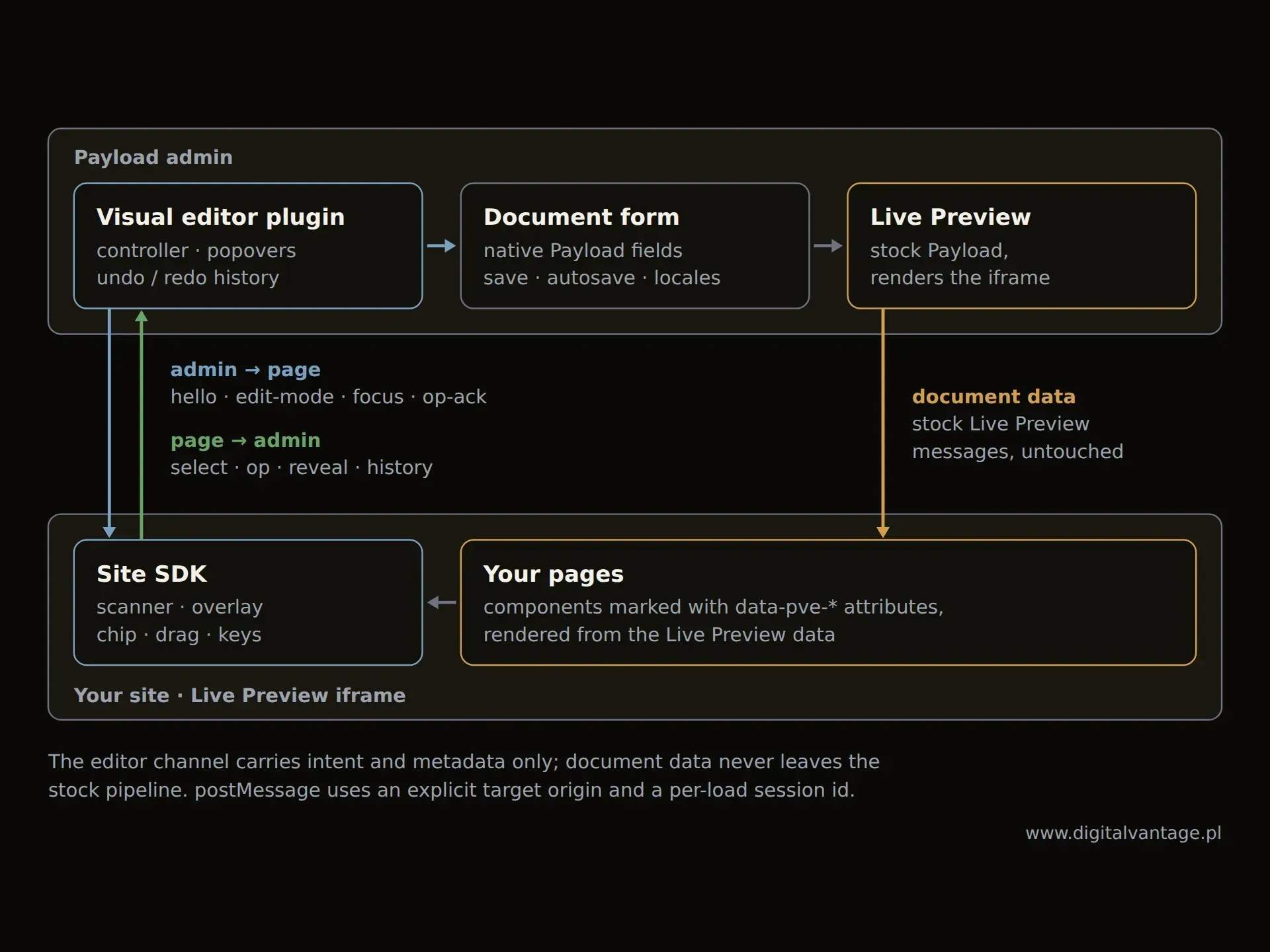
How it works: a plugin in the Payload panel talks to the page in the preview, and the document data flows the usual Live Preview way
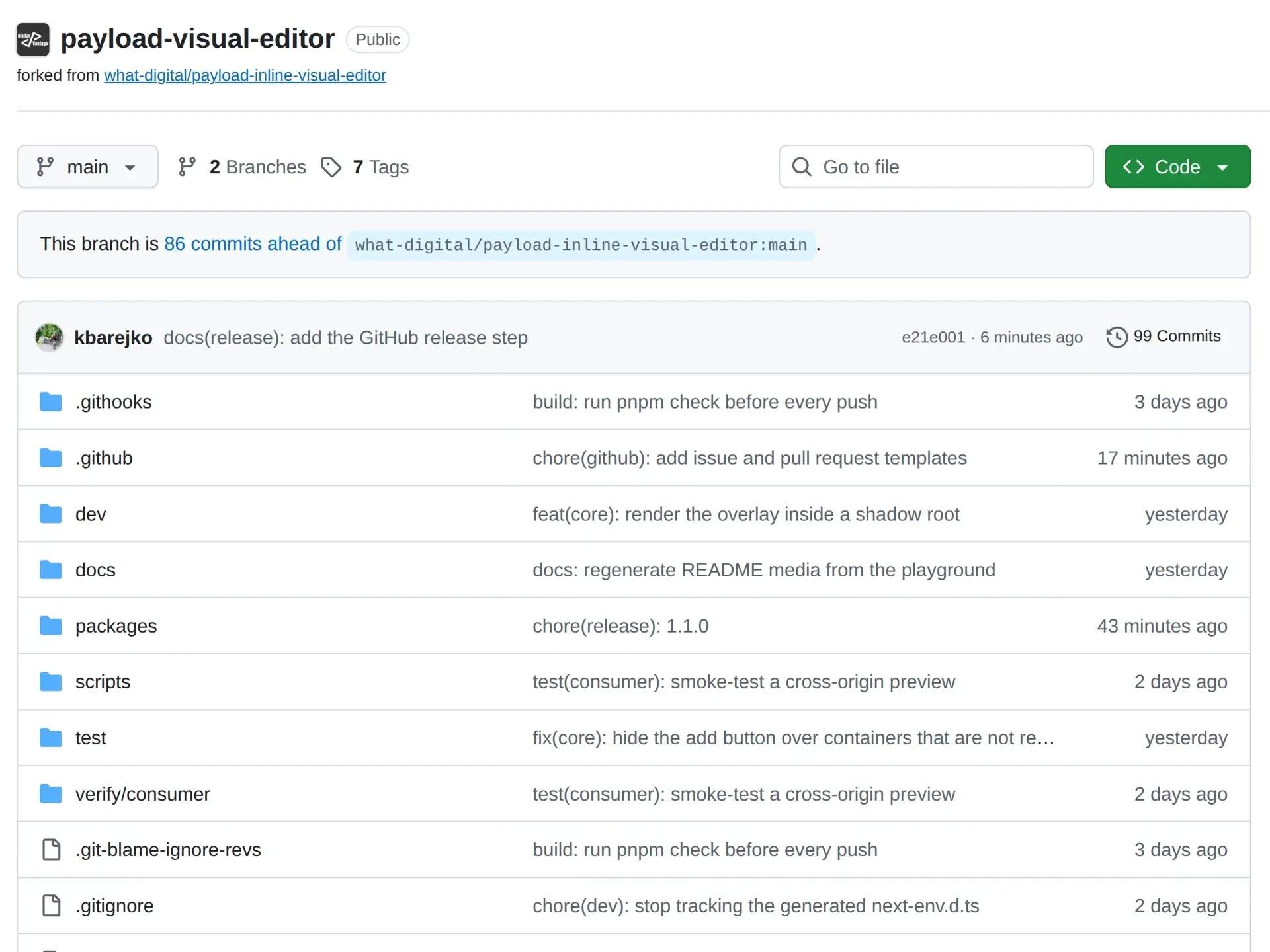
The code is public on GitHub under the MIT licence — we develop it as a fork of the what-digital project
- Double-click from a spot on the page to the field that changes it
- 1
- Content types editable on the page
- 8
- Content migrations at rollout
- 0
- Editor markers in the code visitors receive
- 0
A client with a site on our platform edits it by clicking what they see. They don't need to know what a field is called or which row of the form holds a block. They change the text in the popover next to the heading, reorder sections by dragging, and undo a mistake with a shortcut. Saving, versions and publishing work as before.
For us, it changes what we hand over to clients. Instead of instructions on which block and which tab hides a field — a page you edit like a page. The editor covers eight content types: pages and the industry modules that have a page of their own. We didn't have to build a separate page builder or a second data model.
The plugin is free and MIT-licensed, and version 1.1.0 is on npm for anyone building on Payload. It runs on our platform and on digitalvantage.pl. Every release passes 36 scenarios in the Chrome, Firefox and Safari engines, plus a clean-install test on two Payload versions.
What we don't know yet: we are still moving the first clients' domains onto the platform, so we have no data on how much time the editor saves a client or how often they use it. The next step is Payload 4 compatibility.
The code is open. The plugin's full source code, tests and change history are public on GitHub under the MIT licence. Anyone can review it, use it in their own project and contribute a fix.
Technologies
- Payload CMS 3
- React 19
- TypeScript
- Shadow DOM
- Next.js 15 / 16
- pnpm workspaces
- Vitest
- Playwright
- publint + attw
- Payload Live Preview
- Payload i18n
- Lexical
- Next.js (App Router)
- Any front end through an SDK, no dependencies
Team
Konrad Barejko — dvnt — development since version 1.0.2
what-digital — Author of the original plugin (up to 1.0.1, MIT)
// contribute
The code is public
Report a bug, suggest a feature or send a pull request. Using Payload yourself? We can help you set it up.
15 minutes. Zero selling.
Building on Payload CMS and need a plugin or support? In 15 minutes we'll tell you what can be done.