
Web and mobile apps16 min read3064 wordsKonrad Barejko
What is a mobile application, and when does a company need one
What a mobile application is and how it differs from a website and a PWA. The frequency test, loyalty apps, working offline and app store costs.
A mobile app makes sense for a company when someone comes back to you often — a customer who orders every week, or an employee who ticks off jobs on the phone all day long. If the contact is a one-off, or happens a few times a year, a well-built website will do the same job, and nobody will have to install anything.
That sentence is the whole article in a nutshell. Below we explain what a mobile application is and how it differs from a website viewed on a phone, check with data how your customers really use the web, and give you a simple test for deciding: app, website or something in between. We look separately at the two areas where apps most often earn their place — the loyalty app for customers and the app for employees in the field — and at the costs proposals mention least: the ones you pay just for being in the app stores, every year, however many people use the app.
What is a mobile application?
A mobile application is a program installed on a phone or tablet, usually downloaded from a store — the App Store on iPhones or Google Play on Android. It has its own icon on the home screen, can work without an internet connection and can use the phone's features, such as the camera, location or notifications. A mobile website — a responsive one — is something else: it opens in the browser at an ordinary address, with no installation and no store's approval.
If you are asking "what is an app" in the most general sense, Wikipedia gives the broad meaning: a program designed to run on a mobile device such as a smartphone, tablet or smartwatch — and it sets mobile apps apart from web applications, which run in the phone's browser rather than on the device itself. For a company, a practical split into three kinds is more useful. They differ in two things: where the app is installed, and who approves it.
A native app is written separately for each system — for iOS and for Android — in the languages and tools Apple and Google provide. It makes the fullest use of the phone's capabilities, but it means two codebases, two sets of tests and two releases.
A cross-platform app is built from one codebase, for example in React Native or Flutter, and goes to both stores as two apps. To the user it looks like a native one, and for you it means one team and one set of logic. There are still two releases and two store reviews.
A PWA, or progressive web app, is a website that behaves like an app: it can be added to the home screen, can work offline and can send notifications. It does not go through a store — you update it like a website, whenever you choose. The price is narrower access to the phone's features, depending on the system and the browser.
The difference that gets lost most often in conversations about technology is not about code but about the route to the customer. Native and cross-platform apps reach people through a store, and the store has its rules: Apple or Google reviews every version, a bug fix included, before it reaches users, and the store's rules decide how you may take payments inside the app. A website and a PWA have no such gate. What that gate costs is covered in a section of its own.
Phone or computer — how your customers really use the web
The first argument for an app usually runs: "everyone has a smartphone these days". True — but it is the wrong question. The data shows something less obvious.
According to StatCounter Global Stats, in August 2026 computers accounted for 61.33% of page views in Poland, phones for 37.91% and tablets for 0.76%. Among phones, Android clearly leads with 69.3%, and iOS has 30.64% (StatCounter, mobile operating systems in Poland). So in Poland computers still account for well over half of page views. One caveat, without which these numbers are easy to misread: StatCounter measures the share of page views on the sites that carry its code, not the number of users. Someone who browses at a desk all working day weighs more in that measurement than someone who checks the web on the phone once a day. What these proportions mean for the layout of a website itself we cover in the article on responsive web design.
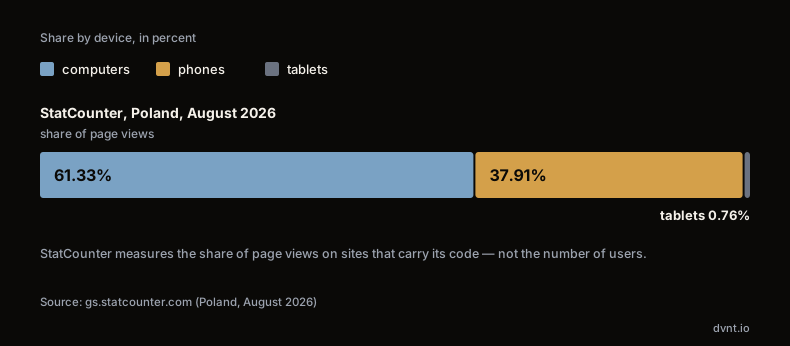
A national average also hides the thing that matters to you: your own audience. A business customer researching a purchase may well be at a desk; someone booking a haircut may well be on the phone. Your analytics will tell you which of the two you are dealing with in a minute — and that is a better starting point than any national figure.
That leads to the question worth asking instead of "do our customers have phones". It is: do they come back to us from their phones — and how often? A clothing shop's customer looks at new arrivals on the phone on the way to work. A buyer who orders parts from you once a quarter does it at a computer, with a spreadsheet open next to it. For the first, an app may be a convenience, if she comes back regularly. For the second, it is an unnecessary installation.
App, website or PWA — the frequency test
The decision about an app comes down to three questions. Ask them separately for each group of users — customers and employees almost always give different answers.
1. How often does this person come back to you? This question settles the most. Installing is a cost on the user's side: go to the store, download the app, log in, agree to notifications. An icon on the home screen repays that effort only when it is used often — daily or weekly. When contact happens a few times a year, people prefer a link from a search engine or an email to yet another program on the phone, and an app unused for months usually ends up deleted the next time someone frees up storage.
2. Do you need phone features the browser doesn't handle well? This is where misunderstandings are easy. A website can also take a photo, read the location or send a notification. The difference appears with continuous and background work: scanning codes for a whole shift, recording location along a route, notifications that have to arrive regardless of system and browser, and above all working without a signal for hours. If you need none of these, an app gives no advantage that would justify a store and two releases.
3. Does the user have an account and data that belongs to them? An app is most useful when it remembers something: the order history, the points balance, today's list of jobs, a season ticket. Without a login it turns into a catalogue, which a website shows faster and more cheaply.
These answers lead to three roads. If someone comes back rarely, a website that works well on a phone is enough. If they come back often and have an account, but need no special phone features, a PWA or a customer portal on the website does the same without a store. An app makes sense when all three answers are yes: frequent return, phone features the browser won't handle well, and the user's own data.
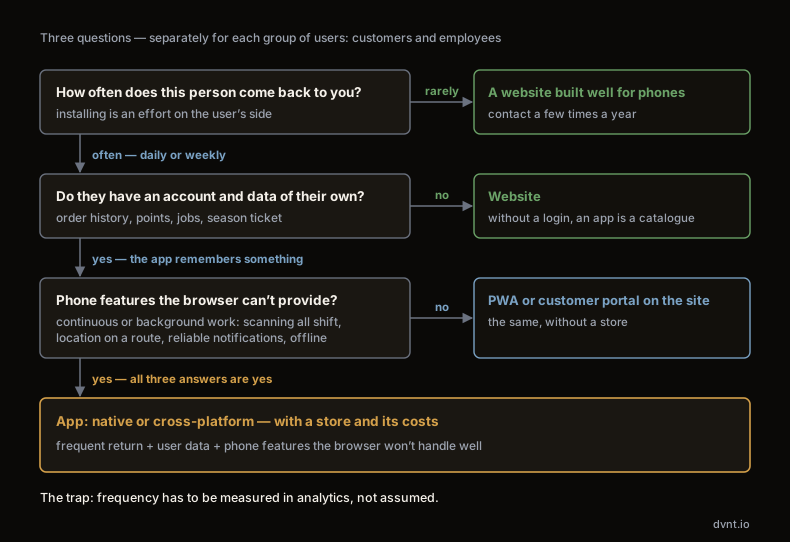
The test has one trap: frequency has to be measured, not assumed. Every owner believes their customers come back often. Website analytics will show what share of visitors returns within a month, and from which devices — and that is the number the conversation about an app starts from, not the feature list. If you would like to go through similar questions step by step, take the quiz "Website, web app or mobile app?".
It also often happens that the test gives two different results within one company. A wholesaler's customers order once a month, at a desk — for them a portal on the website is enough. Yet the same customers are served by sales reps who are on the road every day and need the price list without a signal — for them an app is justified. That is not a contradiction, just two groups of users with different habits, served by the same system in the background.
An app for customers — loyalty app, orders, bookings
Among apps for customers, the one considered most often is the loyalty app: a loyalty card on the phone, points for purchases, coupons, a notification about a promotion in a nearby shop. Anyone who types that phrase into a search engine will mainly see off-the-shelf subscription products — and that is a good clue to where to start.
For most companies, an off-the-shelf loyalty system is enough. A café, a salon, a chain of a few shops or a clinic have similar needs: award points, hand out rewards, send messages to regular customers. You can launch an off-the-shelf system in a short time, without a team of your own and without your own app in the stores, because the vendor takes care of publishing and updates. Some of these systems also work without a separate app, for instance through a card in the phone's wallet, which removes the installation barrier. Before you choose, check two things: whether the system connects to your till or your online shop, and whether you can export your customer data should you ever want to change vendor.
A loyalty module of your own makes sense in a narrower set of situations. When the points are meant to be calculated from data only you have — from the order system, the warehouse, the service history. When the programme's rules are unusual, they are what sets you apart, and off-the-shelf tools don't support them. Or when the loyalty programme is meant to be part of a bigger app that customers use anyway. How to settle choices like these function by function we describe in the article custom software or off-the-shelf.
Orders are the second natural area. An app earns its place where the customer orders the same things regularly: a restaurant that delivers, a wholesaler for regular buyers, a shop selling products bought in cycles. A remembered basket, address and payment method cut a repeat order down to a few taps. One important detail from Apple's rules: for physical goods and services consumed outside the app, payment has to go another way than in-app purchase, for example by card or Apple Pay (App Store Review Guidelines, section 3.1.3(e)). The store's commission therefore concerns digital content and features, not the order for lunch.
Bookings — at a salon, a clinic or a gym — are an area where a website with a booking module and a reminder by email or text message is usually enough. An app starts to have an edge only when the customer books every week, wants to see the season ticket balance and the history of visits, and you want to send a notification about a slot that has just freed up.
An app for employees and field sales — service, warehouse, the road
If there is anywhere an app wins most often, it is here. The frequency test is passed from the start: an employee uses it every day, for a whole shift. The account is a given. The installation barrier disappears as well, because the company decides what goes on a work phone, and an internal app can be distributed outside the public store listing, through channels intended for businesses.
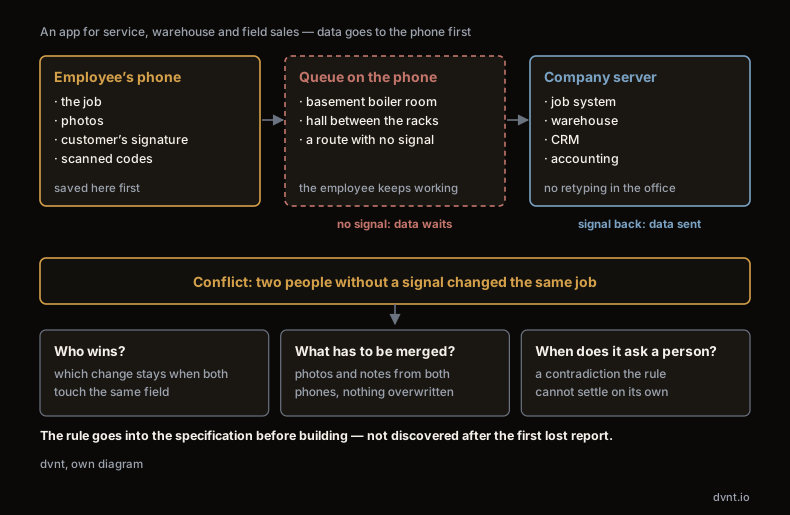
The most important feature of an employee app like this is working offline. A service technician goes down to a boiler room in the basement, a warehouse worker works in a hall where the signal dies between the racks, a sales rep drives a route through areas without a stable connection. An app designed for offline work saves everything on the phone first — the job, the photos, the customer's signature, the scanned codes — and sends the data to the server as soon as the connection comes back. The employee does not wait for the network and does not lose a half-filled report when a page in the browser cannot reload. That is exactly the function a browser handles worst, and it is why the case for an app is easiest to make here.
Offline work has a design cost that has to be named before building: what happens when two people without a signal change the same job. The rule for resolving such conflicts — who wins, what has to be merged, when the system asks a person — should be written into the specification, not discovered after the first lost report.
The typical uses look similar across many industries:
- field service app for service and installation crews — today's list of jobs, a report with photos and the customer's signature, ordering parts from the repair site,
- warehouse — scanning codes when goods come in and go out, stock-taking without paper lists,
- field sales — the catalogue and price list available without a signal, the customer's history before the visit, an order taken in the field and passed to the company's system once the network comes back,
- construction and renovation crews — time recording, photos of progress, safety checklists.
In every one of these cases, an app for employees is only the end point. Its value depends on where the data goes: to the job system, the warehouse system, the CRM or the accounting software. The integration with those systems is usually a bigger part of the work than the screens on the phone — and it decides whether the office stops retyping reports by hand.
What it costs just to be in the App Store and Google Play
The cost of building an app gets plenty of attention. The costs you pay only because the app is in the stores get almost none — and they are what sets it apart from a website in a calculation over several years.
Developer account fees. Publishing in the App Store requires membership of the Apple Developer Program, which costs 99 USD per membership year. A Google Play account is a one-off registration fee of 25 USD. These are small sums, but Apple's fee comes back every year, and without it the app disappears from the store.
Commissions on digital sales. If you sell a subscription, premium content or unlocked features inside the app, Apple's rules require in-app purchase, and Apple takes a commission of 30% on it, or 15% in the App Store Small Business Program. In the European Union different terms apply: apps distributed in EU storefronts can offer alternative payment methods alongside Apple's in-app purchase, under separate business terms — check them before you settle on a revenue model. As mentioned above, orders for physical goods and services consumed outside the app go through a different payment route.
Yearly update requirements — and this is the most expensive item. Phone operating systems change every year, and the stores make you keep up. From 31 August 2026, Google Play accepts new apps and updates only if they target Android 16, and existing apps that do not target at least Android 15 stop being available to new users on newer versions of the system (Google Play requirements). The requirement moves every year. It means an app cannot be "built and left" — even if you add no features, someone has to rebuild it regularly, test it on new system versions and publish it again, separately for each store.
A website has its own costs — the domain, the server, maintenance — but it has no store gate, no store commission and no deadline after which it stops being visible to new users.
Costs that come back regardless of the number of users
| App in the App Store and Google Play | Website | |
|---|---|---|
| Store account | App in the App Store and Google PlayApple Developer Program: 99 USD per year without the fee the app disappears from the store Google Play: 25 USD one-off | Websiteno account fee you pay for the domain and the server |
| Commission on sales | App in the App Store and Google PlayApp Store: 30%, 15% in the Small Business Program digital sales inside the app only: subscriptions, premium content, unlocked features — not physical goods or services outside the app different terms apply in the EU | Websiteno store commission |
| Yearly updates — the most expensive item | App in the App Store and Google PlayGoogle Play from 31 August 2026: new apps and updates must target Android 16 apps below Android 15 unavailable to new users on newer systems the requirement moves every year: rebuild, test and publish separately in each store | Websitewebsite maintenance no store gate and no deadline for losing visibility to new users |
Amounts on the website side omitted — we have no verified figures.
What building the app itself costs depends above all on the scope — the number of screens, the integrations, offline work, one platform or two. Our own price ranges for native and cross-platform apps are on the page about our mobile apps for businesses.
Where to start
For a customer app, the safest order is website or PWA first, app second. Build the function you would like to have in the app — the repeat order, the customer portal, the points balance — on the website first. After a few months your analytics will show how many customers use it, how often they come back and from which devices. If they come back often, from the phone, and miss something the browser cannot give them, you have an argument for an app backed by data rather than a hunch. None of that work is lost: the server-side logic, the data and the integrations stay the same, and the app becomes one more window onto the same system.
For an internal app the order can be reversed, because the frequency test is passed from the start. Still, start with one process — a service report or goods receipt, for example — rather than a system that runs the whole company. One path that works offline and sends the data where it needs to go will show more than a specification running to dozens of pages. You add further functions when the team asks for them. Before building, talk to three or four of the people who will use the app — where they lose time today, and where they have no signal.
More broadly, which problems in a company apps solve and when an off-the-shelf tool is enough, we cover in the guide to business software. And how we design and build mobile apps for businesses — native and cross-platform, with integrations and offline work — is described on the service page.
Where these numbers come from
- The share of computers, phones and tablets, and of mobile operating systems, in Poland — StatCounter Global Stats, August 2026; the share of page views on sites tracked by StatCounter, not the number of users.
- Store fees and commissions — the Apple Developer Program and Google Play Console pages, the payment rules in the App Store Review Guidelines (sections 3.1.1 and 3.1.3(e)), Apple's page on apps in the EU, and Google Play's Android version requirements, checked on 22 September 2026.
- Definition of a mobile app — Wikipedia, article "Mobile app".
Frequently asked questions about mobile apps
What is a mobile application?
A mobile application is a program installed on a phone or tablet, usually downloaded from the App Store or Google Play. It has its own icon on the home screen, can work without an internet connection and can use the phone's features, such as the camera, location or notifications. For a company it makes sense above all when customers or employees use it often.
How does a mobile app differ from a mobile website and a PWA?
A mobile website opens in the browser at an ordinary address, with no installation. A PWA is a website that can be added to the home screen and can work offline, but it still does not go through a store. A native or cross-platform app reaches users through the App Store and Google Play — with a review of every version, payment rules and store fees.
Does a loyalty app have to be built from scratch?
Usually not. For most companies an off-the-shelf loyalty system on subscription is enough: it provides points, rewards and messages to customers without an app of your own in the stores. A module of your own makes sense when the points have to be calculated from data available only in your systems, or when the programme's rules are unusual and off-the-shelf tools don't support them.
How much does it cost to publish an app in the App Store and Google Play?
An Apple Developer Program account costs 99 USD a year, and a Google Play account is a one-off fee of 25 USD. On digital sales inside the app Apple takes a commission of 30%, or 15% in its programme for small businesses; different terms apply in the European Union. The biggest fixed cost, though, is the yearly updates the stores require for new system versions.
Can an app for employees work without the internet?
Yes, if it is designed that way. An offline app saves jobs, photos, signatures and scanned codes on the phone first and sends them to the server when the signal comes back. That is the strongest argument for an app for service technicians, warehouse staff and sales reps. Before building, decide what happens when two people without a signal change the same job.
Related articles
Web and mobile apps
Web application — what it is, its types and when you need one
A web application is not just a bigger website. The real difference, the types of web application, what they cost and when they are worth building.

Web and mobile apps
Business software — which tools a company needs, function by function
Business software is chosen one function at a time: accounting, CRM, ERP, booking, your own tools. A map of situations, the order to go in and the costs.
Web and mobile apps
Custom software or off-the-shelf — how to decide in a company
Off-the-shelf or custom software is decided one function at a time. Four questions, a five-year TCO with our own prices, and vendor lock-in both ways.
Web and mobile apps
How to make a mobile app for your business — from choosing a platform to publishing it
How to make a mobile app for a business: Android vs iOS in Poland, native or cross-platform, a DUNS number, closed testing and app review.
Costs and working with a vendor
How to make an app for your business: six stages and what you decide at each one
How to make an app for your business with a contractor: brief, prototype, sprint development, UAT and go-live. How long each stage takes and where you decide.

Web and mobile apps
Web and mobile apps for businesses — a guide to building them, decision by decision
Guides on building apps for businesses: what a web app is, how the project runs, what it costs, how to plan an MVP, and PWA vs mobile apps.
We will check whether you need an app or whether a website will do
Tell us who would use it and how often — customers, or a team in the field. We will go through the frequency test together, and if a website, a PWA or an off-the-shelf tool is enough, we will say so.