
SaaS and your own product17 min read3382 wordsRedakcja dvnt
SaaS application — how to build your own product from MVP to recurring payments
A SaaS application from MVP to subscription: the five building blocks, recurring payments in Poland, the legal minimum, costs and the DVN Links example.
A SaaS application is software you sell as a subscription rather than hand over to a client once the project is done. That one difference changes almost everything: how you count the cost, what has to be in the first version, how you collect money, and which legal documents you need before the first customer clicks "Pay".
This article is for people with an idea for their own product who want to know what building one in Poland in 2026 involves. We rely on current Polish and EU law, payment-provider documentation, and our own experience: we run a SaaS product — DVN Links — and this site itself uses its public API. You won't find invented customer stories or revenue promises here.
How a SaaS application differs from custom software
Custom software is built for one client. It has one set of requirements, one budget, and a handover point after which it moves into maintenance. SaaS applications work differently in three respects.
One codebase, many customers. Every company that signs up uses the same application on the same servers. Customer data has to stay separated, and a change made for one customer reaches everyone. How that separation is actually done — one database with a customer identifier on every record, or separate databases per customer — is the subject of our multi-tenant architecture article.
A subscription instead of a one-off payment. The customer pays monthly or yearly and can cancel at any time. That means revenue depends on how many customers stay, not just how many arrive — and that recurring payments, invoicing, and handling failed charges are part of the product, not an add-on.
Development with no end date. SaaS products have no "handover". After the first version come fixes, new features, pricing changes, and security updates. The cost of building it is only the start; you keep paying the cost of running and improving it for as long as the product exists.
If you're still deciding whether your problem needs its own product or a ready-made tool is enough, start with our guide to SaaS and the comparison with custom software.
The five building blocks every SaaS product needs
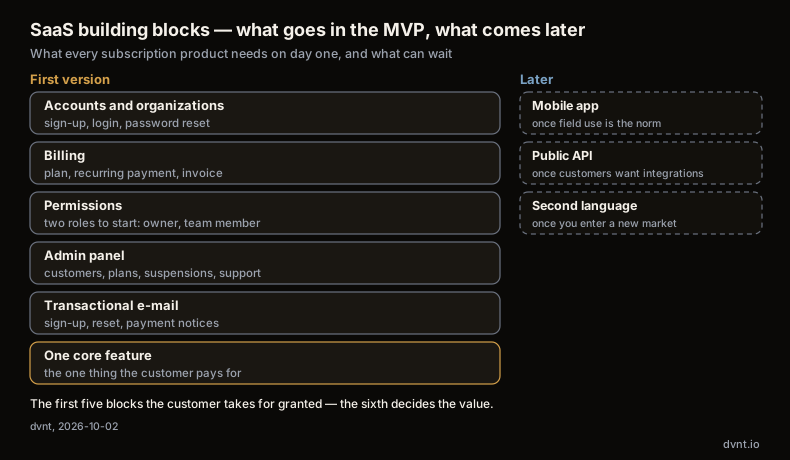
Whether you're building invoicing, booking, or a link shortener, underneath they share the same five blocks. The customer doesn't buy them — they buy the one feature that solves their problem — but without these, that feature can't be sold.
1. Accounts and organizations
A user signs up, logs in, resets a password. B2B products add a level above that: the organization, which several people belong to and which owns the data and the subscription. Decide early whether an account belongs to a person or to a company — changing your mind later means rebuilding the data model.
2. Billing
Plans, prices, trial periods, mid-cycle plan changes, failed payments and retries, invoices. Most of this isn't built from scratch — you use a payment provider — but integrating it is still real work. Our own web-app cost calculator puts it this way: "Payment integration requires webhook handling, idempotency logic, and compliance testing — not just embedding a checkout widget."
3. Permissions
Who in an organization can invite people, who sees invoices, who can delete data. Two roles — owner and team member — are usually enough to start. A fuller permission system is worth building once customers start asking for it.
4. An admin panel
Your own screen where you see customers, their plans and payments, can extend a trial, suspend an account, or check why a customer is reporting a bug. Without it, every support case ends in a manual database query.
5. Transactional e-mail
Sign-up confirmation, password reset, team invitation, payment confirmation, a failed-charge notice. This isn't marketing — these are messages the customer needs to know what's happening with their account.
What can wait
Three things that often land in the first-version plan and are rarely needed on day one:
- a mobile app — a well-built web app works fine in a phone browser; a dedicated app is worth building once you know customers actually need it in the field;
- a public API — it makes sense once customers want to connect your product to their own systems; before that it's extra surface to build and secure;
- a second language — translating the interface, e-mails, terms, and support is several separate tasks; if your first customers share one language, ship one.
SaaS MVP — what belongs in the first version
An MVP, a minimum viable product, has to answer one question: will anyone pay to have this problem solved. We cover how to plan one more broadly in our MVP article. For SaaS the rule is simple: the five blocks above, plus the one feature the customer actually comes for. Everything else waits until paying customers say what's missing.
The most common MVP mistake is building every feature from the idea before anyone has used any of them. The second is skipping billing "because we'll give it away free for now." If the product is meant to earn on a subscription, payment is the most important MVP test there is.
A free plan and limits as a sales mechanism
In many SaaS products, pricing isn't a list of features — it's a list of limits. Our own product, DVN Links, a European link management platform with analytics and QR codes, shows this well. Its plan ladder (read 2026-10-02) runs Free → Starter → Pro → Business → Enterprise, with 50 / 500 / 2,000 / 10,000 links a month, 1,000 / 10,000 / 50,000 / 250,000 clicks a month, stats history of 7 / 30 / 90 / 365 days, API access from the Starter plan up, rate limits of 10,000 and 50,000 requests an hour on the higher tiers, a 7-day trial on the Pro plan, a 20% discount on annual billing, and a contractual SLA on Enterprise.
Every plan is the same application — only the numbers differ. The free plan lets someone try the product with no card, and the limits (link count, how long stats are kept, API access) mark the point where upgrading starts to pay off. For an MVP that means one thing: design the limit mechanism from day one, even if you launch with only one paid plan. We cover when a free plan helps and when it just costs money in our article on the freemium model.
Recurring payments in Poland: Stripe, PayU, Przelewy24
Recurring payments are automatic charges taken from a customer every month or year, once they've consented. In Poland you have several providers to choose from, and they differ not just on price but on which payment methods actually support recurring charges.
Stripe Billing — Stripe in Poland
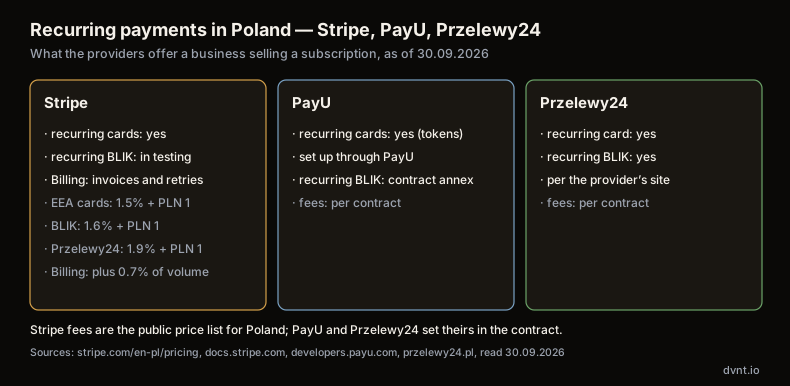
Stripe lets companies from Poland open an account — Poland is on the country list on Stripe Global. Subscriptions are handled by its Billing module, which its documentation describes this way: "Subscriptions let customers make recurring payments to access a product or service. When you create a subscription, Stripe automatically generates invoices, attempts payment collection, and manages the subscription status throughout its lifecycle." Stripe also takes over retrying failed payments (Stripe, Billing overview).
Fees on the Polish Stripe pricing page (read 2026-09-30):
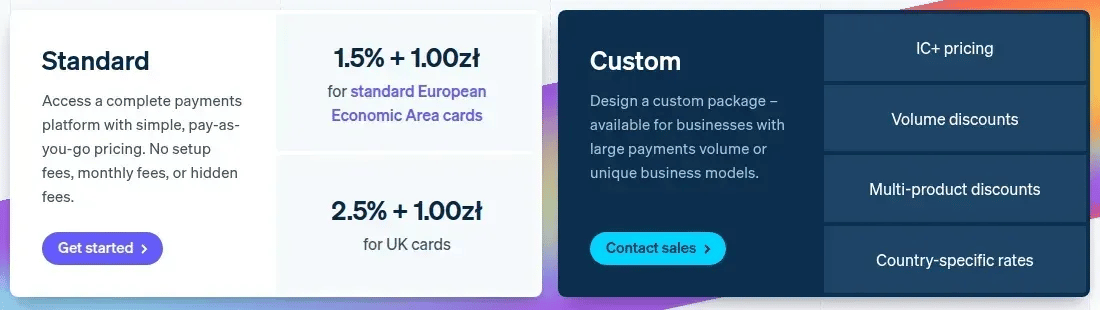
- domestic and EEA cards (standard): 1.5% + PLN 1.00;
- premium EEA cards: 1.9% + PLN 1.00; UK cards: 2.5% + PLN 1.00; international cards: 3.25% + PLN 1.00; currency conversion: an extra 2%;
- BLIK: 1.6% + PLN 1.00; Przelewy24: 1.9% + PLN 1.00;
- Billing (pay as you go): 0.7% of Billing volume — on top of the fee for the payment itself.
One important caveat concerns BLIK. In the Stripe BLIK documentation, recurring payments are marked "Recurring payments: Yes (Private preview)" — that is, available in a test version for selected accounts, not for everyone. If your customers are to pay recurring by BLIK, check before choosing a provider whether your account has access.
PayU
PayU supports recurring card payments based on reusable tokens: "All transactions, except of the first one, are not initiated by the cardholder." Before integrating, you have to contact PayU to configure the service (PayU docs — recurring card payments). PayU also supports recurring BLIK: the customer initiates the first payment, the merchant collects the following ones. Activation, however, requires signing an annex to your existing agreement, as the documentation says (PayU docs — recurring BLIK).
Przelewy24
Przelewy24 describes the service as "recurring payments — automatic collection of a fee from customers who have consented to it," suited to subscriptions and passes (our translation of the Polish original). It lists the payment card and BLIK as methods (Przelewy24 — recurring payments).
Invoices and KSeF for a subscription business
A payment provider collects the money, but you still have to issue a VAT invoice to a business customer in line with Polish rules — and in 2026 that means issuing it in KSeF, the National e-Invoicing System (Krajowy System e-Faktur). According to the Ministry of Finance (Ministerstwo Finansów, our translation): "The obligation to issue invoices in KSeF came in stages: from 1 February 2026 for firms whose 2024 sales exceeded PLN 200 million (incl. VAT), from 1 April 2026 for the rest. In addition, until 31 December 2026 invoices can still be issued outside KSeF (paper or electronic) if the monthly total of sales with VAT on such invoices does not exceed PLN 10,000." (ksef.podatki.gov.pl). From 1 January 2027 KSeF is also mandatory for businesses previously exempt (KSeF rollout stages).
In practice, every B2B subscription invoice has to go through KSeF. Before choosing a billing tool, check that your invoicing system — the payment provider's own or the accounting package you will connect it to — is integrated with KSeF. The EU picture is background only: ViDA (Directive (EU) 2025/516) entered into force on 14 April 2025 and sets EN 16931 as the common e-invoice standard, with cross-border digital reporting from 1 July 2030.
One line on VAT for consumer digital services: a seller established in a single member state may charge its home-country VAT on cross-border sales to EU consumers only while those sales stay under €10,000 a year (about PLN 42,000 under the Polish VAT act), counted over the current and the preceding year (VAT Directive Art. 59c). Above that, VAT is due in each customer's member state, and the One Stop Shop (OSS) lets you declare it through one return instead of registering in each.
Legal minimum: terms, GDPR, and the digital-service rules for consumers
What follows is a map of obligations, not legal advice. Have a lawyer check your terms of service and data-protection documents before you take a first payment.
Terms of service for an online service
Every SaaS application is a service provided by electronic means, so it needs terms of service (regulamin). Art. 8(1) of the Act on Providing Services by Electronic Means (ustawa o świadczeniu usług drogą elektroniczną) requires the provider to define the terms and to "make the terms available to the recipient free of charge before the contract is concluded." Paragraph 2 says what happens if it does not: "The recipient is not bound by those provisions of the terms that were not made available" in this way. Paragraph 3 lists what the terms must contain in particular: the types and scope of services, the conditions of providing them (including technical requirements and a ban on supplying unlawful content), the conditions for concluding and terminating contracts, and the complaints procedure (Dz.U. 2024 item 1513, consolidated text). The E-Commerce Directive sets the EU-level minimum behind this (Art. 5(1) disclosure of the provider's details, Art. 10(3) terms made available in a form the recipient can store and reproduce).
GDPR in both directions: controller and processor
In a B2B SaaS application you hold two roles at once.
Towards your own users — the people who create an account — you're the controller, and under Art. 13 you must give them, at the point of collection, your identity and contact details, the purposes and legal basis for processing, the recipients of the data, and (among other things) how long you keep it and what rights they have.
Towards the data your customers upload — their own customers, employees, or contacts — you're normally the processor. Art. 28(3) then requires a data-processing agreement setting out the subject matter and duration of processing, its nature and purpose, and the type of data involved. In practice you prepare one standard DPA that the customer accepts alongside your terms. Your own suppliers — hosting, e-mail delivery, the payment provider — are then your own sub-processors, who the customer also has to accept. We cover what this chain looks like from the customer's side in our article on cloud data security.
Consumer customers: digital service and the right of withdrawal
If you also sell to individuals, two consumer directives apply. A SaaS application fits the definition of a digital service under Directive (EU) 2019/770, Art. 2(2): a service that lets the consumer "create, process, store or access data in digital form," or share or interact with data uploaded by users of that service. Three provisions matter most for the product itself:
- you supply the service "without undue delay after the conclusion of the contract" unless agreed otherwise (Art. 5(1));
- a change to the product that isn't needed to keep it conforming to the contract is allowed only "if the contract allows, and provides a valid reason for, such a modification," and must come at no additional cost to the consumer (Art. 19(1));
- if a change "negatively impacts the consumer's access to or use of" the service beyond a minor degree, the consumer can terminate the contract free of charge within 30 days (Art. 19(2)).
Before an indefinite or auto-renewing contract, the Consumer Rights Directive (Art. 6(1)(o)) also requires you to disclose the conditions for terminating it.
The question that comes up most is the right of withdrawal. A consumer who concludes a distance contract can withdraw within 14 days without giving a reason (Art. 9). The exception in Art. 16(a) covers service contracts "after the service has been fully performed... with the consumer's prior express consent." A monthly or annual subscription isn't fully performed within the first 14 days. In our reading, a consumer who starts using the application right away most often keeps the right of withdrawal — but if they explicitly asked for the service to start before the withdrawal period ended (Art. 8(8)), they pay a proportionate amount for what they used up to that point (Art. 14(3)). This is our interpretation, not legal advice, and EU member states don't all transpose it the same way: have a lawyer check the withdrawal clauses in your terms. Separately, a "withdrawal button" requirement (Directive (EU) 2023/2673, new Art. 11a) has applied from 19 June 2026 — national transposition of the exact mechanics may still differ.
1 · Before the contract
CRD Art. 6(1)(o)how and on what grounds it can be terminated
2 · Day of contract
DCD Art. 5(1)service supplied without undue delay, unless agreed otherwise
3 · Days 1–14
CRD Art. 9, 8(8), 14(3)withdrawal without a reason; if an early start was requested — pay proportionately
4 · Whole contract
DCD Art. 19(1), 19(2)changes only as the contract allows, free; if clearly worse — 30 days to terminate
The “fully performed” exception (CRD Art. 16(a)) rarely fits a subscription in its first 14 days — our reading, not legal advice; member states transpose it differently. Have a lawyer check your terms.
What it costs to build a SaaS application
The most reliable reference point for the Polish market is our report "Web application costs in Poland — 2026 edition". It collects 118 price observations from 92 entities from March to May 2026. The two largest samples give two reference points:
- MVP: median PLN 30,000 (n=24);
- enterprise / multi-tenant application: median PLN 200,000 (n=43).
A caveat: the report compiles published price lists and benchmarks of market firms, not invoices from completed projects, so it shows what amounts firms start the conversation with, not what clients finally paid. Our own data is not included in these medians. The remaining categories in the report have samples too small to rely on.
Our price line: Lean MVP from PLN 10,000 — the simplest version to test whether anyone wants to pay at all — and MVP from PLN 30,000, the first version with the five building blocks and a core feature. Every project is priced individually, because the difference between a "simple SaaS" and "the same SaaS with recurring payments, roles and a KSeF integration" is often several weeks of work. You can get a rough estimate for your own scope with our web-app cost calculator. The calculator assumes about 8 weeks of work for a baseline MVP; the report gives 8–12 weeks for an MVP, but without a sample size for that value. For general background on what drives the price of an application, see how much does it cost to build an app.
Running costs after launch
A SaaS product pays bills every month: hosting and the database, an e-mail delivery service, payment-provider fees (with Stripe, a per-transaction fee plus 0.7% for Billing), monitoring, and backups. On top of that comes developer time for fixes, dependency updates, and new features. We cover how to organize this after launch in our articles on technical maintenance and self-hosting on Coolify — the latter can cut your infrastructure bill while the product is still small.
Example: DVN Links and its public API
DVN Links is our own SaaS product — on its own site it's described as "a European link management platform with analytics and QR codes." We described its pricing above: a product where the free plan and its limits are the main sales mechanism.
A public API in practice
DVN Links exposes a REST API to customers, documented to the OpenAPI 3.1 standard. Every request needs an API key sent as a Bearer token in the Authorization header. Rate limits depend on the plan, and the API reports them in the X-RateLimit-Limit, X-RateLimit-Remaining, and X-RateLimit-Reset response headers, so a client program always knows how many requests it has left and when the counter resets. API access is included from the Starter plan up.
It's a good example of something that can wait: the API wasn't needed to find out whether anyone would pay for short links. It became necessary once the product had customers who wanted to create links automatically from their own systems — and at that point it also became another limit distinguishing the plans.
What our own site does with that API
The best test of an API is using it yourself. This site — the one you're reading — talks to DVN Links through the same public REST API that paying customers get:
- creates a short link when an article or page is published, and stores it on the document;
- checks on every later publish that the link still exists;
- recreates the link if someone deleted it in the DVN Links panel;
- updates the destination URL when a page's address changes — the old short link keeps working and now points at the new address;
- adopts links created before the site started saving their IDs: it looks up a link by its destination URL and attaches it to the document instead of creating a duplicate.
A failed call to the API never blocks saving the article — it's only logged. That's a rule worth adopting for any integration with a third-party service: your application should keep working even when the other side is briefly unavailable. We explain what an API is, how a webhook works, and how to secure an integration in our article on APIs.
Build it yourself, with a software house, or with us
There's no single right answer — just a few criteria worth going through honestly.
Build it yourself if you're a developer, or have one on the founding team, and time is cheaper than cash. The risk: the five building blocks take longer than the core feature, and payments and legal documents get pushed to "later."
Start with no-code or low-code tools if you want to test demand in a few weeks and accept that you'll probably rebuild the first version. We cover when that makes sense, and when it blocks growth, in our article on low-code.
Choose a software house if you have a well-defined scope, a budget for a full build, and someone on the business side to own the product afterwards.
Talk to us if you want to start from the smallest version that can take payments and grow it in stages. We run our own SaaS product, so recurring payments, plan limits, the API, and the legal obligations are things we know as an owner, not only as a contractor. See our MVP for startups and web-app development pages for how we work, or take our SaaS-vs-custom quiz if you're still deciding whether you need your own product at all.
Frequently asked questions about building a SaaS application
How much does it cost to build a SaaS application?
According to the report "Web application costs in Poland — 2026 edition", the median MVP price is PLN 30,000 (n=24) and for an enterprise or multi-tenant application PLN 200,000 (n=43). The report compiles published price lists and benchmarks, not project invoices. With us a Lean MVP starts from PLN 10,000 and an MVP from PLN 30,000; every project is priced individually. On top of that come monthly costs: hosting, e-mail, payment-provider fees and development.
How long does it take to build a SaaS MVP?
It varies with scope, but the fastest path is the five basic building blocks (accounts, billing, permissions, an admin panel, transactional e-mail) plus one core feature. Every addition — recurring payments across multiple currencies, a fuller permission model, extra integrations — adds time on top of that baseline.
Does a SaaS application need terms of service?
Yes. A SaaS application is a service provided by electronic means, and Art. 8 of the Act on Providing Services by Electronic Means requires terms made available free of charge before the contract is concluded. They must state, among other things, the scope of services, technical requirements, the conditions for concluding and terminating contracts and the complaints procedure. Provisions not made available in this way do not bind the user. Have a lawyer review your terms, especially if you sell to consumers.
Can you start a SaaS product on no-code tools?
Yes, if the goal is testing demand quickly and you accept that you'll likely rebuild the first version. The five things every SaaS needs — accounts, billing, permissions, an admin panel, and transactional e-mail — still have to exist inside it. We cover when low-code helps and when it blocks growth in a separate article.
Related articles
SaaS and your own product
ARR, MRR and churn — SaaS metrics, formulas, benchmarks and measurement traps
ARR, MRR, churn, NRR, LTV:CAC and Rule of 40: formulas from ChartMogul and Stripe, benchmarks with their sample size, and the traps that make SaaS metrics lie.
SaaS and your own product
Multi-tenant — what it is and how to choose a SaaS architecture for many customers
Multi-tenant SaaS: single tenant vs multi-tenant, the silo/pool/bridge models, Row Level Security, GDPR and choosing a model for an MVP.
SaaS and your own product
Code refactoring or a rewrite? What to do with a SaaS MVP that cracks under its first customers
SaaS MVP cracking under its first customers? Code refactoring, staged replacement or a rewrite: what to measure first and what a rewrite really costs.
SaaS and your own product
Micro-SaaS examples 2026 — 35 niche tools you could build
35 concrete micro-SaaS examples grouped by industry, a niche-scoring framework, a 30-day MVP plan, and a path to your first 50 paying customers.
SaaS and your own product
MVP (minimum viable product) — what it is and how to cut a scope that answers one question
What is an MVP (minimum viable product), how it differs from a proof of concept and a prototype, and how to scope it with the MoSCoW method.

Web and mobile apps
Web and mobile apps for businesses — a guide to building them, decision by decision
Guides on building apps for businesses: what a web app is, how the project runs, what it costs, how to plan an MVP, and PWA vs mobile apps.