
Web and mobile apps17 min read3279 wordsRedakcja dvnt
Low code and no code — what they are and when they replace programming
Low code and no code explained: who a citizen developer is, what a low code platform suits, its price limits and what you can take with you when you leave.
Low code is often presented as a cheaper, faster version of programming. That isn't quite true. When you build an application on a low code platform, you aren't writing cheaper software — you are renting someone else's platform: its database, its screens, its automations and its price list. In return you get something very valuable: a working tool in a few days, without hiring a team. You pay for it by playing by someone else's rules.
And that is fine, as long as you fit within those rules. For a lot of internal tools, you fit for years.
We write this from an unusual position: we don't sell low code platforms and we don't implement them for clients. We build software in code. That is why we can calmly say when low code is enough and when it stops being enough — and show you the limits that only become visible in the price list or in the export documentation.
What is low code (and how it differs from no code)
Low code is a way of building applications from ready-made blocks — forms, tables, views and automations — on a vendor's platform, with the option of adding code where the blocks run out. No code is the same without the code: you assemble the whole application in the browser, dragging elements into place and setting rules.
The difference between the two is smaller than the names suggest. Both assume that the platform does most of the work and you describe what should happen. In no code, the description ends where the vendor's foresight ends: if there is no block for "send the invoice to the accounting system", you can't send it. In low code, you drop in a piece of code at that point — a formula, a script, a call to an external service — and carry on. That is why no code is usually closer to a spreadsheet, and low code closer to programming. When people search for "low code no code" as one phrase, they are usually asking about this whole family: tools that let people outside IT build software.
What a low code platform gives you
A low code platform is four things from one vendor that, in traditional development, you would have to put together separately:
- hosting — the application runs on the vendor's servers; you don't install or update anything;
- a database — tables of records, usually with a view that looks like a spreadsheet;
- screens — forms, lists, record details, simple dashboards;
- automations — rules like "when a record changes status, send an email and add a task".
Among the low code development platforms and no code platforms you are likely to come across are, for example, Airtable, Microsoft Power Apps, Google AppSheet, Glide and Retool. They differ in who they are aimed at and how they charge, but the model is the same: you pay a subscription, and the application exists for as long as the subscription does.
No code apps are not the same as automations
Alongside the platforms on which whole applications are built, there are no code tools that only connect existing services: Zapier, Make, n8n. They have no screens or database of their own — they move data between systems you already have. When they are enough and how they charge, we cover in our article on business process automation. Here we deal with the platforms on which an application with its own data and screens is built — what people usually mean when they look for a no code app builder.
Who is a citizen developer
A citizen developer is someone outside the IT department who builds a tool for themselves or their team — on a low code or no code platform. Most often it is someone from operations, sales, HR or finance who has had enough of copying data between spreadsheets and, over a few evenings, puts together an application that does it for them.
This has one huge advantage: a citizen developer knows the process better than any outsider. Nobody has to explain to them why an order must go through a manager's approval or what the status "on hold" means. The application is built around real work from the start, not around an idea of it. It is often the first place the process is written down at all.
It also carries one serious risk: the one-person application. A tool built by one employee is usually understood only by that employee. They know which automation triggers which, why one field is calculated with a strange formula, and which table must never be touched. When that person goes on holiday, changes department or leaves the company, what remains is a working tool that nobody can fix or change. The problem grows quietly, because for a long time everything works.
The point isn't to stop citizen developers. It is three simple rules. The application has a second owner who understands how it works. It has a short description: which tables, which automations, who uses it. And it is set up on a company account, not a private one — because the data and the application belong to the company, not to the person who built them.
What low code is best for
Low code works best where three conditions are met: the application is used by your team, not by customers; there are few users; and the process is still changing. In practice, that means four typical uses.
Internal tools. An equipment register, a list of jobs to be handled, an on-call rota, a supplier database. Things that live in a spreadsheet today, where the spreadsheet is starting to chafe, because several people edit the same rows and nobody knows who changed what.
A process prototype. Before you commission a system, check whether the process you have in mind actually works. On a low code platform you can put together a working version in a week and see, over a month, which fields nobody fills in, which step is redundant and which one is missing. It is the cheapest way to be wrong.
A form, a table and an approval. A holiday request, an order for materials, a fault report, a discount request. Someone fills in a form, the record lands in a table, someone else approves or rejects it, and the system sends a notification. This pattern is at the heart of most no code platforms and works very well on them.
A small number of users. Most platforms charge per person. With five users that is a small cost; with fifty it isn't. Low code is at its most cost-effective in a small team.
AppSheet Core — you may already have it in your subscription
If your company uses Google Workspace, it is worth checking AppSheet before you pay for anything else. According to Google Workspace's admin help, AppSheet Core is available at no extra cost in most editions: Business Starter, Standard and Plus, the Enterprise editions, and the Education, Frontline and Nonprofit editions too. It lets you build simple applications on Workspace data — for example on Google Sheets — and use them with anyone in your organisation.
There is one condition, but it is an important one: apps built with AppSheet Core can only be shared with people inside the organisation. Sharing outside it, for instance with customers or subcontractors, and advanced integrations require the AppSheet Enterprise Plus plan. For an internal tool, though, Core is often enough — and it is the cheapest possible start, because you are already paying for it in your Workspace subscription.
Limits you don't see at the start
The first week with a low code platform is usually a delight. The limits turn up later, as the application grows and gains records, users and requirements. Below are the ones worth checking before you start. All prices are in US dollars, as the vendors publish them, as of 22 September 2026.
Records per base. On Airtable, the Free plan holds 1,000 records per base, the Team plan 50,000 and Business 125,000 (Airtable plan documentation). A thousand records is less than it sounds: at twenty submissions a day, it lasts under two months. Fifty thousand will last a long time for an equipment register, but in the order database of a company taking a few hundred orders a day, space will soon run short. Then there is storage for attachments: 1 GB, 20 GB and 100 GB per base on the successive plans.
The price per person grows with the team. Airtable Team costs $20 per person per month billed annually and $24 billed monthly. Business costs $45 annually and $54 monthly. Power Apps Premium costs $20 per user per month, paid yearly. The subscription for one person tells you little. What counts is how many people will be using the application in a year or two.
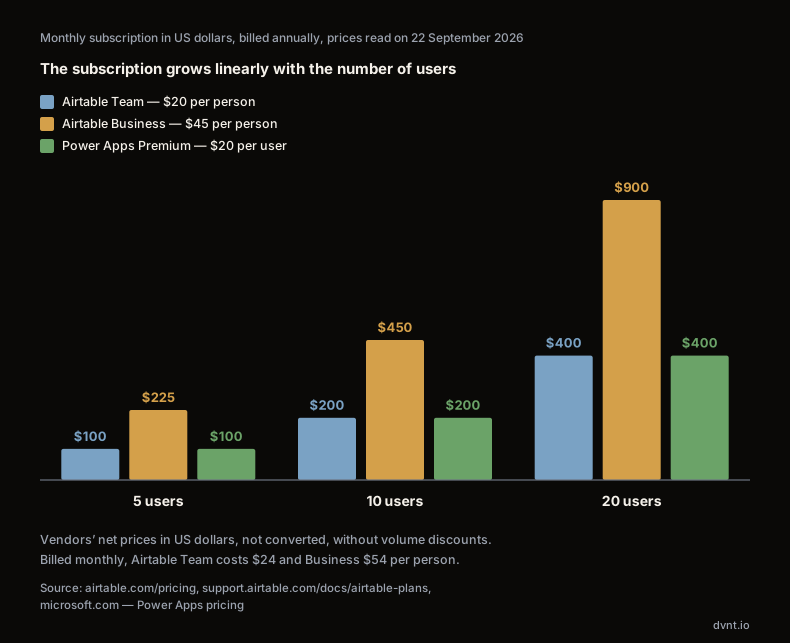
With five people, the difference between plans is a few hundred dollars a year. With twenty people on the Business plan, you pay $900 a month billed annually, and $1,080 billed monthly. That is the point at which it is worth working out what a tool of your own would cost — not because low code is expensive, but because its cost grows with every person you hire, and the cost of your own application doesn't.
Who counts as a paying user. This is a detail that is easy to miss. On free Airtable, at most five people can work with editing rights. On the Team plan you pay for everyone who can comment or edit, on Business for everyone who can edit; people with read-only access are free on both plans. Before you set a budget, establish who really needs to change anything in the application.
A higher plan means more space — and a different definition of a paying user
| Free | Team | Business | |
|---|---|---|---|
| Records per base | Free1,000 | Team50,000 | Business125,000 |
| Attachments per base | Free1 GB | Team20 GB | Business100 GB |
| Who counts as a paying user | Freenobody — but at most 5 people edit | Teameveryone who comments or edits | Businesseveryone who edits |
People with read-only access are free on Team and Business — before you set a budget, establish who really needs to change anything.
CONCLUSION1,000 records at 20 submissions a day last under 2 months
Sharing outside on a more expensive plan. An application for the team and an application for customers are, on many platforms, two different plans. On AppSheet the line is clear: Core works only inside the organisation, and sharing outside requires Enterprise Plus. If you expect that customers or partners will one day use the tool, check this before you start, not on the day you invite them.
Integrations. A connection to your accounting system, your online shop or your database usually isn't in the basic plan. In Power Apps, prebuilt, custom and on-premises connectors are part of the Premium plan. Before you choose a platform, list the systems the application has to talk to and check which plan each of those connections is available on.
What you can take with you when you leave
Vendor lock-in is usually discussed in terms of data: will the provider let you get it out? With low code, that question has two parts, and the answers are different. You can take the data. Not the application.
Data: yes, but piece by piece
On data, the position today is good, partly thanks to the law. Since 12 September 2025 the EU Data Act (Regulation 2023/2854) has applied, and it covers data processing services, including software and platforms delivered as SaaS and PaaS — and so low code and no code platforms too. The contract with the provider must set a notice period for starting a switch of no more than two months, a transition period of up to 30 days during which the provider helps with the move, and an exhaustive specification of the data that can be exported (Article 25(2)). From 12 January 2027, the provider may not charge for the switch itself (Article 29).
In practice, though, exporting can be more laborious than the regulation suggests. Airtable's export documentation is a good example. It says that:
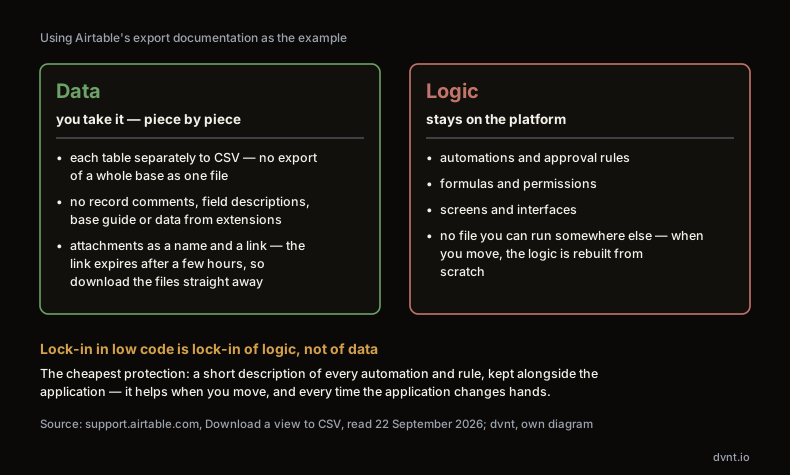
- you can't export a whole base as a single file — each table is downloaded separately as a CSV;
- the export doesn't include record comments, field descriptions, the base guide, or data stored only in extensions;
- attachments go into the file as a file name and a link, and the links expire after a few hours — so the files have to be downloaded straight away, not "at some point".
With a base of ten tables and thousands of attachments, moving is a project, not a click. It is worth knowing that before the base grows.
The application: it stays on the platform
The second part matters more. On a low code platform you have built not only tables of data but also logic: automations, approval rules, formulas, permissions, screens and interfaces. That logic is the value of the application — it is where your process is written down. And it runs only on the vendor's platform.
Airtable's export documentation, mentioned above, is silent on automations and interfaces. We aren't saying that nothing can be reconstructed from them — but there is no file you can download and run somewhere else. An automation built from one platform's blocks won't run on another, just as a macro from one program won't run in another. When you move, the logic is rebuilt from scratch.
That is why vendor lock-in in low code is lock-in of logic, not of data. You will get the data out, perhaps piece by piece. The process you wrote into the application, you will have to write again. The simplest protection costs very little: keep, alongside the application, a short description of what each automation and each rule does. That description will help when you move, and before that — every time the application changes hands.
Where our admin panel ends and code begins
We don't implement low code for clients. We build software in code, and that is our perspective, not a verdict. But the question "what can be changed without a developer?" is one we ask on every project, including this website. And we answer it much as low code platforms do; we just draw the line in a different place.
Forms are built in the admin panel. The contact form, the consultation sign-up, every form on this site is assembled in the admin panel from ready-made fields — text, email, a drop-down list, a date, a consent box — without a developer. Whoever runs the site adds a field, changes a label or creates a new form on their own.
So is the brief. Our multi-step project brief, which a client fills in before we quote, has its structure in the panel: steps, sections within them, fields within those, together with the rules for when a field or a section is shown. Changing a question, adding a step or a new answer option is an edit in the panel, not a task for a developer.
The calculators are deliberately in code. The eight cost calculators on this site — from a website, through an online shop, to the cost of downtime — are configurations written in code and checked by tests. We could move them into the panel. We don't, because a calculator gives a price, and a mistake in a price costs money: the client gets an understated quote and builds a budget on it. So a change of rate goes through a test that checks the result still adds up.
This leads to a rule we apply and recommend with any platform. What changes often, and where a mistake is easy to spot and fix, goes into the panel — a field label, a new question, the wording of a consent. What has to be tested before it reaches people goes into code — prices, calculation rules, the logic that money or decisions depend on. A low code platform pushes that line a very long way towards the panel. That is its strength — and the place to be careful.
Low code, off-the-shelf SaaS or custom software?
Low code isn't the only alternative to programming. Often a ready-made system for the specific task is better: if you need a customer database, an off-the-shelf CRM will almost always beat a CRM assembled from blocks yourself — we cover this in our article on CRM for small business. Low code has the edge where there simply is no ready-made system for your process.
For many companies the path looks similar: a spreadsheet, then no code, then low code, and sometimes custom software. There is no reason to skip stages. There are, however, a few signals that it is time for the next step — and at the end of the path, three that say low code is no longer enough.
You are hitting a limit. On records in the base, on attachment storage, or on licences whose cost grows with every new person. If every quarter you delete old data to stay within the plan, or you put off inviting more people because it would mean paying more, the limit has started making decisions for you.
Customers use the application, not just the team. A customer portal, orders placed from outside, a partner dashboard. That means a more expensive plan, higher demands on appearance, speed and security — and a situation in which an outage on the platform becomes an outage of your customer service.
The logic becomes the core of the business. When the application holds the way you price, plan or serve customers — and that is what sets you apart from your competitors — keeping it on someone else's platform, with no way of taking it with you, becomes a risk rather than a saving.
1 · Spreadsheet
data in one file, edited by one or two people
2 · No code
- an app assembled from ready-made blocks (form, table, automation) on a vendor’s platform
- signal → step 2
- several people edit the same data, and a form, an approval or a separate view for each person is needed
3 · Low code
- blocks plus your own code where the blocks run out
- signal → step 3
- a block is missing for a necessary rule or integration, and code has to be added
4 · Custom software
- your own code, which the company can move and develop without the platform’s limits
- worth costing step 4 when at least two of three apply:
- • you are hitting a limit on records or licences (for example 50,000 records per base on Airtable Team, a fee for every additional person) • customers use the app, not just the team • the app’s logic becomes the core of the business
If you recognise two of these signals, it is worth working out whether a custom application would pay for itself. How to do that, feature by feature, is covered in our article on off-the-shelf versus custom software. If you don't recognise any of them — stay on low code and don't let anyone talk you into more.
Where to start
If you have a process that doesn't fit in a spreadsheet, start with a low code or no code platform — ideally one you already pay for in a subscription. Build a simple version, give it to the team for a month and watch. Don't design everything in advance: add a field when someone genuinely needs it.
While you are at it, do the one thing most companies don't: write the process down. Which tables, which statuses, who approves what, what should happen automatically. A description like that takes an hour of work and pays back twice. First, it protects you from the one-person application. Second, if the application ever outgrows the platform, a working prototype together with its description will be the cheapest and most accurate specification you can hand to the team that builds the final version. Instead of assumptions about the process, they get a process tested in daily work.
If you can already see that low code won't carry your case — because the application has to serve customers, connect to your systems or contain the logic your business rests on — let's talk about whether you need custom software development. For the wider context, which business applications solve which problem, see our guide to business software.
Where these figures come from
- Airtable limits and prices — the airtable.com/pricing page and the plan documentation at support.airtable.com/docs/airtable-plans, read on 22 September 2026, prices in US dollars per person per month.
- Exporting from Airtable — the "Download a view to CSV" documentation, support.airtable.com, read on 22 September 2026.
- Power Apps Premium price — the Power Apps price list on microsoft.com, read on 22 September 2026; we leave out the price for a minimum of 2,000 licences, which doesn't apply to a small business.
- AppSheet in Google Workspace — Google Workspace admin help, read on 22 September 2026.
- Rules — Regulation (EU) 2023/2854 (Data Act), Articles 25 and 29.
- Our admin panel and calculators — the state of the system this website runs on.
Frequently asked questions about low code and no code
What is low code?
Low code is a way of building applications from ready-made blocks — forms, tables, views and automations — on a vendor's platform, with the option of adding code where the blocks run out. The platform provides hosting, a database, screens and automations, and you pay a subscription, usually per user.
What is the difference between low code and no code?
In no code, you assemble the whole application from blocks the vendor has provided, without writing code. In low code, where the blocks run out, you can add a piece of code, a formula or a call to an external service. No code is closer to a spreadsheet, low code to programming.
Who is a citizen developer?
Someone outside the IT department who builds a tool for themselves or their team on a low code or no code platform. They know the process better than any outsider, but their application is often understood only by them. That is why such a tool should have a second owner, a short description and a company account.
Can you move an application from a low code platform somewhere else?
The data, yes — on Airtable, for example, each table is exported separately to CSV, and the EU Data Act requires the contract to specify which data can be ported. The application's logic — automations, rules and screens — usually can't be run on another platform, and when you move, it is rebuilt from scratch.
When should you choose custom software instead of low code?
When at least two of three signals appear: you are hitting a limit on records or licences, customers start using the application and not just the team, or the logic written into it becomes the core of the business. Before that, low code is usually cheaper and faster.
Related articles
Automation and integrations
API — what is it? REST API, webhooks and OpenAPI explained for business
API explained with NBP, KSeF and VIES as examples: REST API, webhooks, OpenAPI, API keys and integration security for business.

Artificial intelligence
AI in business — where to start, what it costs and what the law says
AI in business without the hype: how many Polish firms use it, when an assistant is enough, what it costs and what the AI Act and Polish act require.
Artificial intelligence
AI agent in business — what it is and when it makes sense
An AI agent is a language model that chooses its own steps and tools. When it makes sense in a company, what it costs and what the AI Act and Polish law say.
Artificial intelligence
How to build an AI agent for your business — from process to first working version
How to build an AI agent for your company step by step: process, tools and permissions, human in the loop, cost limits, evaluation and prompt injection.
Automation and integrations
What is n8n — and when does it make sense for a business
What is n8n? An automation tool with AI nodes, in the cloud or on your own server. Licence, prices with a PLN guide, GDPR, and n8n vs Make and Zapier.
Artificial intelligence
Model Context Protocol (MCP) — what it is and what it means for a business
Model Context Protocol (MCP) connects AI assistants and agents to company systems. How an MCP server works, its risks, GDPR and when to build your own.
Not sure whether low code will do?
Tell us which process you want to support and who will be using it. We will help you judge whether a low code platform, an off-the-shelf system or an application built to order is what you need. If low code will do — we will say so.