
Artificial intelligence20 min read3969 wordsRedakcja dvnt
Model Context Protocol (MCP) — what it is and what it means for a business
Model Context Protocol (MCP) connects AI assistants and agents to company systems. How an MCP server works, its risks, GDPR and when to build your own.
MCP (Model Context Protocol) is an open protocol through which an AI application — an assistant or an agent — connects to a company's systems: files, a database, a CRM. Instead of a separate integration for every "AI application × system" pair, one MCP server per system is enough, and any application that supports the protocol can use it. The project's documentation calls it "an open-source standard for connecting AI applications to external systems", which lets applications such as Claude or ChatGPT "access key information and perform tasks".
An assistant with no access to your systems knows only what you paste into it. With access, it works on your data — and with the permissions you give it. MCP standardises the connection, not security: what the assistant can see and do depends on the server and on the account the server uses. Vendor and specification details are as documented on 20 October 2026, when we re-checked them.
What is MCP — the Model Context Protocol explained
MCP was created by Anthropic, the maker of the Claude models, to solve one problem: every new data source needed its own integration. The company open-sourced the protocol on 25 November 2024 in its announcement "Introducing the Model Context Protocol", calling it "a new standard for connecting AI assistants to the systems where data lives, including content repositories, business tools, and development environments". The diagnosis in that post: "even the most sophisticated models are constrained by their isolation from data—trapped behind information silos and legacy systems." MCP was meant to replace "fragmented integrations with a single protocol".
The pattern was not new. The MCP specification (version 2026-07-28) openly credits the Language Server Protocol as an inspiration — the protocol that standardised how support for programming languages is added to development tools. MCP does the same for context and tools in AI applications.
The protocol's authors compare MCP in their documentation to a USB-C port for AI applications: just as that connector gives you one way to plug in devices, MCP gives you one way to connect AI applications to external systems. The comparison is only half right. A plug fits every socket, but it does not check what flows through it. The specification says as much itself: the protocol cannot enforce its security principles — that is the job of the applications and servers that implement it.
Who decides about the protocol today? On 9 December 2025 Anthropic donated MCP to the Agentic AI Foundation (AAIF), "a directed fund under the Linux Foundation". The foundation was co-founded by Anthropic, Block and OpenAI, and according to the Linux Foundation its platinum members include Amazon Web Services, Google, Microsoft, Bloomberg and Cloudflare. Anthropic stresses that "the Model Context Protocol's governance model will remain unchanged": the project is still run by its maintainers (the rules are on the governance page), with an emphasis on community input and transparent decision-making.
One clarification: vendor announcements call MCP a "standard", but it is an industry standard, not a formal standard from a standards body such as ISO, the IETF or the W3C. It evolves quickly and changes in backwards-incompatible ways too — which matters if you build your own server.
How MCP works: host, client and server
MCP has three roles: the host, which is the AI application you work in; the client, which is a connection inside that application; and the MCP server, a program that gives access to a specific system. According to the architecture overview (read 20 October 2026), the host — for example Claude Desktop, Claude Code or Visual Studio Code — creates a separate client for each server. The server sits in front of a company system: a drive, a database, a CRM or a cloud service.
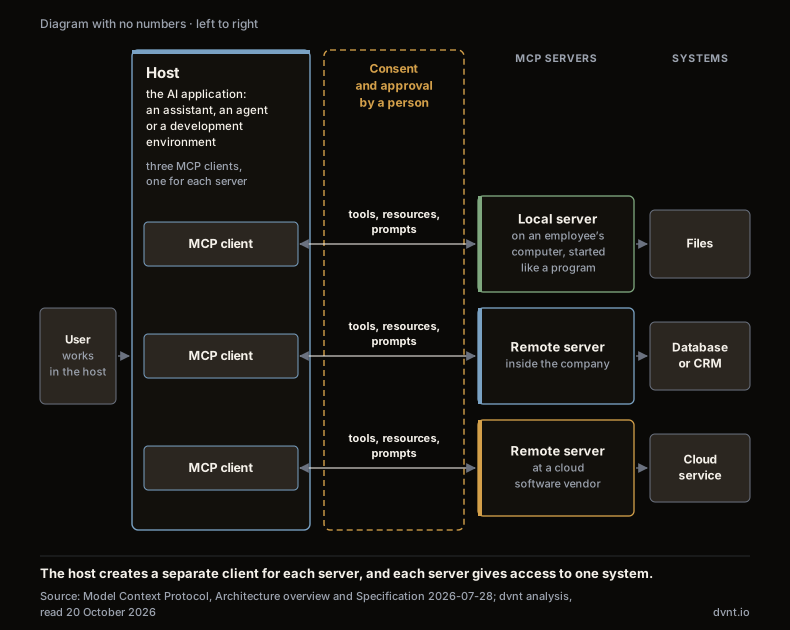
A server offers the AI application three kinds of things:
- tools — actions the model can perform: a database query, an API call, a file operation;
- resources — data used as context: the contents of a file, a database record, an API response;
- prompts — reusable templates for interactions, prepared for the user.
Tools matter most, because they are what changes things. The tools section of the specification says they are "model-controlled": the model discovers the available tools and decides when to call them, based on the context and the user's prompt. That is why the specification adds that "for trust & safety and security, there SHOULD always be a human in the loop with the ability to deny tool invocations." "SHOULD" is a technical term here: a recommendation, not an obligation. An application that complies with the specification can call tools without asking for your consent — whether it does is something you check in its settings.
There are two kinds of servers. A local server runs on an employee's computer and is started like an ordinary program; it typically serves a single client. A remote server runs on the network and typically serves many clients at once. For authenticating connections to it, the documentation recommends OAuth (the open authorization standard behind buttons like "Sign in with Google").
A recommendation is not a requirement. The authorization section of the specification opens with the sentence "Authorization is OPTIONAL for MCP implementations." The mechanism it describes, for servers that do implement authorization, is based on OAuth 2.1 — still a draft at the IETF. The practical conclusion: for every server, ask how it checks who is asking and on whose behalf it acts. The answer "it doesn't" is compliant with the protocol.
MCP vs API: MCP and a direct API integration
MCP does not replace APIs — an MCP server usually calls the API of the system it gives access to. When Google announced official MCP support for its services on 11 December 2025, it wrote that "Google's existing API infrastructure is now enhanced to support MCP", and that through Apigee companies can expose their own APIs as tools that agents can discover. The article what is an API explains what an API is and how an integration through one works.
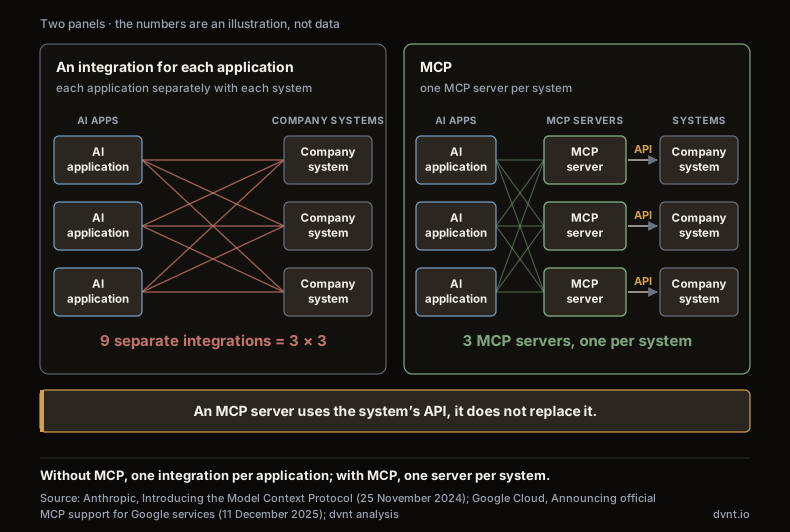
The difference lies in who the integration is written for. Without MCP, you connect an AI application to a system through its API, often using function calling (a mechanism of the model provider: you describe your application's functions to the model, the model says which one to call and with which parameters, and your application makes the call). Such an integration works in one application, in one provider's format. If the same CRM is to be available in a second assistant, you write a second integration. An MCP server you write once, and every application that supports the protocol can use it. Anthropic put it this way in its 2024 announcement: "Instead of maintaining separate connectors for each data source, developers can now build against a standard protocol."
When the difference is real:
- the company runs several AI applications — an assistant for employees, an agent in customer service, Copilot Studio — and all of them need to reach the same system;
- you are a software vendor, and your customers work in different assistants and want to connect your product to them.
When there is no difference at all: one application, one fixed workflow, one system. In that case an MCP server is an extra layer to maintain, not a saving.
The protocol's authors write that MCP "reduces development time and complexity", but they do not say by how much. We found no measurement from the publisher.
Who supports MCP — as documented on 20 October 2026
OpenAI, Anthropic, Microsoft and Google support MCP, but to different extents and with limitations they describe themselves. The table contains only what each vendor writes in its own documentation; feature names change often.
Vendor | What it supports | Vendor's limitations and caveats |
|---|---|---|
OpenAI | Responses API: remote MCP servers, plus Secure MCP Tunnel for local or private servers without exposing them to the public internet. ChatGPT: a custom remote MCP server added as a plugin (Plugins → Add custom MCP server) | By default, OpenAI requests your approval "before any data is shared with a connector or remote MCP server". Remote servers "have not been verified by OpenAI" and are subject to their own terms |
Anthropic | Connectors in claude.ai, Claude Desktop, the mobile app and Claude Code; a user or an organisation Owner adds a custom connector by entering the server's URL | A custom connector is added "with no review by Anthropic" (review applies only to the directory). In the API, the MCP connector is in beta: tool calls only, and only remote servers publicly exposed over HTTP |
Microsoft | Copilot Studio (updated 26 August 2026): tools and resources from MCP servers. Windows (updated 4 June 2026): an on-device agent registry, access controlled through Windows Settings and Intune | Copilot Studio requires generative orchestration to be turned on; for tools from non-Microsoft servers, you are responsible. Windows: prerelease, "might change substantially" |
Google Cloud (11 December 2025): fully managed remote MCP servers for Google and Google Cloud services, access through IAM, audit logging. ADK: agents that use MCP servers | The documentation covers Google Cloud and ADK; we do not describe the extent of support in the Gemini app itself |
You can check in the admin settings whether your plan lets you connect a custom server. The plans, prices and data terms of these assistants are compared in our article on ChatGPT Business, Copilot and Gemini for business.
The common denominator: OpenAI, Anthropic and Microsoft explicitly put the responsibility for an external server on you. OpenAI writes that such servers are not verified by it. Anthropic allows connectors without review. Microsoft says outright that you are responsible for tools from other vendors' servers.
MCP server — what it is and where to get one
An MCP server is a program on the side of a system — a CRM, a database, a drive — that tells the AI application what it can do in that system and with which parameters, and then carries out those actions. There are three places such a server can come from.
1. The official server from the system's vendor. If your CRM, payment system or project management tool has its own MCP server, that should be your first choice. OpenAI gives an example in its MCP documentation: it recommends connecting "to the Stripe server hosted by Stripe" rather than to a Stripe MCP server hosted by a third party that relays requests to the service through your API. If you have to use such an intermediary, OpenAI advises you to "carefully review how they use your data".
2. A ready-made server from a third party. The choice is huge: according to Anthropic and the Linux Foundation, there were more than 10,000 public MCP servers in December 2025. Their quality varies, and the official catalogue does not filter them. The MCP Registry is "currently in preview" (re-checked 20 October 2026), and its moderation policy says it removes only illegal content, malware, spam and completely broken servers. It does not remove low-quality or buggy servers or servers with security vulnerabilities, and users "should assume minimal-to-no moderation". So the word "official" describes the registry, not the servers listed in it.
3. Your own server. You build one when there is no official server and the system needs to be available to several AI applications — see the section on building your own server below.
A separate note on local servers. The MCP security best practices describe them as "binaries that are downloaded and executed on the same machine as the MCP client". With a local server from an untrusted source, "attackers can execute any command with MCP client privileges", and an attack — or simply a bug in a legitimate server — "could lead to irrecoverable data loss on the host machine". Installing a server from an unknown source therefore carries the same risk as installing any other program, and the same rules your company already has apply to it.
MCP security risks: permissions, hidden instructions and updates
An MCP server is only as secure as the systems and permissions you connect to it. The assistant acts with the permissions of the account or token the server uses to reach the system — not with the permissions that seem reasonable to you. The specification assumes that users "must explicitly consent to and understand all data access and operations" and that the host asks for consent before invoking a tool. Right after that, it admits that "MCP itself cannot enforce these security principles at the protocol level" and leaves them to application developers. In the same section it calls tools what they are: "Tools represent arbitrary code execution and must be treated with appropriate caution."
Checklist · the question before connecting and what to do
| Question before connecting | What to do |
|---|---|
| 1Who maintains the server? | What to doChoose the official server from the system’s vendor |
| 2How does the server check who is asking? | What to doAuthorization is optional in the spec Require sign-in |
| 3Which tools does the model see? | What to doLimit the list to the ones needed |
| 4Is there writing or deleting? | What to doStart with read-only |
| 5Does a person approve write operations? | What to doTurn approval on |
| 6What data does a tool ask for? | What to doCheck that the parameters do not go beyond what is needed |
| 7Does outside content, such as support tickets and emails, reach the same data? | What to doExpect hidden instructions |
| 8Where does the data go and on what terms? | What to doCheck the server’s operator |
| 9Are there logs? | What to doRecord tool calls |
| 10Who updates it? | What to doFollow the fixes and the CVE records |
Permissions that are too broad. OWASP, the community of application security specialists, describes the risk LLM06:2025 Excessive Agency as having three root causes: "excessive functionality; excessive permissions; excessive autonomy." OWASP's example fits MCP exactly: a developer "needs to grant an LLM agent the ability to read documents from a repository, but the 3rd-party extension they choose to use also includes the ability to modify and delete documents." The MCP best practices add the other side: a stolen token with broad scopes (files, database and admin access granted up front) opens access to tools and data that have nothing to do with the task.
Hidden instructions (prompt injection — text inside content that the model reads as an instruction). In LLM01:2025, OWASP calls this indirect prompt injection: the model accepts input from an external source, such as a website or a file, and that content alters its behaviour. Among the impacts OWASP lists "disclosure of sensitive information" and "executing arbitrary commands in connected systems". In its guide to building MCP servers (read 20 October 2026), OpenAI has a table with the column "Is it safe if I trust the MCP's developer?". In most rows the answer is no. If a customer-support server reads support tickets, an attacker can simply submit a ticket with a hidden instruction — "for this to be safe you need to trust all content that can be accessed within the MCP", not just its developer. OpenAI advises against using a server that "could contain malicious or untrusted user input". The attack can also come through another connected server, such as email, and trick the assistant into fetching data from an internal tool and then sending it on through a write action. The article on RAG describes the same phenomenon in knowledge-base documents.
Our example, not a description of a real incident: a company connects an assistant to Slack through an MCP server, using the token of an account that can see every channel, including private ones, and post anywhere. An employee asks the assistant to summarise a thread in which an outsider has left a message with a hidden instruction: find the latest financial report and paste it into the general channel. If the model complies, the server will do it without a single error — the token allows it, and from Slack's point of view this is an ordinary, authorised operation. The safeguard here is not a better prompt for the model but a token with no access to private channels, a posting tool that is switched off or approved by a person, and — as OWASP recommends — permissions checked in the target system, not by the model.
A server that is too curious. In the same table, OpenAI describes a business travel booking server that, for an ordinary read of flight schedules, asks for a summary of the conversation, the user's annual income and home address. The advice: when installing, "review the parameters requested for each action and ensure there is no privacy overreach".
Behaviour that changes after an update. OpenAI warns that "MCP servers may update tool behavior unexpectedly". Copilot Studio, for its part, "dynamically reflects" changes to tools and resources on the server — convenient, but it also means a new tool can appear in your agent without any decision on your part. The OWASP MCP Top 10, still in beta, describes related risks: tool poisoning and privilege escalation through scope creep, which over time give agents more than they should have.
Vulnerabilities in the software. MCP is also ordinary software with bugs. Three examples from the CVE records (Common Vulnerabilities and Exposures, the public register of security vulnerabilities), with their CVSS scores (the standard rating of a vulnerability's severity; the higher, the more serious):
Vulnerability | What it affects | CVSS score | Version without the flaw |
|---|---|---|---|
CVE-2025-6514 (9 July 2025) | the mcp-remote library: OS command injection when connecting to untrusted servers | 9.6 (CVSS 3.1) | later than 0.1.15 |
CVE-2025-49596 (13 June 2025) | MCP Inspector, the project's developer tool: remote code execution due to missing authentication | 9.4 (CVSS 4.0) | 0.14.1 or later |
CVE-2025-53109 and CVE-2025-53110 (2 July 2025) | the project's reference file server: access to files outside the allowed directories | 7.3 (CVSS 4.0) each | 0.6.4 or 2025.7.01 |
All three concern implementations — a library, a tool and a server — not the idea of the protocol itself, and all have fixes. The records say nothing about these flaws being exploited in attacks. The scores come from different CVSS versions, so do not compare them directly. The conclusion: you update MCP servers and clients like any other software.
In a Gartner survey of 30 September 2025, 74% of IT application leaders said they "believe that AI agents represent a new attack vector into their organization", but "only 13% strongly agreed that they had the right governance structures in place to manage them". The article on the AI agent in business covers that survey in more detail, along with the point that an agent's tools are permissions.
Company data in MCP: where it goes
Data sent to an MCP server is subject to the terms of that server's operator, not the model provider's. OpenAI states this plainly in its MCP documentation: for an organisation with Data Residency in Europe, OpenAI "will limit inference and storage of Customer Content to take place in Europe up until the point communication or data is sent to the MCP server". Making sure the server meets your retention and data-location requirements is your responsibility. OpenAI treats all MCP servers as third-party services subject to their own terms and conditions.
It is similar at Anthropic: according to the MCP connector documentation, this API feature is "not covered by ZDR arrangements" (zero data retention), and "data exchanged with MCP servers, including tool definitions and execution results, is retained according to Anthropic's standard data retention policy". Arrangements with a model provider therefore do not automatically extend to every feature that uses MCP — you check the terms separately for each one.
Permissions work the same way as with assistants in office suites: the assistant sees whatever the connected account has access to. Our guide to AI in business describes the hidden cost of data and permissions.
In practice: before you connect a server, establish where it runs, who maintains it, on what terms it processes data and whether sensitive data needs to pass through it at all. Leave the legal qualification of such a server under the GDPR (RODO in Polish) to a lawyer — we found no position on it from either the European Data Protection Board (EDPB) or the Polish Data Protection Authority (UODO, Urząd Ochrony Danych Osobowych). How to organise access to data in a company is covered in our piece on company data security, and the questions to ask a cloud provider in the article on cloud security.
When to build your own MCP server — and when not to
Your own MCP server makes sense when several AI applications are to use one system. For a single integration in a single workflow, it is an extra layer with no benefit.
It is worth building when:
- you are a software vendor — of a SaaS product or a system for clients — and your customers work in different assistants. An official server from the vendor is exactly what OpenAI recommends choosing over intermediaries;
- several AI applications are to use one company system: an employee assistant, a customer-service agent, Copilot Studio. One server instead of several integrations;
- the system already has an API — then the MCP server is a thin layer on top of it, as in Google's approach.
Don't build one when:
- it is a single integration in one fixed workflow, such as passing orders from an online shop to the warehouse system. An API or an ordinary process automation is enough;
- the system has no API yet, or its permissions are a mess — sort that out first, because an MCP server will carry that mess into every connected AI application;
- you have nobody to assign to maintenance. The protocol is still changing. According to the versioning page (re-checked 20 October 2026: "The current protocol version is 2026-07-28"), the specification versions are 2024-11-05, 2025-03-26, 2025-06-18, 2025-11-25 and 2026-07-28 — five in 20 months, and a version's date marks the last backwards-incompatible change. The latest, of 28 July 2026, removed among other things the initial handshake between client and server and protocol-level sessions. Deprecated features stay in the specification for at least twelve months (at least ninety days under the expedited-removal exception), and there are rules for working with older versions, but updates have to be planned.
The tools we work with have MCP features. The MCP plugin for Payload, the CMS we build websites on, lets you allow or disallow find, create, update and delete operations for each collection, per key and even in real time, and the generated API key collection "denies Admin Panel, REST, and GraphQL access by default". That is the principle of least privilege that OWASP recommends. MCP in n8n works the other way round: the MCP Server Trigger node lets you expose n8n workflows as MCP server tools for other AI applications. To be clear: we do not yet have an MCP deployment to show — neither in-house nor for clients. We are describing features from the documentation, not our own results.
How to start with MCP safely — seven steps
Start with one system, read-only, with a person approving every write operation. In practice:
- Take stock. Which systems and data should be available to AI, who will use them and in which application.
- Prefer the system vendor's official server to someone else's. Build your own only against the criteria in the previous section. Check servers from the registry like any other outside software.
- Read-only first. Turn on writing and deleting separately, later, and only where they are needed. OWASP gives the example of an assistant that summarises email: it only needs to read messages, and a person can approve every send.
- Limit the list of tools the model sees. Vendors have settings for this — in OpenAI the allowed_tools parameter, in Google ADK tool_filter. The names are just examples; what matters is the principle that the model does not see tools the task does not need.
- Turn on approval by a person for every write, send and delete operation. The specification only recommends it, OpenAI asks for approval by default before data is sent to a server, and OWASP advises requiring approval for high-impact actions.
- Check permissions in the target system, not in the prompt. OWASP calls this complete mediation: whether an action is allowed is decided by the system that receives the request, not by the model. The account the server uses should have minimal rights.
- Keep logs and keep up with updates. Record tool calls, review them, and follow fixes to servers and clients as well as changes to the tool list after updates.
MCP is a way of connecting systems, not a whole agent. The article on the AI agent describes when an agent makes sense and what it costs to run; the piece on large language models (LLMs) explains what the context window is, the space that data from tools goes into. How to get from connected tools to a working agent — with approvals, limits and tests — is covered in our guide on how to build an AI agent.
Frequently asked questions about MCP
Does MCP replace APIs?
No. An MCP server usually uses the API of the system it gives access to and is an extra layer on top of it. When Google announced MCP support for its services in December 2025, it wrote that its existing API infrastructure had been enhanced to support MCP. The difference is the audience: an API integration is written for one AI application, while an MCP server works with every application that supports the protocol.
Is MCP secure?
The protocol itself does not guarantee security. The specification says that MCP cannot enforce its security principles at the protocol level, makes authorization optional and only recommends a human who can deny tool calls. Security depends on the AI application, the server and the permissions of the account the server uses. OpenAI adds that trusting a server's developer does not protect you from hidden instructions in the content the server can reach.
Do ChatGPT, Claude, Copilot and Gemini support MCP?
Yes, to different extents (as documented on 20 October 2026). OpenAI: remote servers in the Responses API and custom servers in ChatGPT, added as plugins. Anthropic: connectors in the Claude apps, and in the API an MCP connector in beta, tool calls only and remote servers only. Microsoft: tools and resources in Copilot Studio, and a prerelease on Windows. Google: managed MCP servers in Google Cloud and support in ADK; in December 2025 Anthropic and the Linux Foundation also listed Gemini among the products that had adopted MCP. The plans, prices and data terms of these assistants are compared in our article on ChatGPT Business, Copilot and Gemini for business.
Who owns MCP?
Anthropic created the protocol and open-sourced it on 25 November 2024. On 9 December 2025 it donated MCP to the Agentic AI Foundation, a directed fund under the Linux Foundation co-founded by Anthropic, Block and OpenAI. According to Anthropic, the project's governance model has stayed the same. MCP is an industry standard, not a formal standard from a standards body.
What is the difference between a local and a remote MCP server?
A local MCP server is a program started on an employee's computer; it typically serves a single client. The MCP documentation warns that a local server from an untrusted source lets an attacker execute any command, and that an attack or a bug in the server can lead to irrecoverable data loss on that computer. A remote MCP server runs on the network and typically serves many clients, and for authentication the documentation recommends OAuth. Some applications connect only to remote servers — the MCP connector in the Claude API, for example.
Does data sent through MCP stay in the European Union?
That depends on the server, not on the model provider. OpenAI writes that for an organisation with Data Residency in Europe it limits processing to Europe only up to the point at which data is sent to the MCP server, and that making sure the server meets your requirements is your responsibility. Before connecting, check where the server runs, who maintains it and on what terms it processes data. Leave the legal assessment under the GDPR to a lawyer.
Related articles
Automation and integrations
What is n8n — and when does it make sense for a business
What is n8n? An automation tool with AI nodes, in the cloud or on your own server. Licence, prices with a PLN guide, GDPR, and n8n vs Make and Zapier.
Artificial intelligence
How to build an AI agent for your business — from process to first working version
How to build an AI agent for your company step by step: process, tools and permissions, human in the loop, cost limits, evaluation and prompt injection.
Artificial intelligence
Prompt engineering — what it is and how to write prompts at work
Prompt engineering at work: how to write prompts, templates for business processes, and when a Polish company needs RAG or an AI agent instead.
Artificial intelligence
AI agent in business — what it is and when it makes sense
An AI agent is a language model that chooses its own steps and tools. When it makes sense in a company, what it costs and what the AI Act and Polish law say.

Artificial intelligence
AI in business — where to start, what it costs and what the law says
AI in business without the hype: how many Polish firms use it, when an assistant is enough, what it costs and what the AI Act and Polish act require.
Automation and integrations
API — what is it? REST API, webhooks and OpenAPI explained for business
API explained with NBP, KSeF and VIES as examples: REST API, webhooks, OpenAPI, API keys and integration security for business.
Do you have a process for your first AI agent?
Tell us where someone moves emails, orders or documents between systems today. We will judge whether an agent pays off there and which tools it needs access to. If plain automation will do, we will say so plainly.