
Artificial intelligence20 min read3826 wordsRedakcja dvnt
Prompt engineering — what it is and how to write prompts at work
Prompt engineering at work: how to write prompts, templates for business processes, and when a Polish company needs RAG or an AI agent instead.
Prompt engineering is writing instructions for an AI model so that it consistently gives you the result you need. That is how OpenAI's documentation defines it: "the process of writing effective instructions for a model, such that it consistently generates content that meets your requirements". The key word is "consistently". One good answer in a chat window proves nothing.
In a company the problem usually looks like this: several people use the same assistant and get uneven results. One gets a usable draft proposal, another gets generic filler, a third gets a text with figures that were never in the material. The difference rarely lies in the model; most often it lies in how the task was described. Below: how to write prompts for ChatGPT, Copilot or Gemini, which popular tips have stopped working, where the model providers contradict each other, how to build a library of templates, and when no prompt is enough. Providers' advice changes with every generation of models, so we quote it from the documentation as we read it on 20 October 2026.
Prompt engineering — what it is (and what an AI prompt is)
A prompt is everything you give an AI model: the question, the task, the material to work on and directions on what the answer should look like. An AI prompt can be one sentence typed into a chat or several pages of instructions, examples and documents.
Prompt engineering is the skill of writing and organising those prompts. Each provider describes it slightly differently. Google, in its Gemini API documentation (updated 13 October 2026), speaks of prompt design that elicits "accurate, high quality responses", and adds that "Prompt engineering is iterative": the guidelines are a starting point, and the rest you work out by watching how the model responds. OpenAI notes that because a model does not answer the same way every time, getting the output you want is "a mix of art and science".
In a company, prompt engineering works on two levels:
- an employee in a chat — someone writes a prompt in ChatGPT, Copilot or Gemini to prepare a reply to a customer, a memo or a summary table;
- a prompt inside an application or agent — standing instructions (a system prompt) that a developer writes into an application that uses a model. OpenAI recommends keeping them in the application code, where every change goes through code review and tests.
This article is mainly about the first level, but the rule of checking the output is the same on both. How instructions work inside an agent is covered in our guide on how to build an AI agent, and what the model reading those prompts actually is, in the article on large language models (LLMs).
There are dozens of prompting techniques. A survey by Schulhoff et al. from 2024 counted 58 techniques for text models and pointed out the field's "conflicting terminology". An employee does not need a catalogue — just a few habits and a way to check that they work.
How to write AI prompts: the four parts of a good prompt
A good prompt describes the task the way you would describe it to a new employee: what to do, why, using which material, and what the result should look like. Microsoft puts it in four parts in its guide to writing prompts in Copilot (last updated September 2026): Goal ("What do you want Copilot to do?"), Context ("Why do you need it, and who is involved?"), Source ("What information or samples should Copilot use?") and Expectations ("How should Copilot respond?"). The same guide says that "all that's required is a clear goal", but adds that you will often need to include more than that to get the result you want. If your team uses Copilot in Polish, the Polish version of the same page names the four parts Cel, Kontekst, Źródło and Oczekiwania, and calls a prompt polecenie.
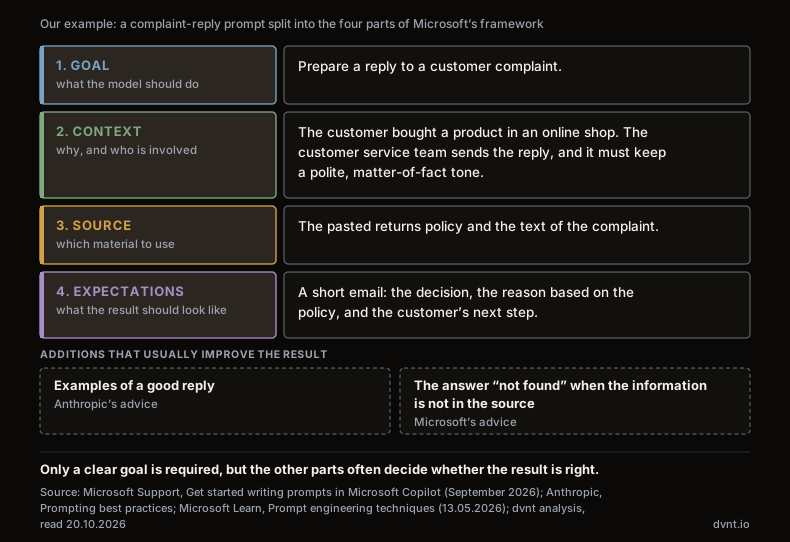
Anthropic says the same in other words in its prompting best practices: "Think of Claude as a brilliant but new employee who lacks context on your norms and workflows. The more precisely you explain what you want, the better the result." It adds a "golden rule": show your prompt to a colleague with minimal context on the task and ask them to follow it. "If they'd be confused, Claude will be too."
The providers' documentation points to five habits that help with any task:
- Explain, rather than just forbid. Anthropic gives an example: the instruction "NEVER use ellipses" works worse than explaining that the response will be read aloud by a text-to-speech engine, which cannot pronounce an ellipsis. A model that knows the reason can apply it to cases you did not foresee.
- Say what to do, not what not to do. Instead of "Do not use markdown in your response", write "Your response should be composed of smoothly flowing prose paragraphs". The example is Anthropic's own.
- Show an example. Anthropic calls examples "one of the most reliable ways to steer Claude's output format, tone, and structure" and recommends three to five of them: close to the real task and varied. Keep them separate from the instructions, for example with tags. Other providers see examples differently — more on that below.
- Name the output format explicitly. A table with the columns listed, an email of up to five sentences, a task list with an owner and a deadline. The model will not guess that the result is going into a spreadsheet.
- Allow the answer "not found". In its overview of prompt engineering techniques (updated 13 May 2026), Microsoft suggests that for questions about a text you add something like "respond with 'not found' if the answer isn't present", which "can help the model avoid generating false responses". We explain why models make things up, and what a prompt cannot fix, in the article on AI hallucinations.
A conversation in several steps is normal, not a failure. Microsoft says plainly that you will most likely follow up the first result with another prompt, and to "expect some back-and-forth conversation". It also warns that "using the same prompt multiple times can result in different responses". That is why one success is not enough — how to test a template is covered in the section on the prompt library.
Myths: "think step by step", "you are an expert" and being polite to AI
The three most repeated tips — asking for step-by-step reasoning, giving the model an expert role and being polite to it — are not universal today, and the first two are questioned by the providers and researchers themselves. Yet they are still often passed on without any caveats.
Chain of thought, or "think step by step"
Chain-of-thought prompting comes from a study by Wei et al. from 2022. The authors showed that a 540-billion-parameter model, given eight worked examples of reasoning in the prompt, reached the best result of its time on maths word problems (the GSM8K benchmark). That result comes from models four years old, on maths tasks.
Today's reasoning models think on their own before they answer, and the providers write about this in similar terms:
- OpenAI, in its advice for reasoning models: "Avoid chain-of-thought prompts", because asking them to "think step by step" or "explain your reasoning" is unnecessary, and some techniques "may not enhance performance (and can sometimes hinder it)".
- Microsoft states that the techniques in its guide "aren't recommended for reasoning models", and describes step-by-step reasoning prompts only for models without built-in reasoning.
- Google writes that Gemini 2.5 and 3 models generate internal "thinking" on their own, so it is generally not necessary to have them lay out reasoning steps in the answer. For problems that need heavy reasoning, a simple request such as "Think very hard before answering" can improve performance, at the cost of extra tokens.
- Anthropic advises preferring general instructions to prescribed steps: a prompt such as "think thoroughly" often produces better reasoning than a hand-written step-by-step plan. It treats manual chain-of-thought as a fallback for when built-in thinking is switched off, and notes that on the newest Claude models a request to write out the reasoning "may be declined".
A study by Meincke et al. from June 2025 confirms this with tests: for models designed to reason, chain-of-thought prompting brings "only marginal, if any, gains in answer accuracy", while it clearly increases the time and the number of tokens — that is, the cost. On ordinary models it usually helps a little, but it makes answers more variable and sometimes breaks an answer the model would otherwise have got right.
"You are an expert in…"
A role in the prompt sets the tone and the perspective, but it does not add knowledge. A report by Basil et al. from December 2025 tested six models on hard, graduate-level questions in science, engineering and law (the GPQA Diamond and MMLU-Pro benchmarks). An expert persona matched to the question had no significant impact on the result, with the exception of one model, and "low-knowledge" personas often reduced accuracy. The authors stress that they measured answer accuracy only — a persona may serve other purposes, such as changing the tone. Anthropic describes it the same way: a role in the system prompt focuses the model's "behavior and tone".
The takeaway for a business: write a role in when you want a particular tone or audience ("you are replying to a customer of an online shop, factually and politely"). Do not count on "you are an experienced lawyer" making the answer legally correct.
Politeness, tips and threats
There are no formulas that always work. The first report in the same series (Meincke et al., March 2025) found that being polite to the model sometimes improves the result and sometimes lowers it, and that you cannot know in advance which approach will help with a given question. The third report (August 2025) found that promising the model a tip or threatening it "generally has no significant effect". All of these studies used English benchmark questions, not office tasks in Polish.
The upshot: do not add formulas out of habit, and review old prompts after every model change. Anthropic gives an example: newer Claude models respond more strongly to the system prompt, so emphatic wording written for earlier models, such as "CRITICAL: You MUST use this tool when…", can make the model reach for the tool too often. Anthropic suggests toning it down to a plain "Use this tool when…".
Providers contradict each other — why you test a prompt on your own model
Anthropic, OpenAI, Google and Microsoft differ on basic points, so the only honest rule is: test the prompt on the model you use. Anthropic says so directly: where a technique names a specific model, "treat it as measured on that model and re-check it against your own evals before applying it to another".
Advice from the providers’ documentation, as of 20.10.2026 · column order is not a ranking
| Anthropic | OpenAI | Microsoft | ||
|---|---|---|---|---|
| Examples in the prompt | Anthropicthree to five examples | OpenAIwith reasoning models start without examples, add them if needed | Googlealways include examples | Microsofteffective prompts often rely on examples |
| “Think step by step” | Anthropiconly when thinking is off; newer models may decline to write out their reasoning | OpenAIavoid with reasoning models | Googleusually unnecessary; for hard problems “think very hard” can help | Microsoftonly for models without reasoning |
| Order with long material | Anthropicdocument at the top, question at the end | OpenAIcontext usually near the end of the prompt | Googlecontext first, instructions at the very end | Microsofttask at the beginning; test repeating it at the end |
| Role | Anthropicsets behaviour and tone | OpenAI“Identity” section in the developer message | Googlepersona in the system instruction or at the start of the prompt | Microsoftno such advice in the guide (as of 20.10.2026) |
CONCLUSIONA 2023 study (Sclar et al.): changing the prompt format alone shifted accuracy by up to 76 percentage points on one open model, and a format that worked well for one model only weakly predicted the result on another.
Examples in the prompt. Few-shot prompting means giving the model a handful of "input → expected output" examples; zero-shot prompting means a prompt without examples. Google recommends "to always include few-shot examples in your prompts", because in its view prompts without them "are likely to be less effective" — though with too many examples the model may start to overfit its answer to them. Microsoft writes that effective prompts often rely on one or a few examples. OpenAI advises the opposite for reasoning models: "Try zero shot first, then few shot if needed" — and keep the examples closely aligned with the instructions, because discrepancies between the two "may produce poor results".
Where to put the instruction in a long document. Microsoft writes that its research suggests stating the task at the beginning, before the context and examples, can produce higher-quality output — though it notes that with GPT-4 models its testing showed no difference. It also suggests testing whether repeating the instructions at the end helps, because models can be susceptible to recency bias: what comes at the end of a prompt may influence the result more than what comes at the start. Anthropic, for documents of about 20,000 tokens or more (a token is the piece of a word a model counts text in), recommends putting the document at the top and the question at the end. It says that in its tests this improved response quality "by up to 30 percent", especially with several documents at once — a figure from the provider itself, with no description of the test. Google, for Gemini 3, says to supply all the context first and to place your specific instructions "at the very end of the prompt". OpenAI writes that context is "usually best positioned near the end of your prompt".
Why it matters. A study by Sclar et al. from 2023 showed that open models are very sensitive to small changes in prompt formatting: in the extreme case, on one model (LLaMA-2-13B) and with examples in the prompt, changing the format alone shifted accuracy by up to 76 percentage points. The second finding matters more: a format that worked well on one model "only weakly correlates" with the result on another. Today's models are newer, but the providers say the same. Microsoft: a carefully crafted prompt that worked well in one scenario does not necessarily generalise more broadly. OpenAI: different models — and "even different snapshots of models within the same family" — can produce different results from the same prompt.
In practice: a prompt copied from a guide written for a different model is a hypothesis, not a finished solution. How to test it without a developer is covered in the section on the prompt library.
ChatGPT prompts, Copilot prompts and Gemini — prompt templates for business processes
A good prompt template describes your process and asks you to paste in your source. It does not contain knowledge the model lacks. Below are five templates for typical office tasks. They are our examples, built on Microsoft's framework (goal, context, source, expectations) and on Anthropic's advice on examples and on explaining the reason — not "the best prompts" and not a promise of results. They will work in ChatGPT, Copilot and Gemini, but each one needs to be tested in your own tool, for the reasons described above.
The common rule: you paste in the price list, the terms and conditions, the customer data and what was agreed, or attach them as a file. You do not ask the model to "remember" or "know" them. OpenAI notes that adding relevant context to the request "is sometimes called retrieval-augmented generation (RAG)" — more on that in the section on the limits of a prompt.
In the fifth template the document is at the top and the instruction at the end, following Anthropic's and Google's advice for long material. Also test the reverse, with the task at the beginning, as Microsoft's guide recommends. A quote for every claim lets you check the summary in a minute instead of taking it on trust.
Treat ready-made prompts from the internet as templates to rework. A template becomes useful only once it has your source and your output format, and someone has tested it on your tasks.
A prompt library in the company: owner, version, test
A template meant to work across a team needs an owner, a written criterion for a good result and a test repeated after every model change. Anthropic sets this as a precondition: its prompt engineering overview assumes that before you start improving a prompt you have "a clear definition of the success criteria" and some ways to test against them empirically. "If not, spend time establishing that first."
Shared templates usually have a home in the tool the company already uses. Microsoft describes the Copilot Prompt Gallery: next to Microsoft-curated prompts it holds prompts created and saved by users and by teams, and sharing them is meant "to promote consistency and collaboration". The collections stay "within the tenant boundary", and an admin can see in reports which prompts users save, like and share. You can check whether your plan includes this feature, and what ChatGPT and Gemini offer instead, in our comparison of ChatGPT Business, Copilot and Gemini for business.
The tool, however, is the smaller part of the work. Our list — what every template in the library should have:
- a name and the process it covers (complaints, proposals, order summaries);
- an owner — the person responsible for the template's content who decides on changes;
- the date and the model it was tested on;
- 5–10 sample inputs with the expected output, including the hard cases: missing data, conflicting information, a question the source does not answer;
- a criterion for a good result, written down before the test, for example "does not invent prices", "has a deadline if one was mentioned", "stays within the length limit";
- a re-test date — mandatory after every model change in the tool.
The test does not need a developer. You paste the prepared examples one after another and tick off the criteria. If the template fails on the hard cases, you fix it before it reaches the team, not after the first complaint.
In applications where developers write the prompts, OpenAI recommends the same thing in more formal terms: pin the application to a specific model snapshot, build tests that measure prompt behaviour whenever the model version changes, and store prompts in the application code, where they go through review like any other change. Even the tools for storing prompts are changing: OpenAI is deprecating reusable prompt objects in its API, and v1/prompts is scheduled to shut down on 30 November 2026. This affects developers using the API, not ChatGPT users.
A warning for templates that take someone else's content — a customer's email, a web page, a document from a supplier. Such content can contain hidden instructions that the model reads as if they were yours (prompt injection). In a chat the damage is limited to an answer you read anyway. In an agent with access to your systems it can be serious — we cover this in the guide on how to build an AI agent.
When a prompt is not enough: RAG, automation or an agent
When a task needs company knowledge, calculations, data moved between systems every day, or decisions and actions in your systems, a better prompt will not help — you need a different solution. Anthropic writes in its guide that "not every success criteria or failing eval is best solved by prompt engineering" — latency and cost, for example, are sometimes easier to improve by choosing a different model.
Anthropic calls the next step context engineering. In an article of 29 September 2025 it describes it as "the natural progression of prompt engineering": it is no longer only about the words of the prompt, but about the whole set of information that reaches the model while it works, "including all the other information that may land there outside of the prompts". The question shifts from "which words should I use?" to "what configuration of context is most likely to generate our model's desired behavior?". The same article warns against two extremes: "hardcoding complex, brittle logic" into the prompt, and guidance so vague that it "falsely assumes shared context".
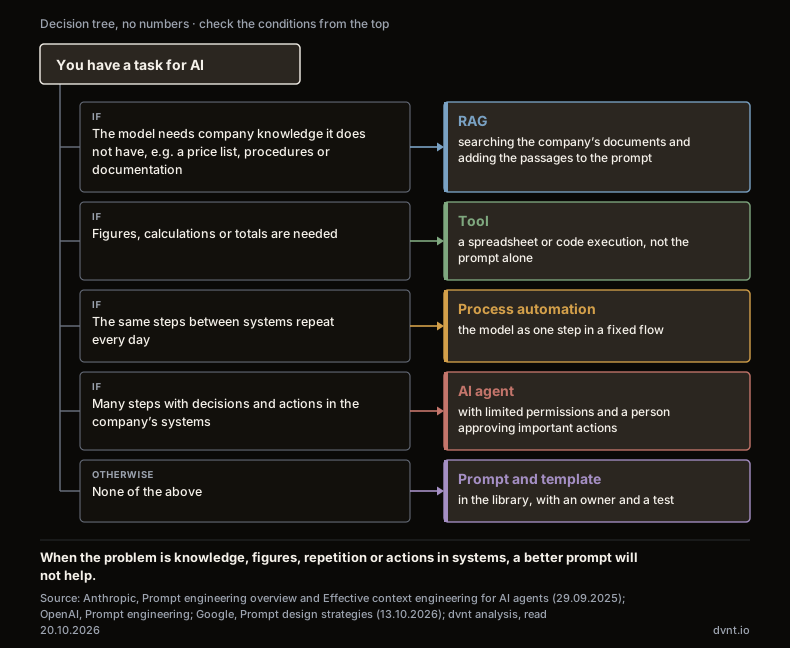
Four limits you see in practice:
- The model does not know your company. If employees paste in the same price list, terms or procedure every time — or, worse, do not paste it and the model guesses — that is a sign you need RAG: a system that finds the right passages in the company's documents and adds them to the prompt itself. We explain when the whole document in the prompt is enough and when you need RAG in the article on RAG.
- The task needs calculations. Google advises enabling code execution whenever the model needs to perform "any kind of arithmetic, counting, or calculation", and web search grounding whenever it may need "obscure or recent facts". No prompt turns a language model into a calculator. Work out the totals in a proposal in a spreadsheet or with a tool, not in the chat.
- The same steps between systems, every day. If an employee copies data from email into a prompt and the result into the CRM, dozens of times, the problem is not the prompt but the manual moving of data. That is a job for process automation, for example in n8n, where the model is one step in a fixed flow.
- Many steps with decisions and actions in your systems. When AI has to work out the next steps on its own and do something in your systems — send, change, order — you need an agent with limited permissions and a person who approves important actions. We explain when an agent makes sense and when something simpler will do in the article on AI agents in business.
At this point a company usually no longer needs a better prompt but an implementation: connecting the model to documents, systems and permissions. Prompts are still part of it, but they become instructions inside an application — versioned and tested like code.
Prompts and the rules for employees
Writing prompts is a skill, but what may be pasted into them is decided by the company, not the employee. Which accounts count as company accounts, and what data may and may not be entered, is covered in the "Rules for employees" section of our comparison of ChatGPT Business, Copilot and Gemini for business.
The second rule: a person checks the output. Microsoft's Copilot help warns that "Copilot responses can include incorrect content" and advises evaluating them and cross-referencing with trusted sources. A good prompt reduces the number of errors, but does not bring it to zero.
Article 4 of the AI Act, as amended by Regulation 2026/1744 of July 2026, requires a company that uses AI to "take measures to support the development of AI literacy" of its staff. It does not require any specific level to be reached — "This obligation does not require providers or deployers to guarantee any specific level of AI literacy of any individual" — and it does not prescribe training in prompt writing. We explain how to read this provision in the article on the EU AI Act for business. A template library with written rules and tests is one practical way to make sure those skills actually exist in the team.
Lack of expertise is the most common barrier. According to Statistics Poland (GUS), 3.9% of Polish enterprises with at least 10 employees had considered AI in 2025 but did not use it, and the most common reason was a lack of staff or know-how (2.4% of all enterprises of that size). Across the EU, according to Eurostat, the "lack of relevant expertise" was named by 70.89% of enterprises that had ever considered AI but did not use it. The two institutions count differently, so we do not compare these figures, but they point to the same problem. Where to start is described in our guide to AI in business.
Frequently asked questions about prompt engineering
Does a business need a prompt engineer?
In a small or mid-sized company you usually do not need a dedicated role for it — that is our assessment. What you need is an owner of the template library who makes sure every template has a criterion for a good result and is re-tested after a model change. Prompts inside applications and agents are written by the team that builds them: OpenAI recommends keeping them in the code, with review and tests.
Is a prompt engineering course worth it?
Read the providers' free documentation first — Google and Microsoft also publish theirs in Polish. If you buy a course, check its date and which models it teaches on: Anthropic itself says its tutorial "was written for Claude 3 models" and that where the two differ you should follow its newer best practices. A course that teaches you to add "think step by step" to every prompt teaches a tip that OpenAI tells you to avoid with reasoning models.
Will the same prompt work in ChatGPT, Copilot and Gemini?
Not necessarily. The providers give conflicting advice on examples and on the order of a prompt, and a 2023 study showed that a format that works well for one model only weakly predicts the result on another. Test the template in every tool your team uses.
What is a system prompt?
Standing instructions that an application passes to the model alongside the user's message: role, tone, rules, format. OpenAI writes that instructions given this way "take priority over a prompt" from the user. In chat tools the equivalent is custom instructions or project settings; in agents, instructions that the implementation team writes and tests like code.
Should prompts be written in Polish or in English?
We found no reliable data that settles this for today's models and office tasks. The prompting research we cite was carried out in English. If the output has to be in Polish and the material is in Polish, start with a prompt in Polish and compare both versions on a few of your own examples.
Do politeness, tips or threats improve AI answers?
There is no rule. In the 2025 studies by Meincke et al. politeness sometimes improved and sometimes worsened the result, and promising the model a tip or threatening it generally had no significant effect. The tests were run in English. A well-described task and source achieve more than any formula.
Related articles
Artificial intelligence
Model Context Protocol (MCP) — what it is and what it means for a business
Model Context Protocol (MCP) connects AI assistants and agents to company systems. How an MCP server works, its risks, GDPR and when to build your own.
Automation and integrations
What is n8n — and when does it make sense for a business
What is n8n? An automation tool with AI nodes, in the cloud or on your own server. Licence, prices with a PLN guide, GDPR, and n8n vs Make and Zapier.
Artificial intelligence
How to build an AI agent for your business — from process to first working version
How to build an AI agent for your company step by step: process, tools and permissions, human in the loop, cost limits, evaluation and prompt injection.
Artificial intelligence
AI agent in business — what it is and when it makes sense
An AI agent is a language model that chooses its own steps and tools. When it makes sense in a company, what it costs and what the AI Act and Polish law say.

Artificial intelligence
AI in business — where to start, what it costs and what the law says
AI in business without the hype: how many Polish firms use it, when an assistant is enough, what it costs and what the AI Act and Polish act require.
CRM, ERP and business systems
KSeF integration — the KSeF API for a company with its own system: three routes and how to choose
KSeF API for a company with its own system: accounting software as a gateway, a ready-made connector or your own integration. What to handle and how to choose.
Where would AI really pay off for you?
Tell us which tasks take up most of your time today. We will check whether an off-the-shelf assistant is enough or whether you need an implementation on your own data. If ChatGPT on a business plan will do, we will say so plainly.