
CRM, ERP and business systems19 min read3763 wordsRedakcja dvnt
KSeF integration — the KSeF API for a company with its own system: three routes and how to choose
KSeF API for a company with its own system: accounting software as a gateway, a ready-made connector or your own integration. What to handle and how to choose.
The KSeF API is the interface of the National e-Invoicing System (Krajowy System e-Faktur), through which company systems send structured invoices, download purchase invoices and receive the KSeF number and the official certificate of receipt (urzędowe poświadczenie odbioru, UPO) — without anyone logging in to the Ministry's application by hand. For most small businesses, KSeF is a matter for their invoicing software: you switch the integration on in your subscription and that is the end of it. This text is for a company where the invoice is created somewhere else — in an online shop, in an ERP system, on a B2B platform, in its own application or from an Allegro order — and which asks how to connect it.
The answer comes in three variants: accounting software as a gateway, a ready-made connector from the platform or an integrator, or your own integration with the KSeF API 2.0. The choice depends on where the invoice is created, how many there are and whether the KSeF number has to come back to the system that issued it.
KSeF in one paragraph — what is mandatory and from when
Invoices between businesses must be issued in KSeF; invoices to consumers may be, but need not. According to the Ministry of Finance (Ministerstwo Finansów, MF) page Od kiedy trzeba wystawiać faktury w KSeF (as of 30 April 2026), the obligation has applied since 1 February 2026 to companies whose 2024 sales exceeded PLN 200 million including VAT, and since 1 April 2026 to everyone else — with one exception: until 31 December 2026 invoices may be issued outside KSeF if their monthly total of sales including VAT does not exceed PLN 10,000. According to the Ministry's timeline, from 1 January 2027 KSeF is mandatory for everyone. What this means for the bookkeeping itself, and how to check whether your software is ready, is covered in the article on accounting software; here we deal only with what happens between your system and the API.
Three facts from the Ministry's KSeF 2.0 questions and answers (as of 8 October 2026; quotations from the Ministry and the vendors below are our translations from Polish). First: "Issuing invoices to consumers in KSeF is not mandatory" — this sentence decides what an online shop has to do. Second: the FAQ records that penalties for errors in KSeF have been deferred to 1 January 2027, and that invoices from cash registers, including receipts with a NIP up to PLN 450, do not have to go through KSeF until 31 December 2026. Third: companies may build their own KSeF solutions without signing any agreement with the Ministry — the third route is open to anyone who has a developer.
Where the invoice is created — a map of the systems in a company
The integration route is decided by the place where the invoice is created, not the place where it is booked. The accounts department sees the invoice at the end; KSeF wants it at the moment of issue, because according to the Ministry, for online submission the date of issue is the date the invoice is sent to the system. So the first question is not "which accounting software do we have" but "who presses the issue button".
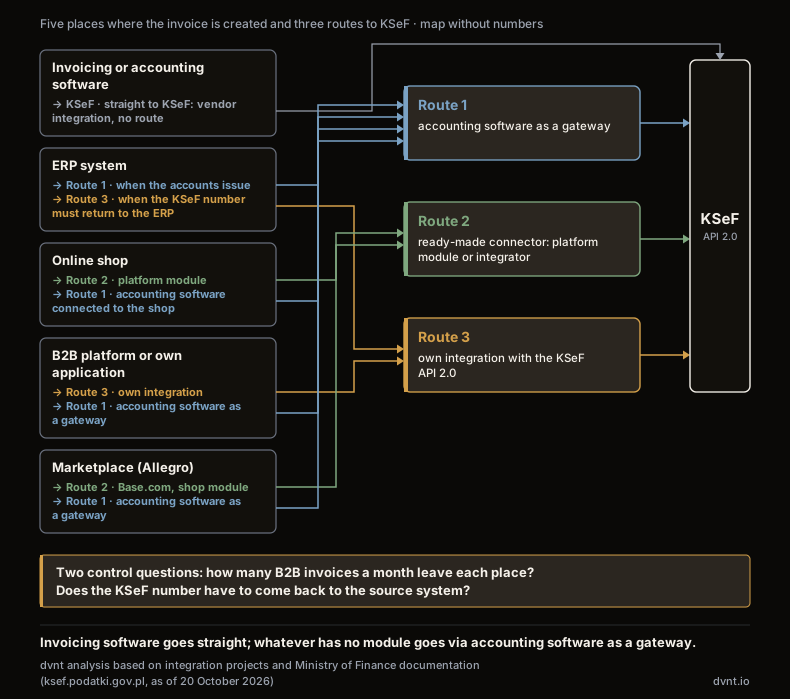
In the companies we work with, the invoice is created in one of five places:
- Invoicing or accounting software. Services, projects, a few dozen invoices a month. The KSeF integration comes from the software vendor; this is the case covered in the article on invoicing software and needs none of what we describe below.
- An ERP system. The invoice is the result of a process: order, goods issue, settlement. The KSeF number has to come back to the ERP, because that is where the document lives, and its absence stops the next steps. What an ERP is, and when a small business needs one, is covered in the article on ERP systems.
- An online shop. The invoice is generated automatically for the order, often with no human involved, hundreds of them a month; most recipients are consumers, a minority — companies with a NIP.
- A B2B platform or your own application. The customer places the order and downloads the invoice from the panel themselves. All recipients have a NIP, so every invoice is a KSeF invoice. How such a platform works is explained in the article on B2B platforms.
- A marketplace. The order comes from Allegro, the invoice is created in the system that handles it — in the shop, in Base.com or in the accounting software connected to the account.
Place 1 needs no route at all, places 3 and 5 most often get a ready-made connector, place 4 and part of place 2 end up with their own integration, and accounting software as a gateway connects everything that has no module of its own. Before you choose, count two things: how many B2B invoices a month leave each place, and whether, after submission, anyone needs the KSeF number back in the source system.
Route 1: accounting software as the gateway to KSeF
Accounting software with its own API can be the gateway to KSeF for any system that can create an invoice in it. Your shop, ERP or application does not talk to the Ministry; it creates the invoice in the accounting software through its API, and the software sends it on, receives the KSeF number and keeps the UPO. For you, the KSeF integration becomes an integration with the software you already have.
What the vendors declare (documentation read on 20 October 2026). wFirma, in its article on the KSeF integration, writes that invoices issued through the API and integrations — it names BaseLinker, Apilo and online shops — "are automatically sent to KSeF at the moment they are created in the wFirma.pl system", on two conditions: sending is switched on in the configuration, and the user of the API key has active authorisation in KSeF. Separate switches control B2B and B2C invoices, and the system can download purchase invoices "daily, during the night". A draft cannot be created through the API, so an invoice from an integration goes to KSeF straight away. inFakt, on its KSeF page, describes connection through the Trusted Profile (profil zaufany), sending with one click and automatic download of cost invoices from KSeF; it declares that using KSeF in inFakt is "completely free of charge". iFirma, in its description of the Shoper integration, promises automatic sending of invoices to KSeF and then to the buyer, and a check of the NIP in the GUS register (Statistics Poland) before issue; up to 100 orders a month in the Faktura+ plan at no extra charge.
This route is enough when B2B invoices number a few dozen, at most a few hundred a month, the source system has a ready connector to your accounting software or can call its API, and it is enough for the KSeF number to exist in the accounting software. It stops being enough when a customer in the panel of your B2B platform is supposed to see the invoice with a QR code and a KSeF number right after ordering, when the ERP blocks the process without the number, or when there are so many invoices that the accounting software's limits and delays become your problem. Two things to check before you decide: whether the accounting software's API returns the KSeF number and the sending status, and what happens to an invoice KSeF rejects — who knows about it and where it is visible.
Route 2: a ready-made connector — the platform module or an integrator
If the invoice is created in a shop on a subscription platform or in a multichannel system, the KSeF connector is most likely already there — and it is the connector that sets what you can and cannot do. Below are the vendors' declarations from their documentation (read 20 October 2026); a declaration is not the same as behaviour in your shop, so below the table is a list of things to check.
Shoper. According to the Shoper Invoices and Warehouse guide (22 January 2026, updated 28 January 2026), you switch the integration on in the module settings, authenticating with a token or a type 1 certificate with your own private key; for offline invoices a second certificate is needed, with the purpose "signing the issuer verification link". Sending can be automatic or manual, from the invoice itself. There is no import of purchase invoices — you enter expenses by hand with the KSeF number.
IdoSell. IdoSell help describes configuration per NIP with two certificates (authentication and link signing), each valid for 2 years. The integration works in offline mode: the date of issue is the date from the document (field P_1), not the date of transmission. Invoices from automations and those issued in bulk go in batches every 10 minutes, a single invoice issued by hand goes at once; there is no review stage before sending. Invoices to private individuals and OSS invoices are separate, optional switches; pro forma invoices, receipts and simplified invoices do not go at all. Documents issued during a KSeF outage are sent once it ends, and testing is allowed only on Demo, with anonymised data. If you issue invoices in an external system with its own integration, you configure nothing in IdoSell.
Base.com (formerly BaseLinker). The Base.com knowledge base describes a token generated separately for each environment, with the invoice-issuing permission only. Invoices can go immediately after creation or manually and in bulk, up to 12 months back. Two filters: "Send invoices without the buyer's NIP" (you can switch off sending consumer invoices) and a choice of the numbering series that go to KSeF. After acceptance the printout gets a QR code, the KSeF number, the date and the status; the system checks invoices in processing every 60 minutes and unlocks rejected ones for resending. It handles offline mode automatically, but needs a certificate with the issuer verification link signing option for that; it does not download purchase invoices. The integration page declares that the feature is included in the subscription at no extra charge.
WooCommerce. On wordpress.org the KSeF Add-on for Flexible Invoices is at version 2.5.3 (13 October 2026) with over 700 active installations; it requires the Flexible Invoices plugin at least 6.2.0, and automatic invoice generation — the PRO version. It authenticates with a token or, since version 2.5.0, a certificate; invoices that failed to go out because of network problems are retried every 8 hours. We implement WordPress and WooCommerce only at the client's request; if the shop already runs on them, this is its route.
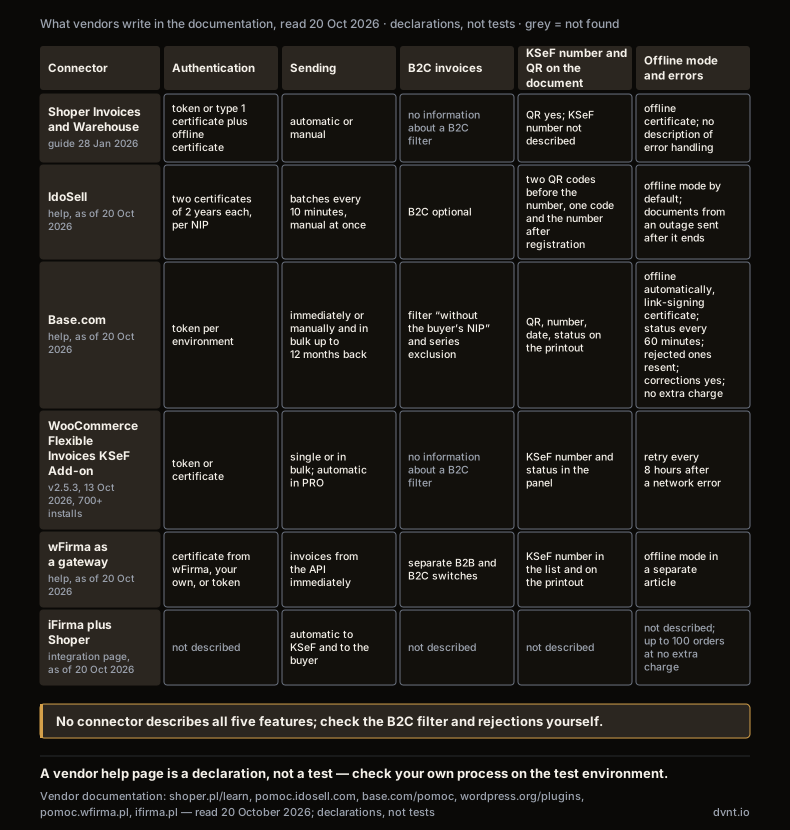
Four things to check in your own shop before you consider the subject closed. Whether invoices to consumers are switched off — if the module has no such filter, you are voluntarily sending everything to KSeF, and that has consequences for corrections and returns. Whether the QR code and the KSeF number land on the PDF the business customer receives, or only in the panel. What you see when KSeF rejects an invoice, and who will see it on a Saturday. And whether authentication in your connector relies on a token: Shoper and wFirma write in their guides that tokens will be supported only until the end of 2026, while the Ministry in its questions and answers (as of 8 October 2026) states that token authentication stays in KSeF 2.0 indefinitely and a generated token is valid until the user revokes it. Whichever version holds, plan the move to a certificate — you need one for offline invoices anyway.
Route 3: your own integration with the KSeF API — what has to be handled
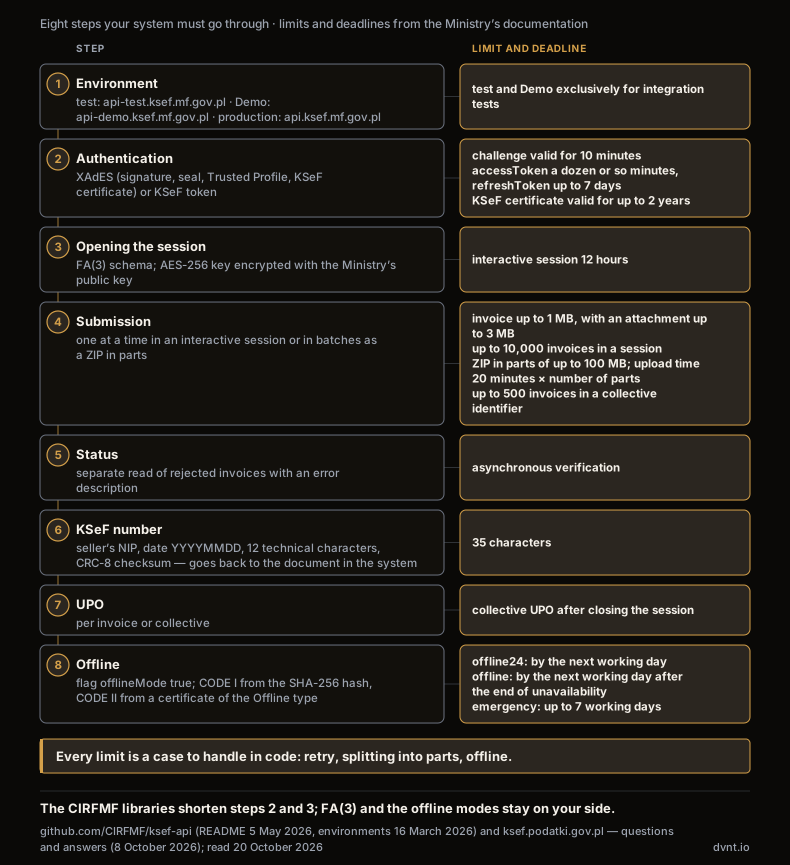
Your own integration with the KSeF API 2.0 makes sense when the invoice has to be created, and come back with a KSeF number, in your system, and no connector does that the way the process requires. The Ministry publishes the documentation for integrators in the CIRFMF/ksef-api repository (README of 5 May 2026) with examples in C# and Java and an OpenAPI specification. There is no code below, only a list of things your system must be able to do, in the order the API expects. If the concepts of an API and a token are new to you, start with the article API — what is it.
Environments. According to the description of environments (16 March 2026) there are three: test api-test.ksef.mf.gov.pl, pre-production Demo api-demo.ksef.mf.gov.pl and production api.ksef.mf.gov.pl. Test and Demo are "exclusively for testing integrations", and production invoices or real company data must not be sent there; only test accepts self-signed certificates, Demo matches the production configuration, and production has a guaranteed SLA. From the Ministry's timeline: the API 2.0 documentation was published on 30 June 2025, open tests started on 30 September 2025, Demo on 15 October 2025, and KSeF 2.0 has been in production since 1 February 2026.
Authentication. According to the description of authentication, the system first fetches a challenge (valid for 10 minutes) and then confirms its identity with one of two methods: an XAdES signature (a person's qualified signature, a company seal, the Trusted Profile or a KSeF certificate, which "is not a qualified certificate") or a KSeF token encrypted with the system's public key. In return it gets a pair: an accessToken with a short validity (the documentation gives "a dozen or so minutes" as an example; the exact expiry is in the exp field) and a refreshToken valid for up to 7 days. Your system must therefore be able to refresh the token and handle the "authentication in progress" state: on Demo and production the system waits for the certificate status to be confirmed by its issuer (OCSP/CRL), which according to the documentation is normal. A KSeF certificate, according to the Ministry, is valid for at most 2 years, and tokens from KSeF 1.0 do not work in 2.0.
Session and submission. You send the invoice in a session. An interactive session is: opening with a declaration of the FA(3) schema and a symmetric AES-256 key encrypted with the Ministry's public key (the documentation recommends a new key for every session), sending the encrypted invoice with two hashes, asynchronous verification, closing the session and a collective UPO. A session lives for 12 hours. A batch session is a ZIP package split into parts of up to 100 MB, uploaded to addresses indicated by the system; the time for the upload is 20 minutes times the number of parts. The documentation recommends it to companies "that generate many invoices a day". Default limits: an invoice up to 1 MB (3 MB with an attachment), 10,000 invoices in a session, 500 invoices in one collective identifier; on production the limits are raised only on a justified request.
Status, KSeF number, UPO. Submission does not end with an "OK" response. Your system polls the state of the session and of the individual invoices (a separate endpoint returns the rejected ones with an error description), and an accepted invoice receives a KSeF number. According to the description of the number it has 35 characters: the seller's NIP, the date of acceptance for processing, 12 technical characters and a two-character CRC-8 checksum. This number must come back to the document in your system, because according to the Ministry the invoice is deemed received at the moment the number is assigned, and a correcting invoice — as the offline modes documentation states — is sent only after the original document has been given its KSeF number. You download the UPO, according to the session documentation, per invoice or collectively after closing the session; the Ministry adds in its FAQ that archiving the UPO is not required, and that KSeF stores invoices for 10 years from the end of the year of issue. It is still worth saving them — they are the evidence in a dispute about the date.
Offline modes and QR codes. This is the part that is easiest to skip and most expensive to add later. According to the description of offline modes there are three: offline24 (your decision; submission by the next working day after the date of issue), offline (unavailability announced by the Ministry; by the next working day after it ends) and emergency mode (up to 7 working days after the failure ends), plus total failure, after which invoices are not sent to KSeF at all. You mark an offline invoice with the flag offlineMode: true, and its visualisation must carry two QR codes: according to the description of QR codes, CODE I leads to verification of the invoice by its SHA-256 hash, and CODE II signs the link with the private key of a KSeF certificate of the Offline type — "Generation requires an active KSeF certificate of the Offline type". An online invoice gets only CODE I with the KSeF number underneath. Your system must therefore: issue with its own P_1 date, generate both codes, watch deadlines that shift with each successive failure, and resend once the system is back.
One practical remark: offline deadlines are counted in working days, so monitoring and an alert about invoices without a KSeF number are part of the implementation, not an add-on. How we design such dependencies between systems is described in the article on process automation.
Invoices from a shop and a marketplace — consumer, company, Allegro
An online shop does not have to send invoices to consumers to KSeF; it has to send invoices to companies, and it tells the two apart by the buyer's NIP. Two Ministry sources: the page Konsumenci i osoby fizyczne (as of 30 October 2025) says that "issuing B2C invoices (to private individuals – consumers) in KSeF is voluntary", and the FAQ adds that entities identified on the invoice by a NIP have access to their purchase invoices in KSeF. In the order path the NIP field therefore stops being cosmetic: it decides whether the invoice goes to KSeF.
Three design decisions follow from this. First, NIP validation in the basket — a wrong NIP is a KSeF invoice issued to a non-existent entity, and the Ministry writes that the system will not tell the seller whether the counterparty has access to KSeF; hence the check in the GUS register before issue that iFirma advertises. Second, the moment of issue: a shop that generates the invoice at the order issues it, for KSeF, at the moment it is sent to the system, so cancelling the order after that moment is a correction, not a deletion — hence the document date in offline mode at IdoSell and the manual sending option instead of immediate at Base.com. Third, the invoice to a company must reach the customer with a QR code: according to the Ministry, an online invoice delivered outside KSeF, for example as a PDF, needs one code, and a foreign buyer without a Polish NIP will not log in to KSeF.
Allegro touches both sides of the same company. As a buyer from Allegro: an Allegro moderator in the KSeF FAQ (2 November 2025, updated 11 February 2026) writes that invoices for Allegro fees are "additionally" sent to KSeF and that sales to consumers "will still be invoiced the old way". As a seller: the notice in Allegro help tells business buyers that they will find invoices from sellers in KSeF and that "this change does not require any additional action on your Allegro account" — the invoices are issued by the seller, not by Allegro. For you this means: the invoice for an Allegro order is created in the system that handles your orders, and the buyer's NIP from the order data has to be there. Where to get it through the Allegro API, and how to account for the whole channel, is covered in the article on Allegro integration.
How much work and how to choose the route — our approach
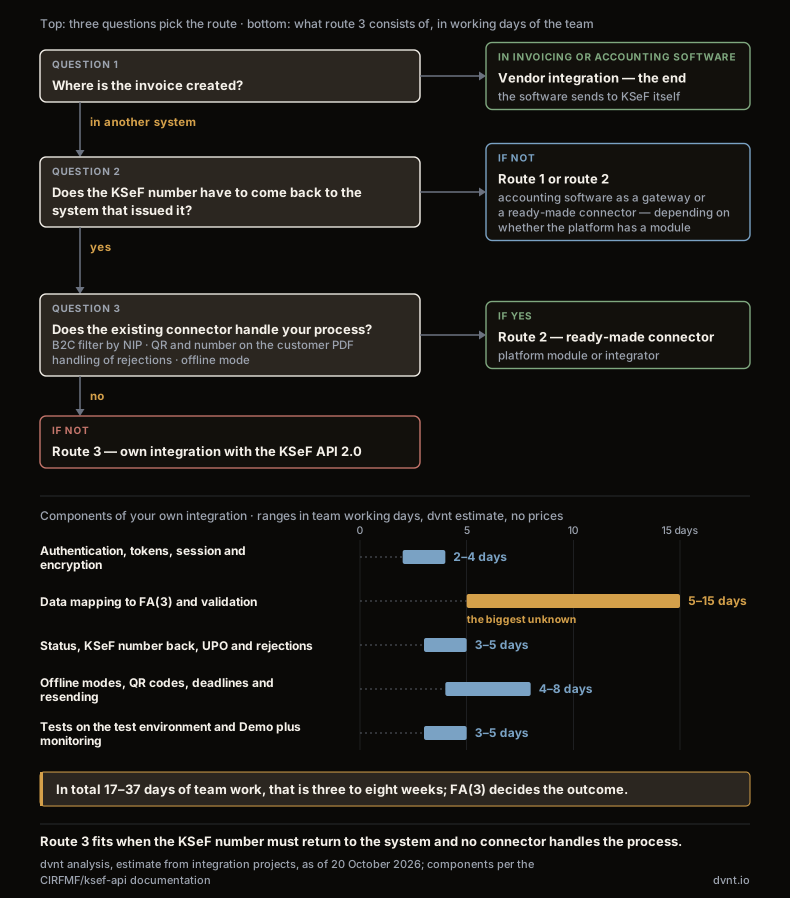
The decision on the route is three questions asked in this order: where the invoice is created, whether the KSeF number has to come back there, and whether the existing connector does it the way the process requires. If the number does not have to come back, route one or two is enough and there is no point building your own. Your own integration wins only when the invoice is part of a process in a system we have built or are building — a B2B platform, an application with its own invoicing, an ERP without a module — and when an intermediate connector would add a third system to the two that already have to agree.
This is how we count the work when someone asks us for their own integration — the components and indicative ranges in team working days; it is an estimate from integration projects, not a price list, and we quote every project individually. Authentication, token refresh, session and encryption: 2–4 days, because the scheme is documented and the Ministry's libraries give a reference point. Mapping the invoice data from your system to the FA(3) schema with validation: 5–15 days, and this is the biggest unknown — it depends on how many invoice variants you issue (advance, collective, corrections, OSS) and how clean the data is. Status, the KSeF number back, the UPO and handling of rejections: 3–5 days. Offline modes, two QR codes, watching deadlines and resending: 4–8 days. Tests on the test environment and Demo with data that is not real, plus monitoring after go-live: 3–5 days. In total: three to eight weeks for one team, half of which a ready-made connector gives you as part of a subscription. That is why we ask "whether to build" only after "does the number have to come back".
Where to start, whichever route. Count the B2B invoices from every place where they are created, for the last three months. Check on your own account what is in the table: issue a test invoice on Demo, look at the PDF, get it rejected deliberately with a wrong NIP and see who finds out. If after that test you know that the KSeF number has to come back to your system and the connector does not do it — that is the moment to talk about your own integration. We build them as part of custom software development: web applications, B2B platforms and shops in which invoicing is one of the processes, not a separate system; whether it is worth building at all instead of buying is examined in the article on custom software. Which software a company chooses function by function — in the guide to business applications.
Frequently asked questions about KSeF integration
What is the KSeF API?
It is the interface of the National e-Invoicing System (Krajowy System e-Faktur), through which a company's system (shop, ERP, application, accounting software) sends structured invoices in the FA(3) schema, receives the KSeF number and the UPO and downloads purchase invoices — without logging in to the Ministry's application. The current version is the KSeF API 2.0; the Ministry publishes the documentation with examples in C# and Java in the CIRFMF/ksef-api repository, and the production environment has been running since 1 February 2026.
Does an online shop have to issue invoices in KSeF?
Invoices to companies (a buyer with a NIP) — yes, on the general rules. Invoices to consumers — no: according to the Ministry of Finance, issuing B2C invoices in KSeF is voluntary. The shop therefore has to tell the two cases apart by the buyer's NIP in the order; the platform modules (Shoper, IdoSell, Base.com) have their own settings for whether to send invoices without a NIP.
What are the KSeF number and the UPO?
The KSeF number is a 35-character identifier assigned to an invoice accepted by the system: the seller's NIP, the date of acceptance, 12 technical characters and a checksum. From the moment it is assigned the invoice is deemed received by the buyer, and only then can a correcting invoice be issued for it. The UPO (urzędowe poświadczenie odbioru) is the official certificate of receipt, available for a single invoice or collectively for a session; the Ministry writes that archiving it is not required.
Does an invoice to a consumer go to KSeF?
Only if you decide so. The Ministry's page "Konsumenci i osoby fizyczne" says that both before 1 February 2026 and after that date issuing B2C invoices in KSeF is voluntary. If your connector has no filter by NIP, it may send everything — check that setting, because every invoice in KSeF means a correction in KSeF on a return.
What if KSeF is down — offline mode?
There are three modes: offline24 (your decision, submission by the next working day after issue), offline during announced unavailability (by the next working day after it ends) and emergency mode during an announced failure (up to 7 working days after it ends). An offline invoice gets the date from the document and two QR codes, the second of which requires a KSeF certificate of the Offline type; once the system is back, the invoice has to be sent within the deadline.
How much does a KSeF integration cost?
In invoicing software and in the platform modules (Base.com and inFakt declare it outright) the integration is included in the subscription at no extra charge. Your own integration with the API is, by our estimate, three to eight weeks of a team's work, and the cost depends on the number of invoice variants to map to FA(3), on whether the KSeF number has to come back to your system, and on the handling of offline modes. We quote every such project individually.
Related articles
Automation and integrations
Housing price transparency in Poland — what a developer must publish on the website and in the dane.gov.pl file
Housing price transparency in Poland: prices, change history, the dane.gov.pl file, UOKiK and fines. What developers must publish, without manual work.
Automation and integrations
Business process automation — examples and where to start
Business process automation: how it differs from RPA and AI, Polish data, KSeF e-invoicing, our hands-off funnel, examples by department and the first step.
CRM, ERP and business systems
Transport management system (TMS) — what it is and when a transport company needs one
Transport management system (TMS) in Poland: GPS vs ERP, driving time, tachograph, e-CMR and SENT, PLN price lists and when a custom driver app helps.
CRM, ERP and business systems
Warehouse management system (WMS) — what it is, what JPK_MAG(2) changes in 2027 and when you need one
Warehouse management system (WMS) in Poland — what it is, how it differs from stock software and ERP, what JPK_MAG(2) changes in 2027, phone or scanner, cost.
Artificial intelligence
Prompt engineering — what it is and how to write prompts at work
Prompt engineering at work: how to write prompts, templates for business processes, and when a Polish company needs RAG or an AI agent instead.
Artificial intelligence
Model Context Protocol (MCP) — what it is and what it means for a business
Model Context Protocol (MCP) connects AI assistants and agents to company systems. How an MCP server works, its risks, GDPR and when to build your own.