
CRM, ERP and business systems19 min read3740 wordsRedakcja dvnt
Warehouse management system (WMS) — what it is, what JPK_MAG(2) changes in 2027 and when you need one
Warehouse management system (WMS) in Poland — what it is, how it differs from stock software and ERP, what JPK_MAG(2) changes in 2027, phone or scanner, cost.
A warehouse management system (WMS) is software that runs the work inside a warehouse: it knows which shelf each item sits on and tells the picker what to receive, put away or collect next. It is not the same thing as stock-control software. Stock software records how much came in and went out, and on which document. From 1 January 2027 it is precisely that second layer from which the Polish tax office can demand the warehouse Standard Audit File JPK_MAG in its new version, with fields for KSeF numbers and with stock counts.
This text is for the owner or operations director of a business whose goods physically pass through a warehouse: a wholesaler, an online shop that ships its own orders, a manufacturer. In order: how a WMS differs from stock software and from an ERP, which program should issue the documents, what JPK_MAG(2) changes, when a simpler tool is enough, how to tell that it no longer is, what to scan codes with, what it all costs and when a custom warehouse app makes sense. Rules, Ministry of Finance documents and price lists are as of 29 October 2026.
What is a WMS — and how does it differ from stock software
The shortest answer to "what is a WMS": a WMS answers the questions "where" and "who", stock software answers "how many" and "on which document". Two layers of data describe the same goods, and you need to tell them apart before you start comparing offers.
The WMS layer — where the goods are and who should deal with them. A warehouse management system knows the address of every location (zone, rack, shelf, bin) and what stands on it. From that it builds tasks for warehouse staff: receive a delivery, put the goods away into free bins, pick an order in a sequence that shortens the walk across the floor, pack it, count a location during a stock count. People usually work in it on a scanner or a phone: the picker scans the shelf and the item, and the system confirms it is the right place and the right thing.
The documents layer — how much came in, how much went out and on what basis. Stock software, meaning a sales-and-inventory program (program handlowo-magazynowy) or the stock module of an ERP, keeps the documents of goods movements: PZ (goods received note, external) when goods arrive from outside, WZ (goods dispatched note) when they leave, RW (internal issue, for consumption) when you use them yourself, MM (inter-warehouse transfer) when they move between warehouses. Stock levels, stock valuation and the link to invoices come from these. This layer is what the accounting department looks at and what the tax office asks about.
In a small business both layers fit in one program, and a "location" is at most a field with a shelf description on the product card. In a larger one two programs work side by side: an ERP or sales-and-inventory program keeps the documents, and a WMS handles the work on the floor. That is why "inventory management system" and "warehouse management system" mean one thing in one conversation with a vendor and another thing in the next. Before you compare offers, ask directly whether the program has location addresses and tasks for warehouse staff, or only documents and stock levels. The first is a WMS, the second is stock software, whatever the vendor calls it. A cloud WMS changes where the software runs, not what it does.
WMS vs ERP — which program should own the stock documents
The most important decision in "WMS vs ERP" is taken before you buy: which program will own the stock documents. PZ and WZ documents, the link to the invoice and its KSeF number (from the National e-Invoicing System, KSeF), and the JPK_MAG file can be produced by the ERP, by a sales-and-inventory program or by the WMS. What matters is that they come from one of them.
This is our reading of the Ministry of Finance schema, not the ministry's position. In the Ministry's brochure on the structure of JPK_MAG(2), a stock document line has a product code (optional), a name, a quantity, a unit of measure, a price and a value. It has no fields for location, batch, expiry date or serial number. So the tax office asks about the documents layer — what came in, what went out and on which invoice — and not about the shelf the goods lay on. Some WMS products issue PZ and WZ themselves and generate JPK_MAG. Then the WMS is the owner of the documents and the ERP receives ready data from it. That is also a sound arrangement, provided it was chosen on purpose.
Trouble starts when both programs change the stock. The ERP takes goods off the stock when the invoice is issued, the WMS when the goods leave the shelf, and a week later nobody knows which number is true. Two programs that each consider themselves the source of truth about stock are in practice two sources of discrepancy. How to write down which system is responsible for what in the data exchange, we show in the text on integrating ERP, WMS and CRM with an online shop. Before buying, three questions to the WMS vendor are enough:
- Does your system issue PZ and WZ documents itself, or does it only pass completed tasks to the ERP, which issues them?
- Which program will generate the JPK_MAG(2) file, and will it have all the data to do so, including the KSeF number of the invoice?
- What happens after a stock count: where is the stock correction created and how does it reach the other program?
Ask for the answers in writing. They say more than a comparison of feature lists, because they decide whether in a year you will have one stock position or two.
JPK_MAG(2) from 1 January 2027 — what warehouse records must be able to do
JPK_MAG is a file with data on stock movements that you hand to the tax office on its request — not a report sent every month, like the monthly VAT audit file JPK_V7. The basis is Art. 193a(1) of the Tax Ordinance Act (Ordynacja podatkowa) (consolidated text, Journal of Laws (Dz.U.) 2026 item 622). In our translation, as there is no official English text of the Polish acts quoted here: "Where tax books are kept using computer programs, the tax authority may demand that all or part of those books and accounting evidence be handed over […] in electronic form corresponding to the logical structure." The logical structure is published by the Ministry of Finance. JPK files are Poland's version of the international SAF-T (Standard Audit File for Tax) model.
Who it applies to. The Ministry of Finance's information brochure on the structure of JPK_MAG(2) of October 2026 says: "All taxpayers who keep warehouse records in electronic form are obliged to submit the JPK_MAG(2) structure at the request of the tax authorities." The new version "will apply from 1 January 2027". Data for periods up to 31 December 2026 is submitted in version 1, for periods from 1 January 2027 in version 2.
What changes in version 2 (according to the Ministry's list of changes and the brochure):
- six document types instead of four: PW (internal receipt) joins PZ, WZ and RW, and the inter-warehouse transfer MM is split into MMWE (transfer in) and MMWY (transfer out);
- fields for the KSeF number of the invoice in PZ, WZ and RW documents — marked in the brochure as optional;
- a stock-count section (INW) for a physical stock count or verification; according to the Ministry this data is required "where the stock count was documented using computer programs";
- a "Method" element, that is, information on which of the four recording methods in Art. 17(2) of the Accounting Act (ustawa o rachunkowości) you use: quantity-and-value records, quantity records, value records, or expensing on the day of purchase;
- document control sums removed.
A separate file for each warehouse. "Where an entity keeps more than one warehouse, a separate JPK_MAG file must be prepared for each warehouse." A warehouse here means, according to the Ministry, an account in the subsidiary books, not a building: a warehouse of raw materials, goods and finished products under one roof is three files if they are kept separately in the records. The Ministry also requires the same naming of goods and warehouses in all files.
Deadline. When the authority demands the file, you have "no less than 3 days" to hand it over, and in justified cases you may apply for an extension. For an unjustified refusal a disciplinary fine (kara porządkowa) may be imposed.
File handed over at the tax office’s request · the version depends on the period of the data
| JPK_MAG(1) periods up to 31.12.2026 | JPK_MAG(2) periods from 1.01.2027 | |
|---|---|---|
| Documents | JPK_MAG(1) periods up to 31.12.2026PZ, WZ, RW, MM | JPK_MAG(2) periods from 1.01.2027PZ, PW, WZ, RW, MMWE, MMWY |
| KSeF invoice number | JPK_MAG(1) periods up to 31.12.2026none | JPK_MAG(2) periods from 1.01.2027fields in PZ, WZ and RW (optional) |
| Stock count | JPK_MAG(1) periods up to 31.12.2026none | JPK_MAG(2) periods from 1.01.2027INW section when the stock count was documented in a program |
| Recording method | JPK_MAG(1) periods up to 31.12.2026none | JPK_MAG(2) periods from 1.01.2027one of the four methods in Art. 17(2) of the Accounting Act |
| Control sums | JPK_MAG(1) periods up to 31.12.2026present | JPK_MAG(2) periods from 1.01.2027removed |
CONCLUSIONA separate file for each separate warehouse Handed over at the tax office’s request: no less than 3 days
What this means when choosing a program. This is our conclusion, not a Ministry requirement. Ask the vendor — of the WMS, the ERP or the sales-and-inventory program — in writing whether, and from which version, their program generates JPK_MAG(2), including the INW section and the KSeF numbers. If you are considering a custom warehouse app, design it so that the documents stay in the program that already generates JPK_MAG(2). KSeF numbers get into the records from invoices; from when KSeF applies to your company, we describe in the text on accounting software for a small business.
Inventory management software for a small business — when it is enough and when it is not
For a small business, a good inventory management system is in many cases enough and a WMS is not needed. Stock records can be pictured as four stages. Each solves a different problem and each stops being enough at a different moment. This is our typology, an order for decisions, not a definition from the Act.
Our typology · an order of decisions, not a standard
1 · Spreadsheet
- answers for
- the stock in a cell
- stops being enough when
- one person no longer remembers what lies where
2 · Sales-and-inventory program or the stock module of an ERP
- answers for
- how many goods there are and on which document
- stops being enough when
- the goods are in the system but nobody knows where they lie
3 · WMS
- answers for
- where the goods lie and who should receive or pick them now
- stops being enough when
- a standard WMS does not fit the process
4 · Custom layer
- answers for
- your unusual process, for example a mobile app on top of the ERP
- stops being enough when
- —
CONCLUSIONAt every stage: stock documents and JPK_MAG(2) are created in one program
Spreadsheet. Many businesses start with a table in Excel. A spreadsheet works while one person keeps the stock, there are few items and the number in the cell matches what is on the shelf. It stops working when several people write to the table at once, someone starts asking for receipt and issue documents, or the stock drifts away from reality and nobody knows when. Whether a spreadsheet is the kind of records JPK_MAG applies to is the question in the box above, for your accountant.
Sales-and-inventory program or the stock module of an ERP. PZ, WZ, RW and MM documents, stock levels, valuation and invoices. For many small wholesalers and shops this is a tool for years. We write more about it, and about when to move to a full system, in the text on ERP systems. Such an inventory management system stops being enough when the goods are "in the system" but nobody knows where they physically lie, and efficient order picking depends on one person's memory.
WMS. Locations, tasks, scanning, picking sequence. It stops being enough less often: when the process is so unusual that a ready-made system would have to be bent around every step.
Custom layer. An application built for one process, for example a mobile app for receiving goods or picking orders that works on top of an ERP through an API. It makes sense only when the earlier stages do not fit; we come back to it in the last part.
The same rule applies on every stage: stock documents and JPK_MAG(2) are created in one program, and the others only read from it or pass data to it.
When a business needs a warehouse management system — signals from the warehouse
A business needs a WMS when the problem is "where" and "who", not "how many". We give no numeric thresholds such as "from this many items" or "from this many pickers", because we know of no source that would justify them. Instead, situations you can recognise on an ordinary working day:
- The goods are "in the system" but nobody knows on which shelf. The stock is right and the picker is searching. Stock software will not fix that because it does not know locations. Only addressing racks and shelves helps.
- Several people pick at once and the sequence has to be decided. Who takes which order, in what order to walk the floor, what to do when an item is missing: if that is settled on a slip of paper or over the phone, tasks assigned by the system become useful.
- The same item lies in many places or in several warehouses. From 2027 transfers between warehouses are separate MMWE and MMWY documents in JPK_MAG(2), so keeping order in what lies where stops being only a convenience.
- Batches and expiry dates. In the food sector Article 18 of Regulation (EC) No 178/2002 says that operators "shall be able to identify any person from whom they have been supplied with a food" and "shall have in place systems and procedures to identify the other businesses to which their products have been supplied". The article does not require a WMS. But if you want that answer at the level of a specific batch, the records have to know batches — and the JPK_MAG schema does not provide for them, so they must be kept in a program that knows batches and locations.
- A customer demands logistics labels. The code on a product (GTIN) says what the item is. The code on a carton or a pallet (SSCC) says which logistic unit it is. If a customer asks for an SSCC, ask the vendor whether its system assigns these numbers and prints the labels.
- The stock count stops work. The Accounting Act (ustawa o rachunkowości; consolidated text, Dz.U. 2026 item 522, Art. 26(1)(1)) requires a physical stock count of inventories on the last day of the financial year. The count may start at the earliest 3 months before the end of the year and finish by the 15th day of the following year (Art. 26(3)(1)). The deadline is also treated as met where the stock count of "materials, goods, finished products and semi-finished products held in guarded storage areas and covered by quantity-and-value records — was carried out once in 2 years" (Art. 26(3)(2)). This exception needs two conditions at once: a guarded storage area and quantity-and-value records. If counting means a closed warehouse and a team with sheets of paper, a stock-count app that goes location by location with a scanner and compares the result with the book stock straight away is one of the typical functions of a WMS.
There is also a signal the other way. If the warehouse is not your advantage but a cost, before buying a WMS check whether it would be better to hand it to an outside company. We write about that in the text on fulfillment in e-commerce.
Barcode scanning in a warehouse — phone or handheld scanner
A handheld scanner (kolektor danych) is not the only way: barcodes can be scanned with a phone, but how well that works depends on whether the app runs in the browser or is installed. There are three routes.
1. A web app in the phone's browser. Browsers have a built-in interface for detecting codes, the Barcode Detection API. According to MDN compatibility data it works in Chrome on Android from version 83. Firefox does not have it. Safari, also on iPhone, has it from version 17, but only behind the "Shape Detection API" flag, which has to be switched on by hand. MDN marks the interface as experimental. Camera access itself (getUserMedia) works only on pages served over HTTPS and with the user's consent. The conclusion: on Android a barcode-scanning app in the browser can use the built-in interface; on iPhone you have to add a JavaScript library that decodes the camera image itself, or move to a native app.
2. A native app. On both systems scanning is a ready-made component. Google ML Kit works on Android and iOS, recognises among others EAN-13, EAN-8, Code 128, QR and Data Matrix, and according to the documentation works offline. On iPhone there is also the system scanner in the VisionKit library, available from iOS 16. You install the app from a store or through company distribution.
3. A dedicated scanner or handheld terminal. A device with a built-in reader and an app from the manufacturer or the WMS vendor. WMS vendors list handheld terminals next to phones: Sellasist describes its app as "Smartphone and handheld terminal app" (our translation of the Polish wording), and Comarch describes working on data terminals in Comarch WMS.
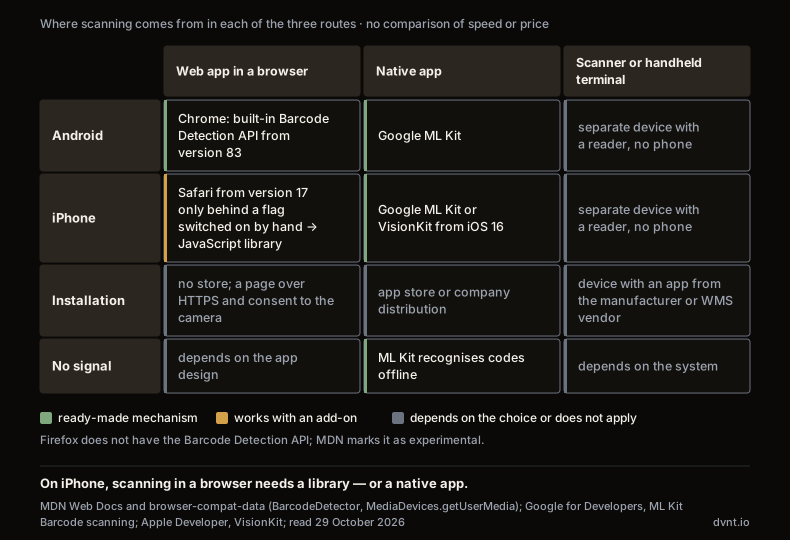
Working conditions decide, not the technology alone. This is our list of questions, with no thresholds: how many scans one person makes in a shift; whether they work in gloves, in a cold store or in dust; whether the device will be dropped on concrete; who pays for the phone and whether staff are to scan with a private one; whether the app must work where there is no signal or Wi-Fi. The more scanning and the harder the conditions, the stronger the case for a dedicated device. For occasional scanning a phone with a good app may be enough. Test it with your own goods and your own labels before you buy hardware for the whole team.
How much does a WMS cost — and what implementation looks like
The cost of a WMS depends first of all on the billing model, and the openly published price lists belong mostly to the warehouse modules of e-commerce platforms. Two examples of models, with no ranking, according to the price lists read on 29 October 2026:
- per user — Sellasist: the WMS modules are add-ons to the platform subscription. Mini WMS, that is, the picking and packing modes, costs PLN 50 net per user per month. The full Sellasist WMS, with location management ("virtual racks, locations"), costs from PLN 199 per user per month, and the manufacturer allows its implementation "only by our specialists or certified external implementers";
- per number of orders — Base: the Freemium plan costs PLN 0 for up to 100 orders a month (up to 1,000 products, 3 staff profiles) and covers what the manufacturer calls "ERP + WMS + PIM". The Business plan is a fixed fee of PLN 279 net a month plus PLN 0.99 per order, with an unlimited number of users. At 1,000 orders a month that gives PLN 1,269 net (PLN 279 + 1,000 × PLN 0.99 — our calculation, the same one the calculator on the price page makes).
Both are modules of platforms for running online sales, not full WMS systems for a large high-bay warehouse. The latter rarely have a public price list — on the Comarch WMS product page there is no price. So the honest answer to "what does a WMS cost" is that the subscription is only part of the bill. On top come costs that price lists do not show (our list, with no amounts):
- hardware — phones or handheld terminals, label printers;
- marking the warehouse — location labels on racks and shelves;
- the implementer — configuring processes, permissions and the integration with the ERP;
- order in the product master data — one code and one unit of measure for every item, uniform names (the Ministry of Finance requires the same naming in all JPK_MAG files anyway);
- the team's time — learning a new way of working while the warehouse still has to ship.
WMS implementation is best run in an order in which each step prepares the next. This is our proposed order, not a standard:
- Product master data and codes. Every item has one code and one unit of measure, the same in the ERP and in the WMS.
- Addressing. Mark the locations (zone, rack, shelf) and stick the labels on before anyone starts scanning.
- Owner of the documents. Write down which program issues PZ and WZ and generates JPK_MAG(2), using the questions from the second part of this text.
- A test on one process. Start, for example, with receiving deliveries and only then move on to picking.
- Opening stock count. Count the goods location by location so that the system starts with a stock that matches the shelf.
We give no typical implementation time and no return on investment. The figures available come from vendors' own materials and their case studies, not from independent research.
A custom warehouse app — when it makes sense
A custom warehouse app does not make sense as a replacement for a WMS in a standard warehouse. Ready-made modules cost from a few dozen zlotys per user per month (plus the platform subscription), and building a WMS from scratch means paying to solve problems that vendors have already solved and maintain.
A custom app makes sense as a layer, not as the whole system:
- when the process is unusual, for example the warehouse is tied to production or service and a ready-made WMS does not foresee your steps;
- when you need to connect several programs that do not talk to each other;
- when a simple mobile app is enough for receiving, order picking or stock counts, working on top of an ERP that has an API, without buying a whole WMS.
There is one condition: the stock documents and JPK_MAG(2) stay in the program that already generates them. The app creates tasks and collects scans, and the documents are issued by the ERP or the sales-and-inventory program. How to weigh ready-made against custom software at all, with total cost, vendor dependence and maintenance, we describe in the text on custom or off-the-shelf software. Before you order a full app, you can check the flow of the process on a prototype in a low-code tool.
How we approach it. We neither sell nor implement WMS systems. We build web apps and mobile apps for businesses, native for iOS and Android or in React Native, and the integrations between programs. That is why, when a warehouse process is standard, we advise against building a WMS from scratch and recommend choosing a ready-made system. When it is unusual, we build a layer on top of the program that stays the owner of the documents.
Where to start
- Establish which program owns the stock documents today and whether it will generate JPK_MAG(2) for periods from 1 January 2027.
- Write down the three situations in the warehouse that cost you the most time or errors, and compare them with the signals described above.
- Talk to a WMS vendor or an app contractor with that list. A list of problems is a better starting point than a list of features, because it shows at once whether you need a WMS, a ready-made module or only order in the program you already have.
Frequently asked questions about warehouse management systems
What is a warehouse management system (WMS)?
A warehouse management system (WMS) is software that manages the work in a warehouse. It knows the location of the goods — rack, shelf, bin — and gives warehouse staff tasks: receiving, putaway, picking, packing and stock counts. It answers the questions "where" and "who". Stock software answers "how many" and "on which document".
What is the difference between WMS and ERP?
An ERP, or its stock module, keeps the documents of goods movements (PZ, WZ, RW, MM), stock levels, valuation and invoices. A WMS keeps locations and the work on the floor. Before buying, decide which of them will own the stock documents and generate JPK_MAG — two programs that both change the stock are two sources of discrepancy.
Does JPK_MAG apply to my business?
According to the Ministry of Finance brochure of October 2026, JPK_MAG(2) is submitted at the tax office's request by all taxpayers who keep warehouse records in electronic form. It is a file on request, not a monthly report. Data for periods from 1 January 2027 is submitted in version 2. Whether your records — a spreadsheet included — qualify is for your accountant to decide.
Can I scan barcodes with a phone instead of buying a warehouse scanner?
Yes, but it depends how. In a browser the built-in code detection works in Chrome on Android, and in Safari on iPhone only behind a flag switched on by hand, so there you need a JavaScript library or a native app. A native app has ready-made components on both systems (Google ML Kit, and on iPhone also VisionKit). For heavy scanning in hard conditions, check a handheld terminal.
How often does stock have to be counted?
Businesses that keep full accounting books count their stock on the last day of the financial year (Art. 26(1)(1) of the Accounting Act). Once in 2 years is enough for stock in guarded storage areas covered by quantity-and-value records — both conditions must be met at once. Under the tax revenue-and-expense ledger (KPiR) other rules apply; settle them with your accountant.
How much does a WMS cost?
The WMS modules of e-commerce platforms have public price lists: Sellasist bills per user, as an add-on to the subscription (Mini WMS PLN 50 net a month per user, the full WMS from PLN 199), Base per order (Business: PLN 279 net plus PLN 0.99 per order; read 29 October 2026). Full WMS systems rarely publish prices. On top of the subscription add hardware, labels, an implementer, order in the product master data and your team's time.
Related articles
CRM, ERP and business systems
ERP system — what it is, when a small business needs one and what it really costs
What an ERP system is, how many Polish firms use one, when a small business needs it, what it costs beyond the price list and where it goes wrong.
CRM, ERP and business systems
KSeF integration — the KSeF API for a company with its own system: three routes and how to choose
KSeF API for a company with its own system: accounting software as a gateway, a ready-made connector or your own integration. What to handle and how to choose.
Automation and integrations
Housing price transparency in Poland — what a developer must publish on the website and in the dane.gov.pl file
Housing price transparency in Poland: prices, change history, the dane.gov.pl file, UOKiK and fines. What developers must publish, without manual work.
Artificial intelligence
ChatGPT Business, Copilot or Gemini for business — plans, prices and data
ChatGPT Business, Copilot or Gemini for a Polish company: what a business plan changes, price per user in PLN, the GDPR processing agreement and your suite.
CRM, ERP and business systems
Transport management system (TMS) — what it is and when a transport company needs one
Transport management system (TMS) in Poland: GPS vs ERP, driving time, tachograph, e-CMR and SENT, PLN price lists and when a custom driver app helps.
SaaS and your own product
SaaS application — how to build your own product from MVP to recurring payments
A SaaS application from MVP to subscription: the five building blocks, recurring payments in Poland, the legal minimum, costs and the DVN Links example.
Warehouse, ERP and an app — want to put them in order?
We will help establish which program should own the stock documents and whether you need a WMS, a ready-made module or a mobile app on top of what you already have. We do not sell WMS, so we will tell you plainly if the program that works for you today is enough.