
Artificial intelligence28 min read5546 wordsRedakcja dvnt
How to build an AI agent for your business — from process to first working version
How to build an AI agent for your company step by step: process, tools and permissions, human in the loop, cost limits, evaluation and prompt injection.
How do you build an AI agent for your business? Start with the process, not the tool: describe one task and how you will know it has been done, give the model a few narrow tools with minimal permissions, set up human approval and a cap on steps and budget, and test the agent on a set of real tasks before it goes live. Add more autonomy only when the logs show the agent copes with what it already has.
That is what the model vendors themselves advise. In "Building effective agents" (19 December 2024) Anthropic, the maker of the Claude models, writes: "we recommend finding the simplest solution possible, and only increasing complexity when needed. This might mean not building agentic systems at all." In "A practical guide to building agents" (2025) OpenAI writes: "While it’s tempting to immediately build a fully autonomous agent with complex architecture, customers typically achieve greater success with an incremental approach." These companies sell models, yet they advise caution rather than ambition.
We assume you already know what an agent is and that your process needs one; if not, start with our article on AI agents in business. Here you will find a seven-step method, protection against prompt injection, four routes to a first version, and what we have designed for the AI chat on our own website. There is no code and no tool ranking. The documentation is as of 3 October 2026; the default limits, the token figure and the shutdown dates were re-checked on 19 October 2026.
Before you start: an agent, a workflow or a single model call
An agent is the most autonomous of three levels, and so the most expensive and least predictable; before you build one, check whether one of the two lower levels will do. Anthropic says plainly: "The autonomous nature of agents means higher costs, and the potential for compounding errors." According to Anthropic, the basic building block of agentic systems is "an LLM enhanced with augmentations such as retrieval, tools, and memory" (the augmented LLM).
At the bottom is a single, well-prepared call to such a model. In the middle are workflows: a developer sets the order of the steps and the model carries out each step. Anthropic describes five common workflow patterns, from prompt chaining to the evaluator-optimizer, in which one model call generates a response while another evaluates it and gives feedback. At the top is an agent, which decides its next steps itself.
The "can you write the rule down?" test and OpenAI's three criteria that separate a process for an agent from a process for automation are covered in our article on AI agents. If the process can be written as a closed list of "if… then…" rules, you are building a workflow, not an agent; that is the kind of work we do in business process automation. From here on we assume the rules cannot be closed off and that a person still resolves the exceptions today.
How to build an AI agent: seven steps from process to first version
Building an AI agent step by step means seven decisions, each of which leaves a concrete document or setting — and all of them are made before launch.
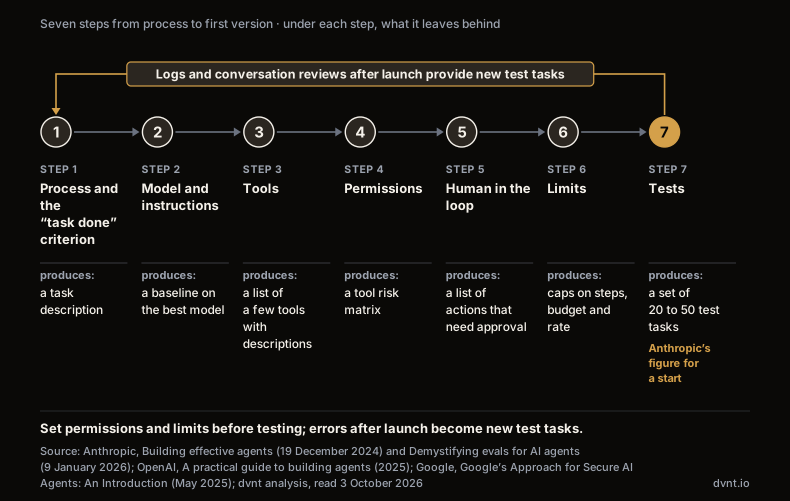
You set permissions, approvals and limits before testing, because the tests should check the agent in the form in which it will reach people, not a version without brakes. Every error spotted after launch becomes a new test task. Steps 4–7 apply the three principles on which Google, in "Google’s Approach for Secure AI Agents: An Introduction" (May 2025), bases agent security: "Agents must have well-defined human controllers", "Agent powers must have limitations", and "Agent actions and planning must be observable".
Step 1: one process and a “task done” criterion
Your first agent handles one process, and its specification begins with a sentence saying how you will know the task has been done. OpenAI advises building the agent's instructions from documents the company already has: "use existing operating procedures, support scripts, or policy documents to create LLM-friendly routines." It also advises capturing edge cases from the start, such as "how to proceed when a user provides incomplete information or asks an unexpected question."
The criterion must be specific and measurable. In "Define success criteria and build evaluations" (read 3 October 2026) Anthropic writes: "Building a successful LLM-based application starts with clearly defining your success criteria and then designing evaluations to measure performance against them." If you cannot write a test, you do not know what you are building.
The most common mistake is a criterion based on what the agent says. "The agent confirmed the booking to the customer" is not a criterion. "The booking exists in the calendar" is.
What should be in the agent's specification before the first line of code is written (our list, based on these sources):
- task and input — which process, who or what triggers it, what data the agent receives;
- when the task is done — a state in a system, not the model's statement;
- what the agent does not do — topics and actions out of scope;
- what a person approves — the list of actions before which the agent stops;
- limits — the maximum number of steps per task and the budget;
- who reads the logs, and how often.
The first version should be small: one process, a few tools, a limited group of users. How to plan that kind of scope is covered in our article on what an MVP is.
Step 2: model and instructions — the best first, cheaper later
Build the prototype on the most capable model available, and swap in a cheaper one only where tests show it is good enough. OpenAI's guide puts it this way: "build your agent prototype with the most capable model for every task to establish a performance baseline. From there, try swapping in smaller models to see if they still achieve acceptable results." You optimise for cost and latency only once you know what accuracy you have to maintain.
OpenAI's second rule: "Our general recommendation is to maximize a single agent’s capabilities first. More agents can provide intuitive separation of concepts, but can introduce additional complexity and overhead, so often a single agent with tools is sufficient." OpenAI suggests considering a split only when the instructions accumulate too many conditional statements or the tools start to overlap.
In the design of the AI chat for our own website, the conversation is to be handled by Claude Sonnet 5.5 and a fixed qualification form filled in by the cheaper Claude Haiku 4.5, because extracting data into a rigid schema is a task where the cheaper model is enough. That is a design decision recorded in the chat specification of 29 September 2026; the chat is not live yet, so we have no results to confirm it. How to choose a model and what tokens are is explained in our article on large language models (LLMs).
Step 3: tools — fewer, narrower and well described
A tool is a function the model can call, but your code executes it — and your code decides what actually happens. According to Anthropic's tool use documentation (read 3 October 2026), "Claude determines when to call a tool based on the user's request and the tool's description. It then returns a structured call that your application executes". In practice a tool is usually the API of one of your systems — for retrieving data, for example from a CRM, or for actions such as sending an email or updating a record.
There should be fewer tools than intuition suggests. In "Writing effective tools for agents — with agents" (11 September 2025) Anthropic writes: "More tools don’t always lead to better outcomes. A common error we’ve observed is tools that merely wrap existing software functionality or API endpoints". It recommends "building a few thoughtful tools targeting specific high-impact workflows" — for example a tool that searches an address book (search_contacts) rather than one that returns the whole list of contacts (list_contacts). "Too many tools or overlapping tools can also distract agents from pursuing efficient strategies."
A tool's description is part of the prompt. Anthropic says: "Tool definitions and specifications should be given just as much prompt engineering attention as your overall prompts", and advises designing tools so that mistakes are hard to make ("Poka-yoke your tools"). Building its own agent, Anthropic "actually spent more time optimizing our tools than the overall prompt", and once a tool was changed to always require absolute file paths, the model "used this method flawlessly".
Tools cost something at every step. Tool names, descriptions and schemas go out with every request as tokens, and the Claude API pricing page (re-checked 19 October 2026) shows that simply enabling tools adds a 286-token system prompt in Claude Sonnet 5.5. We worked out what one agent step costs, in US dollars and in złoty at the NBP exchange rate, in our article on AI agents.
The agent usually gets the company's knowledge as yet another tool — searching documents, which we describe in our article on RAG. Tools can also be connected through MCP (Model Context Protocol), a standard for connecting tools to models, which has its own article.
Step 4: permissions — the agent can do what the system allows, not what the prompt says
An instruction saying "do not send emails" is not a safeguard; a tool that cannot send emails is. The OWASP GenAI Security Project, part of the application security community, calls this risk LLM06:2025 Excessive Agency (updated 5 May 2025): "the vulnerability that enables damaging actions to be performed in response to unexpected, ambiguous or manipulated outputs from an LLM, regardless of what is causing the LLM to malfunction" — a hallucination or an injected instruction. According to OWASP, "The root cause of Excessive Agency is typically one or more of: excessive functionality; excessive permissions; excessive autonomy."
OWASP's example: an assistant is meant to summarise emails, but its mailbox plugin can also send messages, so a maliciously crafted incoming email tricks the model into using it to send data out. There would be no damage if the plugin could only read, if the mailbox access had a read-only scope, or if the user had to click "send" themselves.
OpenAI advises assessing the risk of each tool "by assigning a rating—low, medium, or high—based on factors like read-only vs. write access, reversibility, required account permissions, and financial impact." The rating should trigger automated actions, "such as pausing for guardrail checks before executing high-risk functions or escalating to a human if needed."
Example tools · criteria from the OpenAI method · level and control assigned by us
| Tool (example) | Read or write | Reversible | Financial impact | Risk level | Control |
|---|---|---|---|---|---|
| Knowledge base search | Read or writeread | Reversiblenot applicable | Financial impactnone | Risk levellow | Controlautomatic |
| Order lookup | Read or writeread | Reversiblenot applicable | Financial impactnone | Risk levellow | Controlautomatic |
| Free calendar slots | Read or writeread | Reversiblenot applicable | Financial impactnone | Risk levellow | Controlautomatic |
| Draft reply to a customer | Read or writedraft write | Reversiblereversible | Financial impactnone | Risk levellow | Controlautomatic |
| CRM note | Read or writewrite | Reversiblereversible | Financial impactnone | Risk levelmedium | Controlautomatic with a log and a cap |
| Email to a customer | Read or writewrite | Reversibleirreversible | Financial impactno direct impact | Risk levelhigh | Controla person approves |
| Cancel an order | Read or writewrite | Reversibleirreversible | Financial impactyes | Risk levelhigh | Controla person approves |
| Refund | Read or writewrite | Reversibleirreversible | Financial impactyes | Risk levelhigh | Controla person approves |
| Payment | Read or writewrite | Reversibleirreversible | Financial impactyes | Risk levelhigh | Controla person approves |
CONCLUSIONThe assignment of levels is a dvnt illustration, not a vendor recommendation.
The key rule of this step: permissions are enforced by the target system, not by the model. OWASP calls this complete mediation: "Implement authorization in downstream systems rather than relying on an LLM to decide if an action is allowed or not." Google's ADK safety documentation (Agent Development Kit, read 3 October 2026) gives an example: "by giving read-only permissions to a resource, no matter what the model decides, the tool will be prohibited from performing write actions." In its paper on secure agents Google adds that "agents must be prevented from escalating their own privileges beyond explicitly pre-authorized scopes. Users must also retain the ability to inspect and revoke any authority delegated to an agent."
The second decision: whose account the agent works under. According to the ADK documentation, on its own account all of the agent's actions "will appear as coming from the agent", so the logs must attribute them to individual users; on the user's account the agent will "only perform actions that the user could have performed themselves", but such scopes are often broader than the agent needs. In both cases, keep API keys out of the agent's reach: Anthropic's secure deployment guide (read 3 October 2026) suggests that "you could run a proxy outside the agent’s environment that injects the key into requests. The agent can make API calls, but it never sees the credential itself."
We cover access control in a company in our articles on company data security and cloud security.
Step 5: human in the loop — what a person approves and what they only see
Human in the loop is the list of actions before which the agent stops and waits for a person's decision; everything else the person only sees in the logs. In its first principle of secure agents Google writes: "For actions deemed critical or irreversible—such as deleting large amounts of data, authorizing significant financial transactions, or changing security settings—the system should require explicit human confirmation before proceeding, ensuring the user remains in the loop." The system must also "reliably distinguish instructions originating from an authorized controlling user versus any other input, especially potentially untrusted data processed by the agent."
OpenAI names "Two primary triggers" for human intervention: exceeding failure thresholds (for example, the agent "fails to understand customer intent after multiple attempts") and high-risk actions, examples of which we quote in our article on AI agents. Anthropic adds that agents "can then pause for human feedback at checkpoints or when encountering blockers."
Approval is built into the main agent-building tools, but you usually have to set it up deliberately (documentation as of 3 October 2026):
- OpenAI Agents SDK (human-in-the-loop): for each tool you set
needs_approval— "to True to always require approval or provide an async function that decides per call." For the local shell and file-editing tools approval is opt-in:needs_approvaldefaults to False. - Claude Agent SDK (permissions): permission modes and allow / deny rules. "If a deny rule matches, the tool is blocked, even in bypassPermissions mode", and a tool removed from the agent disappears from the request: "Claude does not see the tool and cannot attempt it."
- Google ADK has action confirmations before a tool is called.
- n8n lets you require human approval before an AI Agent executes a specific tool, and points to it for "tools with higher risk, such as sending messages, modifying records, or deleting data."
In the design of our chat, the rule "the tool's result counts, not the model's word" applies to bookings: the bot shows only slots returned by the calendar tool and books exactly a slot from that list. If someone takes the slot in the meantime, the bot fetches the slots again and offers new ones, instead of retrying the booking or claiming it succeeded. That is a design, not a result — the chat is not live yet.
An agent that deals with people must identify itself. In its guidelines on Article 50 of the AI Act of 20 July 2026 the European Commission writes in point (31) that "AI agents are covered by Article 50(1) AI Act if they are capable of interacting with the persons instructing them or with other natural persons in the execution of the tasks (e.g. making bookings, managing correspondence, negotiating or concluding contracts, executing purchases, etc). AI agents must be designed and developed in such a way that they disclose both their artificial nature and the person on whose behalf they are acting". They should also disclose themselves to the persons instructing them "at key steps", for example at the point of authorisation, reporting or validation. In point (36) one of the examples is "an email generated by an AI agent sent to a natural person that features an AI label at the top". The guidelines are not binding; who carries the obligation and from when is explained in our article on the EU AI Act for business. Here we treat it as a design requirement, not legal advice.
Step 6: limits — steps, budget, rate
The cap on steps and budget is set by whoever builds the agent, because the defaults of popular toolkits differ fundamentally. In the OpenAI Agents SDK, a software development kit (SDK) for building agents, the source code sets DEFAULT_MAX_TURNS = 10 (run_config.py in OpenAI's repository, re-checked 19 October 2026). A turn is "one AI invocation (including any tool calls that might occur)"; when the limit is exceeded, the SDK raises a MaxTurnsExceeded exception, and you can "Pass max_turns=None to disable this turn limit" ("Running agents").
The Claude Agent SDK works the other way round. According to the agent loop documentation (re-checked 19 October 2026), both the maximum number of tool-use round trips (max_turns) and the maximum budget (max_budget_usd) default to "No limit". "Without limits, the loop runs until Claude finishes on its own, which is fine for well-scoped tasks but can run long on open-ended prompts (“improve this codebase”). Setting a budget is a good default for production agents." Defaults can change with the next SDK release, so write the numbers into the specification and into your contract with the developer.
A budget inside the agent is an estimate: according to the cost tracking documentation, "The total_cost_usd and costUSD fields are client-side estimates, not authoritative billing data." The vendor's invoice is what counts, so treat the limit in the agent as a brake, not as billing.
Also design what happens once a limit is exceeded. The OpenAI Agents SDK lets you return "a controlled final output instead of ending the run" when the turn limit is hit, the model refuses or the final output is invalid. In the design of our chat, an exceeded budget outside working hours ends with a single message written in advance, without the model. Behaviour after a limit is hit must not depend on the model whose limit has just run out.
The third limit is rate. In its risk description LLM10:2025 Unbounded Consumption (updated 28 April 2025) OWASP describes the "Denial of Wallet" attack: "By initiating a high volume of operations, attackers exploit the cost-per-use model of cloud-based AI services". OWASP recommends that you "Apply rate limiting and user quotas to restrict the number of requests a single source entity can make in a given time period"; our design has limits per company, IP address and session, plus a separate limit per conversation.
Check the order of your guardrails too, that is, the automated checks on input and output. In the OpenAI Agents SDK input guardrails run in parallel with the agent by default, so "if the guardrail's tripwire is triggered, the agent may have already consumed tokens and executed tools before being cancelled"; in blocking mode "the agent never executes", which the documentation calls "ideal for cost optimization and when you want to avoid potential side effects from tool calls."
Step 7: testing before deployment — AI agent evaluation on real tasks
An evaluation (eval) is a set of test tasks with a clear success criterion, run before launch and after every change; a few dozen tasks taken from real failures are enough to start. In "Demystifying evals for AI agents" (9 January 2026) Anthropic writes: "In reality, 20-50 simple tasks drawn from real failures is a great start." That is advice for the early stage, not a statistical threshold. Take the tasks from what you check by hand today, and if the process is already running, "look at your bug tracker and support queue."
The outcome counts, not the statement. Anthropic defines it like this: "The outcome is the final state in the environment at the end of the trial. A flight-booking agent might say “Your flight has been booked” at the end of the transcript, but the outcome is whether a reservation exists in the environment’s SQL database." The test checks the database, not the sentence.
"Test both the cases where a behavior should occur and where it shouldn't." Graders can be rules written in code, a second model or a person, and "LLM-as-judge graders should be closely calibrated with human experts". Anthropic's example for an agent that talks to customers combines all three: "is the ticket resolved (state check), did it finish in <10 turns (transcript constraint), and was the tone appropriate (LLM rubric)?"
One trial is not enough. Anthropic gives the arithmetic: "If your agent has a 75% per-trial success rate and you run 3 trials, the probability of passing all three is (0.75)³ ≈ 42%. This metric especially matters for customer-facing agents where users expect reliable behavior every time." It is a worked example, not a measurement, but the conclusion is practical: an agent for customers who expect predictable behaviour every time is tested repeatedly on the same task.
Judge the path, not only the answer. Google's ADK evaluation documentation (read 3 October 2026) says: "Due to the probabilistic nature of models, deterministic "pass/fail" assertions are often unsuitable for evaluating agent performance. Instead, we need qualitative evaluations of both the final output and the agent's trajectory - the sequence of steps taken to reach the solution." Anthropic recommends also collecting "the total runtime of individual tool calls and tasks, the total number of tool calls, the total token consumption, and tool errors", basing tasks on realistic data, and running tests in sandboxed environments.
A finished set gives you a baseline — "latency, token usage, cost per task, and error rates" — and regression tests, which according to Anthropic "should have a nearly 100% pass rate". Run them before every change of model, prompt or tool.
In the design of our chat the acceptance criteria are written down before launch, for example: an out-of-scope question is declined, a repeated system notification (webhook) does not create duplicate data, a model refusal switches the conversation to the second provider, and the bot never offers a slot that is not on the calendar list. The tests have not been passed yet, because the chat is not live.
After launch: logs and conversation reviews
An agent without logs is an agent whose actions cannot be explained; you design the logs together with the agent, not after the first incident. In its third principle of secure agents Google lists what to record: "inputs received, tools invoked, parameters passed, outputs generated, and ideally, intermediate reasoning steps." The logs themselves need protecting: "This logging must be done securely, protecting sensitive data within the logs themselves."
The OpenAI Agents SDK has built-in tracing, and "Tracing is enabled by default": it records "LLM generations, tool calls, handoffs, guardrails, and even custom events". Traces may contain sensitive data and capturing it can be switched off, and "Tracing is unavailable for organizations that use OpenAI's APIs under a Zero Data Retention (ZDR) policy." Logs of customer conversations are personal data, so data minimisation applies; what this means for an agent under the GDPR (in Polish, RODO) is covered in our article on AI agents.
Automated tests are not enough: according to Anthropic, "A complete picture includes production monitoring, user feedback, A/B testing, manual transcript review, and systematic human evaluation." "Like the Swiss Cheese Model from safety engineering, no single evaluation layer catches every issue." And it advises plainly: read the transcripts, because "You won't know if your graders are working well unless you read the transcripts".
This is how we are designing the monitoring of our chat: a weekly review of every conversation — where the bot made something up, where it found no answer, and whether its qualification of the visitor matches a person's judgement. Corrections go into the configuration, not the code, and acceptance is a written list of what works and what does not; with a few conversations a month, that is a qualitative assessment, not statistics. Where hallucinations come from and how to catch them is covered in our article on AI hallucinations.
Prompt injection: why you cannot switch it off and what limits the damage
Prompt injection is when text from outside — an email, a web page, a document, a customer's message — tries to take control of the agent; there is no setting that turns it off, only layers that limit the damage. OpenAI's guide "Safety in building agents" (read 3 October 2026) describes it thus: "A prompt injection happens when untrusted text or data enters an AI system, and malicious contents in that text or data attempt to override instructions to the AI." The goals "can include exfiltrating private data via downstream tool calls". OWASP's risk description LLM01:2025 Prompt Injection (updated 17 April 2025) singles out the indirect form: "Indirect prompt injections occur when an LLM accepts input from external sources, such as websites or files." Anthropic describes an agent that, while drafting replies to emails, meets "hidden instructions embedded in white text" telling it to forward confidential emails to an outside address.
Why can it not simply be blocked? OWASP writes: "Given the stochastic influence at the heart of the way models work, it is unclear if there are fool-proof methods of prevention for prompt injection." In "Mitigating the risk of prompt injections in browser use" (24 November 2025) Anthropic admits that "prompt injection is far from a solved problem", and that "A 1% attack success rate—while a significant improvement—still represents meaningful risk." That is the result of one vendor's test of a browser agent on its own model, not a measure for your agent. OpenAI adds that "even with these mitigations, agents won’t be perfect and can still make mistakes or be tricked", so "use caution in what access you give agents".
What works is a set of layers that together reduce the impact of an attack:
- Minimal permissions and approvals from steps 4 and 5 — OWASP lists both among its mitigations for prompt injection. An agent without a sending tool cannot send data out, even if it is fooled.
- Outside content as data, not instructions. OpenAI advises: "Pass untrusted inputs through user messages to limit their influence", and OWASP: "Segregate and identify external content". In our design, the instructions to the model state explicitly that content from the visitor and from the knowledge base is data, not instructions.
- Fixed formats between steps. According to OpenAI, "By defining structured outputs between nodes (e.g., enums, fixed schemas, required field names), you eliminate freeform channels that attackers can exploit"; together with isolation they "greatly reduce, but don’t fully remove, this risk."
- Input and output filters, for example a classifier that detects prompt injection attempts, a PII filter and output validation. According to OpenAI a single guardrail "is unlikely to provide sufficient protection"; guardrails should work in layers and "be coupled with robust authentication and authorization protocols, strict access controls, and standard software security measures."
- Network controls. According to Anthropic, "if an agent processes a malicious file that instructs it to send customer data to an external server, network controls can block that request entirely" — which is why it is worth restricting the agent's traffic through a proxy to selected endpoints.
- Attack tests. OWASP recommends that you "Conduct adversarial testing and attack simulations"; include such tasks in the set from step 7.
Poisoned documents in a knowledge base are covered in our article on RAG; OWASP also maintains a separate list of threats to agentic applications, published in December 2025 ("Top 10 for Agentic Applications for 2026").
Build or buy — four routes to a first version
Four routes lead to a first version; they differ in who controls the permissions, logs and limits, and in what stays yours when you change vendor. The examples come from the publishers' documentation (read 3 October 2026) and are not a ranking.
Examples from publishers’ documentation, read 3 October 2026 · the order of the routes is not a ranking
| Route 1 · An agent in a tool you already have · example: Microsoft Copilot Studio | Route 2 · A no-code or low-code platform with an agent node · examples: n8n and Dify | Route 3 · Your own code on a vendor SDK · examples: OpenAI Agents SDK, Claude Agent SDK and Google ADK | Route 4 · An agent hosted by the vendor · example: Claude Managed Agents | |
|---|---|---|---|---|
| Who runs the agent | Route 1 · An agent in a tool you already have · example: Microsoft Copilot Studiothe suite vendor | Route 2 · A no-code or low-code platform with an agent node · examples: n8n and Difythe platform vendor or you on your own server | Route 3 · Your own code on a vendor SDK · examples: OpenAI Agents SDK, Claude Agent SDK and Google ADKyou | Route 4 · An agent hosted by the vendor · example: Claude Managed Agentsthe model vendor, with an option of a sandbox on your own infrastructure |
| How much control over permissions and logs | Route 1 · An agent in a tool you already have · example: Microsoft Copilot Studiowithin the suite | Route 2 · A no-code or low-code platform with an agent node · examples: n8n and Difywithin the platform | Route 3 · Your own code on a vendor SDK · examples: OpenAI Agents SDK, Claude Agent SDK and Google ADKfull | Route 4 · An agent hosted by the vendor · example: Claude Managed Agentswithin the service |
| What stays yours when you change vendor | Route 1 · An agent in a tool you already have · example: Microsoft Copilot Studiothe agent description and data in the suite | Route 2 · A no-code or low-code platform with an agent node · examples: n8n and Difyworkflows in the platform’s format | Route 3 · Your own code on a vendor SDK · examples: OpenAI Agents SDK, Claude Agent SDK and Google ADKcode, prompts, tool definitions and tests | Route 4 · An agent hosted by the vendor · example: Claude Managed Agentsconfiguration and your own tools |
| Licence and payment (no amounts) | Route 1 · An agent in a tool you already have · example: Microsoft Copilot Studiosuite licence | Route 2 · A no-code or low-code platform with an agent node · examples: n8n and Difyplatform licence or self-hosting, n8n under its own licence, Dify under a modified Apache 2.0 licence | Route 3 · Your own code on a vendor SDK · examples: OpenAI Agents SDK, Claude Agent SDK and Google ADKSDKs under MIT and Apache 2.0 licences, Claude Agent SDK under Anthropic’s commercial terms, plus model tokens | Route 4 · An agent hosted by the vendor · example: Claude Managed Agentsservice fee and tokens |
OpenAI shuts down Agent Builder on 30 November 2026 Flowise reached end of life on 31 August 2026, repository archived
1. An agent in a tool you already have. Microsoft describes Copilot Studio as "a graphical, low-code studio for building and managing AI-powered agents and workflows", in which "You can create an agent by describing it in plain language". This route makes sense when your data and processes already live in the office suite. Plans and what happens to data in the business editions are compared in our article on ChatGPT, Copilot and Gemini for business.
2. A no-code or low-code platform with an agent node. You assemble the agent from ready-made blocks. In n8n the AI Agent node lets you "Connect a chat model and one or more tools, and the agent decides which tools to call to complete a task"; we cover the platform itself in more detail in our article on n8n. According to its documentation, Dify "is an open-source platform for building AI applications. Create agents, agentic workflows, and chatbots that draw on your own data", in the vendor's cloud or on your own infrastructure. Its licence is a modified Apache 2.0: commercial use is allowed, but a commercial licence is required, among other things, to operate a multi-tenant service on the Dify source code or to remove the logo from the console, and the producer reserves the right to make the terms "more strict or relaxed as deemed necessary." For a wider view of no-code tools, see our article on low-code and no-code.
3. Your own code on a vendor SDK — building from scratch. You program the agent loop, tools, permissions and logs yourself, using the model vendor's library: the OpenAI Agents SDK (MIT licence), the Claude Agent SDK (the Python repository is under the MIT licence, while use of the SDK is governed by Anthropic's Commercial Terms of Service) or Google ADK (Apache 2.0; "Available in Python, TypeScript, Go, Java, and Kotlin"). You pay nothing for the library itself, but you do pay for model tokens. Anthropic advises: "We suggest that developers start by using LLM APIs directly: many patterns can be implemented in a few lines of code. If you do use a framework, ensure you understand the underlying code. Incorrect assumptions about what's under the hood are a common source of customer error."
4. An agent hosted by the vendor. Claude Managed Agents (a beta service) is, according to Anthropic, a "Pre-built, configurable agent harness that runs in managed infrastructure. Best for long-running tasks and asynchronous work": the loop, tool execution and runtime come managed — at Anthropic or on your own infrastructure.
Our assessment: a ready-made platform is often faster to a first version, but it may limit your own integrations and safeguards. So hold it up against steps 3–6, not against the feature list on the product page:
- tools — can you build a narrow tool for your system, or are you stuck with a generic connector that wraps the whole API;
- permissions — is access restricted by the target system, on a separate account with minimal scope, and are API keys kept out of the agent's reach;
- approvals — can you set them separately for each tool;
- limits and logs — do you set the caps on steps, budget and rate yourself, do the logs contain tool calls with their parameters, and can you store them where your data policy requires.
Add the business criteria: where the data and systems the agent will handle live, who will maintain it, and whether you can build in a disclosure that the other party is dealing with AI.
Platform risk is real. OpenAI is deprecating Agent Builder, its visual canvas for building agent workflows: "the product is scheduled to shut down on November 30, 2026. ChatKit remains available." Flowise, described in its documentation as "an open source generative AI development platform for building AI Agents and LLM workflows", has been wound down: its makers announced it on 29 July 2026 and scheduled the repository's archival for 10 August 2026 (on 19 October 2026 it is archived); the project reached end of life on 31 August 2026, the date the makers set for ending the core team's presence on GitHub and Discord. The code under the Apache 2.0 licence (apart from the enterprise directory, which is under a commercial licence) can still be maintained in-house. Even Anthropic has added a note to its December 2024 article that "Much of the tooling landscape described in this post has changed since December 2024." Whichever route you take, keep the prompts, tool definitions, test set and logs on your side, in a form you can move elsewhere. We write about vendor lock-in in our article on custom software for business.
The cost of building depends on the number of tools, the systems to integrate and the requirements for approvals and logs; we found no independent study of agent-building prices in Poland, so we do not quote a market figure.
How we are building our own AI chat — what we have designed so far
We are designing the AI chat on digitalvantage.pl with the same method; the chat is not live yet, so we describe the design, not the results.
- The tool as the only source of truth for booking meetings (step 5) and two models, each for a reason (step 2).
- A second provider: if the main one fails, the second takes over the conversation. A model refusal arrives like an ordinary, valid response, so the system has to recognise it and treat it as an outage — otherwise the visitor sees an empty message.
- A limit with a planned ending: once the budget is exceeded outside working hours, the bot sends one message written in advance and goes quiet (step 6).
- Content as data: the visitor's messages and knowledge-base passages are data for the model, not instructions (prompt injection).
- Acceptance criteria before launch and a weekly conversation review (step 7).
By Anthropic's definition such a chat is closer to a workflow than to an autonomous agent — deliberately, as we explain in our article on AI agents. The first version should do little, but do it predictably. Where to start with AI in a company is set out in our guide to AI in business.
Frequently asked questions about building an AI agent
Can you build an AI agent for free?
The libraries themselves can be free: the OpenAI Agents SDK is under the MIT licence, Google ADK under Apache 2.0, and the Python code of the Claude Agent SDK is public under the MIT licence, although use of the SDK is governed by Anthropic's Commercial Terms of Service. A free AI agent in operation is rare, though: you pay for model tokens at every step or for a platform licence, plus the time for testing, log reviews and maintenance. No-code platforms such as n8n or Dify are covered in the section on the four routes, Dify together with its licence terms.
Do you need to know how to code to create an AI agent?
Not always for a first version. Microsoft Copilot Studio lets you create an agent by describing it in plain language, and in n8n you assemble an agent from nodes: a model and tools. Permissions enforced by the target systems, approval of actions, caps on steps and budget, tests and logs still need someone technical — they decide whether the agent is safe, not the way it was put together.
OpenAI Agents SDK, Claude Agent SDK or Google ADK — what should the choice depend on?
Not on a ranking, but on your situation: which model you use, which programming language your team works in, where the agent will run, which licence terms you accept and which defaults you get. An example: according to the documentation (re-checked 19 October 2026), the OpenAI Agents SDK has a default limit of 10 turns, while the Claude Agent SDK has no step or budget limit by default. Anthropic advises starting with the model's API directly and, if you use a framework, understanding what it does under the hood.
How many test tasks do you need before launching an agent?
Anthropic writes that 20–50 simple tasks drawn from real failures is a great start. That is advice for the early stage, not a statistical threshold: the set grows with the agent, because every error from production becomes a new task. Run each task several times — Anthropic shows that at a 75% success rate per trial, the chance of three successful trials in a row is about 42%.
How do you protect an AI agent against prompt injection?
Not 100%: OWASP writes that it is unclear whether fool-proof methods of prevention exist, and OpenAI that even with mitigations agents will not be perfect. Damage is limited in layers: minimal permissions enforced by the target system, human approval of irreversible actions, treating outside content as data, fixed formats between steps, input and output filters, and network controls that block data from being sent to unknown addresses.
One agent or several agents working together?
One to start with. In its guide to building agents OpenAI recommends maximising a single agent's capabilities with tools first, because additional agents add complexity and overhead. OpenAI suggests considering a split into several agents only when the instructions accumulate too many conditions or the tools start to overlap.
Related articles
Automation and integrations
What is n8n — and when does it make sense for a business
What is n8n? An automation tool with AI nodes, in the cloud or on your own server. Licence, prices with a PLN guide, GDPR, and n8n vs Make and Zapier.
Artificial intelligence
Model Context Protocol (MCP) — what it is and what it means for a business
Model Context Protocol (MCP) connects AI assistants and agents to company systems. How an MCP server works, its risks, GDPR and when to build your own.
Artificial intelligence
AI agent in business — what it is and when it makes sense
An AI agent is a language model that chooses its own steps and tools. When it makes sense in a company, what it costs and what the AI Act and Polish law say.
Artificial intelligence
Prompt engineering — what it is and how to write prompts at work
Prompt engineering at work: how to write prompts, templates for business processes, and when a Polish company needs RAG or an AI agent instead.
Artificial intelligence
AI in business — where to start, what it costs and what the law says
AI in business without the hype: how many Polish firms use it, when an assistant is enough, what it costs and what the AI Act and Polish act require.
Automation and integrations
API — what is it? REST API, webhooks and OpenAPI explained for business
API explained with NBP, KSeF and VIES as examples: REST API, webhooks, OpenAPI, API keys and integration security for business.