
Automation and integrations21 min read4022 wordsRedakcja dvnt
What is n8n — and when does it make sense for a business
What is n8n? An automation tool with AI nodes, in the cloud or on your own server. Licence, prices with a PLN guide, GDPR, and n8n vs Make and Zapier.
What is n8n? It is an automation tool in which you build a workflow from ready-made building blocks called nodes: a chain of steps that connects applications, databases and AI models. You pay for each run of the whole workflow, not for each step, and you can use n8n in n8n's own cloud or on your own server.
Two things are worth knowing from the start. First, n8n is not open source, even though it is often described that way: the code is public, but the licence allows free use only for a company's own internal purposes. Second, your own server gives you control over the data but makes the updates your job — and in 2026 alone n8n has already published 211 security advisories.
Before you decide, you need answers to four questions: what the licence allows, who maintains the installation, what you will pay, and whether a simpler tool such as Make or Zapier would do. We build automations in n8n ourselves, which is exactly why we also say when we would not recommend it. Prices, security advisories and statements on data location are as of 19 October 2026; the licence terms and the technical documentation are as we read them on 3 October 2026.
What is n8n and how n8n workflows run
An n8n workflow starts with a trigger and then runs its steps, one after another or in branches. The trigger can be a new form entry, a time on a schedule or a webhook — an address to which another system sends a notification that something has happened, for example that a new order has come into your online shop. The steps that follow are nodes: reading and writing data in applications, conditions, calls to any API, snippets of JavaScript or Python, and calls to AI models. You put the workflow together in a visual editor by connecting the nodes with arrows.
That structure explains how n8n charges. An execution is one run of the entire workflow. n8n's pricing page (read 19 October 2026) is explicit about it: "An execution is a single run of your entire workflow." It makes no difference how many steps the workflow has or how much data it processes — it is still one execution. The same page gives an example: a workflow on a daily schedule makes 30 or 31 executions a month, while one that runs every five minutes makes about 8,600–8,900.
How many systems can you connect? On 19 October 2026 n8n's integrations directory listed 2,367 entries. More important than that number is the HTTP Request node, which lets n8n call any API, including one from a system that is not in the directory — as long as that system offers an API at all.
What n8n is not: it is not a tool for building applications with screens for employees or customers. It connects systems you already have and moves data between them. Platforms for building applications are covered in our piece on low code and no code. Nor will n8n tell you which process to automate. The article on business process automation explains what makes a good first process and how to work out whether an automation will pay for itself.
The n8n licence: fair-code, not open source — what a company may do
n8n does not call itself open source. The code is public, but the licence restricts commercial use; the publisher calls this model fair-code. In its licence documentation n8n explains that, according to the Open Source Initiative, "open source licenses can't include limitations on use, so we do not call ourselves open source". Fair-code is not a licence but a software model: software that is generally free to use, has its source code openly available and can be extended by anybody, but is "commercially restricted by its authors".
The licence itself is called the Sustainable Use License. n8n created it in 2022; until 17 March 2022 the project was licensed under Apache 2.0 with the Commons Clause. Under the licence text you "may use or modify the software only for your own internal business purposes or for non-commercial or personal use", and you may pass it on to others "only if you do so free of charge for non-commercial purposes". Source files with ".ee." in their name are not covered by the Sustainable Use License: they fall under the separate n8n Enterprise License and require a valid Enterprise licence. The Sustainable Use License applies to the self-hosted version; n8n Cloud is a paid subscription with its own terms.
The licence FAQ explains what this means in practice. According to it, a company may:
- use the free version of n8n to help run its business, including on several instances;
- build automations for its clients on its own instance, as long as the clients cannot create or edit them, and charge for building, setting up and maintaining the workflows;
- use n8n "behind the scenes" in its own product, where users run the automations you built and can even connect their own accounts to them;
- install and manage n8n on a client's own server, provided it does not also host it for them;
- trigger pre-built workflows through the API and webhooks.
A company may not:
- host n8n as a service in which clients build their own workflows;
- let external end users build or configure workflows through its product, "whether via a custom UI, our API, MCP, or an AI agent acting on the user's behalf";
- fork n8n's code to launch its own automation product, or white-label n8n and offer it as is;
- use Enterprise features without an Enterprise licence.
The FAQ offers a simple test: "The SUL test is not about UI visibility — it is about who controls the workflow logic and whose commercial interests are being served." If you want to use n8n in a way the licence does not cover, you need a separate commercial agreement with n8n. The licence terminates automatically if you breach it; if you stop the breach within 30 days of a notice from the licensor, it is reinstated retroactively. All of this is the licensor's guidance, not legal advice. If in doubt, n8n asks you to write to license@n8n.io.
n8n Cloud or self-hosted — who pays, who maintains, where the data lives
n8n runs in one of two ways: on n8n Cloud, where the publisher looks after the installation, or on your own server (self-hosting), where that responsibility passes to you. n8n's guide to choosing a deployment is blunt: if you don't have the technical expertise or don't want to manage infrastructure, choose the cloud. Self-hosting is for those who have the infrastructure and the people to run it.
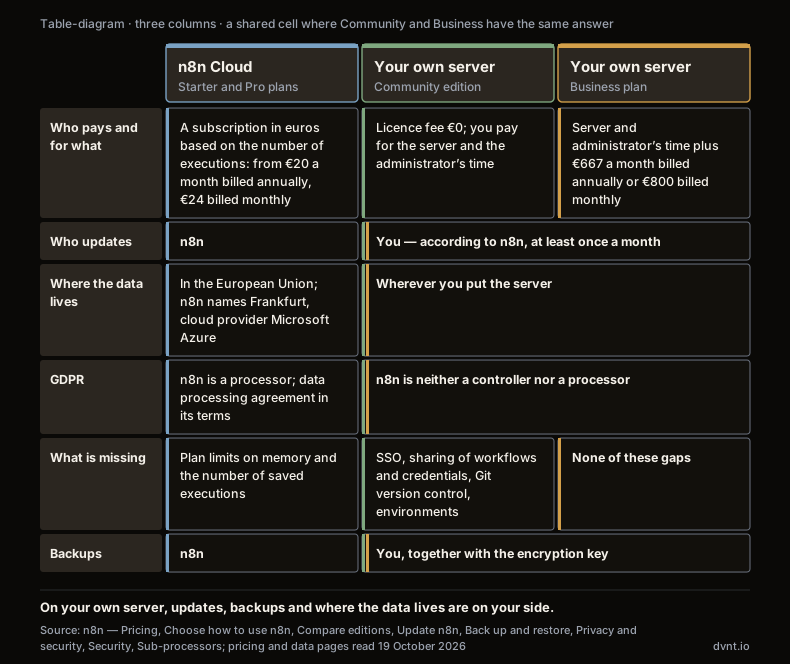
n8n Cloud. n8n hosts, updates and scales the instance. The data stays in the European Union: on its pricing page n8n says it is stored "on servers located in Frankfurt, Germany", and its list of sub-processors names Microsoft Azure as the cloud service provider. According to n8n's security page, credentials and the instance database sit on a disk that is encrypted at rest. For n8n Cloud, n8n describes itself as both a controller and a processor under the GDPR (RODO in Polish); as a processor of the personal data you send to the platform, it includes a data processing agreement (DPA) in its standard Terms of Service, and "the n8n Data Processing Agreement includes the Standard Contractual Clauses (SCCs)" (Privacy and security, re-read 20 October 2026). Telemetry — usage information sent back to n8n — is on by default and, according to the same page, "cannot currently be switched off on n8n Cloud".
The cloud has its limits. On the Starter plan an instance gets 640 MiB of memory (n8n's documentation, re-read 20 October 2026), and n8n warns that complex workflows processing large amounts of data can exceed its memory limits, in which case "the instance can crash and become inaccessible". How many executions are saved and how long logs are kept depend on the plan, and runs beyond the concurrency limit wait in a queue.
Self-hosted. You install n8n on your own infrastructure, on premises or in a private cloud — for example with Docker Compose, which the documentation marks as best for production deployments. Without a licence key, n8n runs as the Community edition: free and, in n8n's words, with "almost the complete feature set". What it leaves out, however, is exactly what a company with several people building workflows needs (Compare editions): SSO, sharing of workflows and credentials (only the instance owner and the person who created them can access them), projects, environments and version control with Git. Those features come with the paid Business and Enterprise plans, and Business runs only on your own server.
The upkeep is yours, and the n8n documentation lists the specific duties:
- updates — n8n advises updating frequently, "at least once a month", so that you don't have to jump several versions at once (Update n8n);
- backups including the encryption key — n8n recommends a full backup before every update, and it stores the credentials for your systems in encrypted form, so without the key from the config file a restored database cannot be decrypted (Back up and restore);
- encryption — HTTPS connections and encryption of data at rest are, according to n8n, the user's responsibility;
- database space — execution data keeps growing, so by default n8n prunes executions older than 14 days or beyond a count of 10,000 (Manage execution data).
The GDPR picture changes as well. On a self-hosted instance, n8n "is neither a Controller nor a Processor, as we don't manage your data". Deleting people's data when they ask is your job, and n8n recommends having execution data pruned automatically every few days. Telemetry is on by default here too. According to n8n it covers the shape of your workflow — which node types are connected to which, but not the information flowing through them — and a truncated IP address that identifies a network rather than a device. On your own server you can switch it off, although with a paid licence the instance keeps reporting usage counts and the licence identifier.
What the server itself costs depends on the load, and the n8n documentation gives no minimum specification, so we quote no figure. Add the time of the person who looks after it: updates, backups and dealing with failures.
n8n pricing — what it costs
n8n charges by the number of workflow executions per month, and every plan includes unlimited users and workflows. Prices from n8n's pricing page as of 19 October 2026, in euros, per month; the page does not say whether they include VAT:
Plan | Billed annually / monthly | Executions per month | Where it runs | Worth knowing |
|---|---|---|---|---|
Starter | €20 / €24 | 2,500 | n8n Cloud | 5 concurrent executions, one execution up to 5 minutes |
Pro | €50 / €60 | 10,000 | n8n Cloud | up to 50 concurrent executions, up to 40 minutes, workflow history |
Business | €667 / €800 | 40,000 | self-hosted only | for companies with fewer than 100 employees; SSO, environments, Git |
Enterprise | on request ("Contact Sales") | by contract | n8n Cloud or self-hosted | dedicated support with an SLA |
Community | no licence fee | — | self-hosted only | you pay for the server and the administrator's time |
For a rough guide: €20 is about PLN 87 (our conversion at the National Bank of Poland (NBP) mid rate of 2 October 2026, PLN 4.3745 per euro). According to n8n, paying annually saves 17%.
You can estimate how many executions you need with the method from the pricing FAQ. A scheduled workflow: runs per day times the number of days. A webhook workflow: the number of events that trigger it, such as orders or support tickets. A chat: the number of conversations times the average number of messages per conversation, because every message triggers the workflow. An example (our arithmetic): checking a mailbox every five minutes means 12 runs an hour, or 8,640 in a 30-day month. That one workflow alone goes over the Starter limit and fits within Pro.
The Business plan has two details worth knowing before you buy. On a self-hosted instance the licence key has to "ping our license server daily to stay active", and the ping includes, among other things, the number of production executions. Above the limit you pay €4,000 for each extra bucket of 300,000 executions, and if you cancel, "n8n does not offer pro-rata refunds". Companies with fewer than 20 employees can get 50% off the Business plan through n8n's start-up plan.
Why pay per execution on your own server, when the infrastructure is yours? n8n answers in its FAQ that its pricing "is not tied to how much it cost us to run n8n but the value it brings to you". Prices change more often than documentation, so check them on the day you decide.
n8n, Make or Zapier — what you pay for and where your data lives
The three tools bill in different units, so the same workflow looks different on each price list.
- Zapier counts tasks. According to Zapier's pricing page (read 19 October 2026), "a task is counted whenever Zapier successfully completes a unit of work for you" — in practice, every successful action in a Zap. Checking for new data does not use tasks, and neither do filters, formatting or paths. AI steps, code and external connector calls do use tasks, though at different rates.
- Make counts credits. According to Make's pricing page, "every time a module in a scenario performs an action, it consumes credits" — adding a row to a Google Sheet, for example. The unit used to be called an operation; according to Make's help centre, the name changed, while plans and pricing stayed the same. If you connect your own account with an AI provider, Make charges credits per operation and you pay the provider directly for tokens.
- n8n counts executions of the whole workflow, however many steps it has.
An example (our arithmetic, no prices): a contact form triggers a workflow with four actions — create a contact in the CRM, send an email, post a Slack message and add a row to a spreadsheet — 1,000 times a month. In Zapier that is 4,000 tasks, in Make at least 4,000 credits (Make's FAQ also lists reading data from an app or a webhook among the actions that consume credits, so the trigger can add more), and in n8n 1,000 executions.
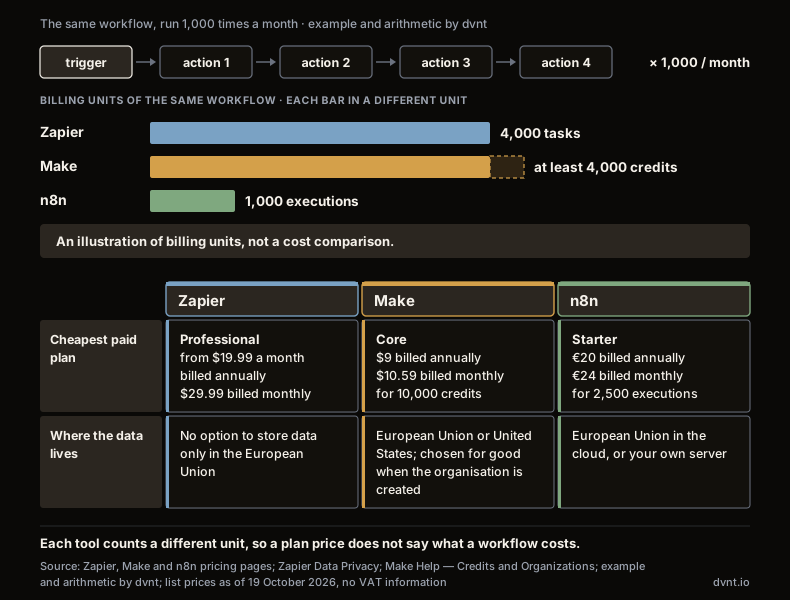
Entry prices as of 19 October 2026, in US dollars or euros as each vendor publishes them, with no information on VAT:
- Zapier: Free — 100 tasks a month; Professional from $19.99 a month billed annually and from $29.99 billed monthly. That is the price of the lowest task tier; it rises with the number of tasks, so check the price for your volume in the calculator on Zapier's site.
- Make: Free — up to 1,000 credits a month, with runs no more often than every 15 minutes; Core — $9 a month billed annually and $10.59 billed monthly for 10,000 credits.
- n8n: Starter — €20 billed annually and €24 billed monthly for 2,500 executions.
In the contact-form example, 1,000 executions fit within n8n Starter and 4,000 credits within Make Core. The conclusion is not "n8n is cheapest". With per-step billing, the cost grows with the number of steps in a workflow; with per-execution billing, it grows with the number of runs. At low volume and with simple workflows the difference can be negligible, and what counts is who is going to run the tool. The article on ecommerce automation compares these tools' prices from an online shop's point of view.
Where does the data live? Here the differences are bigger than in price:
- Zapier, in its data privacy FAQ, answers the question about storing data only within the EU in one line: "Zapier does not support this option." It bases transfers to the US on its certification under the EU-US Data Privacy Framework and on Standard Contractual Clauses.
- Make lets you choose a data centre in the EU or the US when you create an organisation, but according to Make's help centre, "you cannot change the location of the data center after you create the organization". Choosing the EU zone does not, however, keep every request in the EU: Make's page on AI providers and data zones (read 20 October 2026) lists features that always send requests to the US, among them all OpenAI models in Make's AI Provider, and some that are processed in the UK.
- n8n keeps the data in the EU on n8n Cloud and, when self-hosted, wherever you put the server.
The integration counts (Zapier 9,000+ apps, Make 3,000+ native apps, n8n 2,367 entries in its directory) are calculated differently by each vendor, so do not read them as a ranking. Simply check whether your systems are on the list or have an API.
When are Make or Zapier enough? When you have a few simple workflows and low volume, nobody on the team is technical, and you don't want to maintain a server. In that case the choice between Make, Zapier and n8n Cloud comes down to convenience and the price at your volume.
AI in n8n: the AI Agent node, models and a human in the loop
n8n has ready-made nodes for working with AI models, including the AI Agent node: you connect a language model and at least one tool, and the model itself decides which tool to use to complete the task. According to n8n's documentation, one workflow can combine models from different providers, such as OpenAI, Anthropic and Google, add tools, conversation memory and vector databases, and check the results with tests (evaluations). Our article on large language models (LLMs) explains what a language model is and where token costs come from; the piece on RAG covers how a model answers from a company's own documents. Where AI pays off in a business and where it does not is covered in our guide to AI in business.
The bill for an agent in n8n has two parts. Every run is an execution on your n8n plan. Tokens — the text sent to the model and returned by it — you pay to the model provider when you use your own API key. n8n Cloud also offers models that work without your own key, billed in separate credits; check their price in your plan. A chat in which every message triggers the agent uses up executions quickly: 300 conversations a month at 10 messages each is 3,000 executions (our arithmetic), more than the Starter limit.
One important caveat concerns data. Whatever the AI node sends to a model goes to that model's provider and is processed on that provider's terms. n8n's assurance that the data "is not used to train the AI services' models" applies only to the built-in n8n Assistant, which helps you build workflows and is on by default on n8n Cloud — not to the AI Agent node.
When an agent is about to do something irreversible, n8n lets you require approval by a person. According to the documentation, the workflow pauses before the chosen tool is used and sends a request to approve or deny, for example through Slack, Telegram or n8n Chat. n8n recommends doing this for deleting data, sending external communications and making purchases, and advises reducing oversight only as confidence in the agent grows. This mechanism needs patching too: on 30 September 2026 n8n published an advisory about a flaw that let anyone holding an execution's resume token approve a waiting execution without logging in. A separate piece on AI hallucinations describes why a model can get things wrong in the first place.
n8n also has MCP Server Trigger and MCP Client nodes for working with MCP, the protocol through which AI applications connect to tools and data; the protocol itself is described in a separate article on MCP. AI agent in business sets out when an agent makes sense at all and when ordinary rule-based automation will do. How to build an agent step by step — from choosing the process to tests and permissions — is covered in our guide on how to build an AI agent.
Security: on your own server, the updates are yours
n8n publishes information about vulnerabilities openly and often; on your own server you install every fix, on n8n Cloud n8n does. By 19 October 2026, n8n had published 225 security advisories in its GitHub repository, 211 of them in 2026. By the severity stated in the advisories, 22 concerned critical vulnerabilities, 99 high, 102 medium and 2 low. We read these figures from the GitHub API; they grow with every new batch.
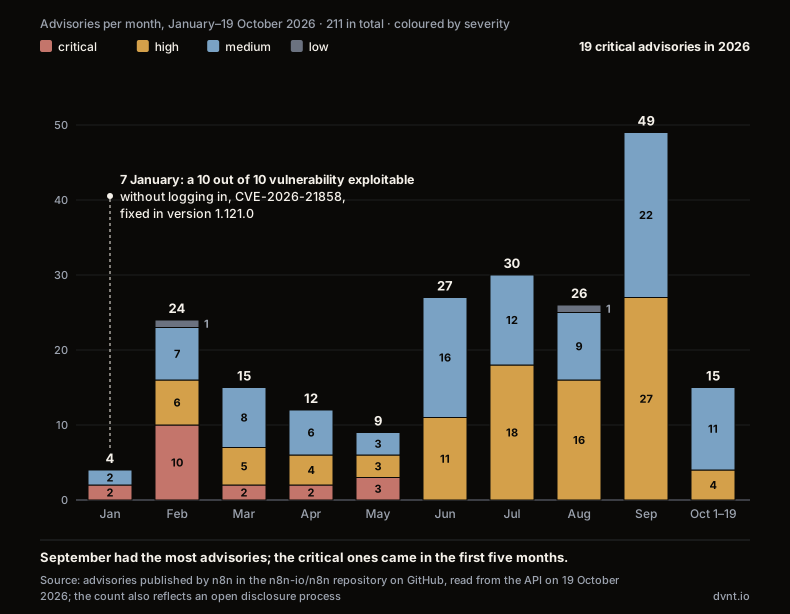
Two examples show what kind of flaws these are. The first is a vulnerability rated 10.0 out of 10 on the CVSS scale (CVE-2026-21858), published on 7 January 2026. Through certain form-based workflows, an attacker who was not logged in could reach files on the server. The fix is in version 1.121.0. Until the upgrade, n8n advised restricting or disabling publicly accessible webhook and form endpoints. The second kind is critical vulnerabilities exploitable by logged-in users, such as CVE-2025-68613: arbitrary code execution on the server through workflow expressions. n8n's advice: "Limit workflow creation and editing permissions to fully trusted users only."
The pace is high. New n8n versions come out roughly every week (release notes), and since June 2026 the advisories have been arriving in batches roughly every two weeks (our count of publication dates; the latest batch, on 14 October 2026, brought 15). So treat n8n's advice to update at least once a month as the minimum. For self-hosted instances, n8n's documentation also lists safeguards to switch on: security audits, SSL, blocking specific nodes, protection against SSRF (tricking the server into sending requests into your internal network) and redacting execution data.
A high number of advisories does not mean that n8n is less secure than other tools. It is also evidence of an open process for reporting and fixing vulnerabilities. Make and Zapier are closed cloud services and publish no comparable list, so we do not set the numbers side by side. What matters is something else: who is going to install the fixes. If nobody on a self-hosted setup follows the advisories and updates n8n at least once a month, n8n Cloud is the safer choice.
When n8n makes sense for a business — and when it doesn't
n8n makes sense when you have more than a handful of workflows, they have many steps or run often, and someone — in the company or at a partner — takes responsibility for maintaining them. Specifically, n8n is worth considering when:
- the process can be described as a rule and connects several systems — for example an order that has to reach the CRM, the warehouse system and accounting;
- workflows have many steps or run hundreds or thousands of times a month, because you pay per run, not per step;
- the data has to stay in the EU or on your own server;
- you need code or API calls where ready-made building blocks fall short;
- you want automation, AI models and human approval in one tool;
- there is a technical person, in-house or at a partner, to handle updates and backups if you choose your own server.
Be careful, or choose something else, when:
- you have two or three simple workflows and nobody technical on the team — Zapier, Make or n8n Cloud will do;
- you want to build a product in which your customers put together workflows themselves — the licence does not cover that, and you need a commercial agreement with n8n;
- several people are to build and edit workflows and you plan to use the free Community edition — it has no workflow sharing and no SSO;
- nobody will update a self-hosted installation regularly.
How we work with n8n at dvnt
We build automations in n8n on servers at OVH in the EU — we pick the location that fits the project — or on the client's own server. Where ready-made nodes are not enough, we add logic in Node.js. The client gets a working automation and its documentation, not access to the editor on our instance: the model that n8n's licence FAQ describes as permitted. When Make or Zapier is enough for the process, we say so plainly and don't force a custom build. The scope of the service is described on our process automation page.
Frequently asked questions about n8n
Is n8n free?
The Community edition on your own server has no licence fee, but only for your own internal business purposes or for non-commercial use — that is what the Sustainable Use License allows. You then pay for the server and for the time of whoever maintains it, and the Community edition lacks, among other things, SSO, workflow sharing and Git version control. n8n Cloud costs from €20 a month billed annually (€24 billed monthly) for 2,500 executions, according to the pricing page as of 19 October 2026.
Is n8n open source?
No. The n8n code is publicly available, but the licence restricts commercial use, and according to the Open Source Initiative open source licences cannot restrict how software is used. n8n itself says that this is why it does not call itself open source, and describes its model as fair-code. The licence is called the Sustainable Use License; source files with ".ee." in their name fall under a separate Enterprise License.
Can I build n8n automations for clients and charge for them?
According to n8n's licence FAQ, yes: you can build, run and maintain workflows for clients on your own instance and charge for it, as long as the clients cannot create or edit them themselves. You can also install n8n on a client's own server, provided you are not also hosting it for them. What you may not do is host n8n as a service in which clients build their own workflows. This is the licensor's guidance, not legal advice; if in doubt, n8n asks you to write to license@n8n.io.
Where is data stored in n8n, and is it GDPR-compliant?
On n8n Cloud the data stays in the European Union — n8n names servers in Frankfurt and Microsoft Azure as its cloud provider — and n8n acts as a processor, with a data processing agreement in its standard Terms of Service. On your own server the data is wherever you put the server, and n8n is neither a controller nor a processor; the obligations towards the people the data is about are yours. Whether you comply with the GDPR depends on what data you process and where you send it, for example to an AI model provider — no tool can take care of that for you.
How does an n8n execution differ from a Zapier task and a Make credit?
An execution in n8n is one run of the whole workflow, however many steps it has. A task in Zapier is every successful action in a Zap, and a credit in Make is every module action in a scenario. In our example, a workflow with four actions run 1,000 times a month comes to 4,000 tasks in Zapier, at least 4,000 credits in Make and 1,000 executions in n8n. That compares units, not costs — the price per unit is different in each tool.
Can I build an AI agent in n8n?
Yes. The AI Agent node connects a language model, for example from OpenAI, Anthropic or Google, with at least one tool, and the model decides which tool to use. Before irreversible actions you can require approval by a person. Every run of the agent is an execution on your n8n plan, and you pay the model provider for the tokens. Our guide on how to build an AI agent explains it step by step.
Related articles
Artificial intelligence
Model Context Protocol (MCP) — what it is and what it means for a business
Model Context Protocol (MCP) connects AI assistants and agents to company systems. How an MCP server works, its risks, GDPR and when to build your own.
Artificial intelligence
How to build an AI agent for your business — from process to first working version
How to build an AI agent for your company step by step: process, tools and permissions, human in the loop, cost limits, evaluation and prompt injection.
Artificial intelligence
Prompt engineering — what it is and how to write prompts at work
Prompt engineering at work: how to write prompts, templates for business processes, and when a Polish company needs RAG or an AI agent instead.
Artificial intelligence
AI agent in business — what it is and when it makes sense
An AI agent is a language model that chooses its own steps and tools. When it makes sense in a company, what it costs and what the AI Act and Polish law say.

Artificial intelligence
AI in business — where to start, what it costs and what the law says
AI in business without the hype: how many Polish firms use it, when an assistant is enough, what it costs and what the AI Act and Polish act require.
Automation and integrations
API — what is it? REST API, webhooks and OpenAPI explained for business
API explained with NBP, KSeF and VIES as examples: REST API, webhooks, OpenAPI, API keys and integration security for business.