
Cloud and security13 min read2512 wordsRedakcja dvnt
Cloud computing — what it is and how IaaS, PaaS and SaaS differ
Cloud computing by the NIST definition: five traits, IaaS, PaaS and SaaS, public, private and hybrid cloud, and how Polish businesses actually use the cloud.
Cloud computing isn't a place — it's a way of splitting the work. When a business "moves to the cloud", it doesn't send a server up into the sky; it hands a provider some of the layers it used to maintain itself: hardware, operating system, database, sometimes the whole application. It stays responsible for the rest.
The most useful definition comes from the US standards body NIST, and it has stood as the industry's reference point since 2011. By that definition, cloud computing is "a model for enabling ubiquitous, convenient, on-demand network access to a shared pool of configurable computing resources (e.g., networks, servers, storage, applications, and services) that can be rapidly provisioned and released with minimal management effort or service provider interaction" (NIST SP 800-145).
This article walks through what that definition is built from, how IaaS, PaaS and SaaS differ, the different types of cloud deployment, and what Polish businesses actually use the cloud for.
What is cloud computing?
NIST's definition rests on five characteristics. If a service doesn't have all of them, it isn't the cloud — it's a remote server in someone else's data centre, which isn't a bad thing in itself, but works differently.
1. On-demand self-service. You order resources — computing power, storage — yourself, through a dashboard or an API, without a sales call and without waiting for an engineer. A new server exists in minutes, not weeks.
2. Broad network access. The service is reached over the network with standard tools — a browser, a phone, a laptop — not exclusively from one office.
3. Resource pooling. The provider serves many customers on the same underlying infrastructure and allocates resources to them dynamically. The customer usually doesn't know which specific server their workload is running on — at most which region or data centre.
4. Rapid elasticity. Resources can be added quickly and released just as quickly, sometimes automatically. From the customer's point of view they look effectively unlimited.
5. Measured service. Usage is metered and billed — you pay for what you actually used: server hours, gigabytes of data, number of users.
That last characteristic is the source of the biggest change for a business: spending on hardware bought once every few years turns into a monthly bill that rises and falls with usage. That's an advantage when load is variable, and a drawback when load is steady and predictable — in which case the bill, added up over years, can end up higher than owning the hardware outright. We come back to that below.
IaaS, PaaS and SaaS — the three cloud service models
NIST distinguishes three service models. The simplest way to tell them apart is to ask: which layers of the stack do you maintain, and which does the provider maintain?
IaaS — Infrastructure as a Service. The provider gives you "raw" resources: computing power, storage, networking. Under NIST's definition, the customer can deploy and run arbitrary software on it, including operating systems and applications. You don't manage the physical infrastructure, but you do manage the operating system, the data and everything running on it. A familiar example: a rented virtual private server (VPS), or a virtual machine on AWS, Azure or Google Cloud. The server is ready in minutes, but system updates, security patches and backups are your job.
PaaS — Platform as a Service. The provider also maintains the operating system and the runtime environment. You deploy your application — written in languages and tools the platform supports — and configure its settings. You stop worrying about system patches or server scaling, but you accept the platform's constraints: its language versions, its database, its way of deploying code.
Two terms come up in almost every developer conversation about the cloud, even though NIST's 2011 definition predates both. Serverless, and specifically functions as a service (FaaS), pushes that boundary further still. The CNCF describes serverless as building and running applications that don't require managing servers: the application, split into functions, is uploaded to a platform and then run, scaled and billed precisely according to demand (CNCF Serverless Whitepaper). You don't even maintain a continuously running application, only individual functions the provider invokes in response to an event — which is how AWS describes its own Lambda service: code that runs without provisioning or managing servers (AWS Lambda). Containers as a service sit on the other side of that line: you supply a ready-built container with your application, and the provider runs and scales it. Both still fit within PaaS logic — what changes is how much stays on your side.
SaaS — Software as a Service. The provider maintains everything: infrastructure, platform and the application itself. You use a ready-made program through a browser or an app, and at most configure the settings available to users. Webmail, an online office suite, invoicing software, a CRM — all of that is SaaS. We cover the SaaS model itself, its advantages and its limits, in our guide to SaaS.
Cloud computing examples in each model
The models are easiest to recognise through services most businesses have already used:
- IaaS — virtual machines: Amazon EC2, Azure Virtual Machines, Google Compute Engine, and virtual private servers (VPS) sold by hosting companies. You get an operating system to administer yourself.
- PaaS — platforms for running applications: Azure App Service, Google App Engine, managed databases such as Amazon RDS. You deploy code or data; the provider maintains the rest.
- Serverless and containers — AWS Lambda and Google Cloud Run: individual functions or ready-built containers run on demand.
- SaaS — Microsoft 365, Google Workspace, online accounting and invoicing software, CRM systems. You log in and work.
The same business typically uses all three models at once, often without realising it: e-mail on SaaS, a website on a virtual server, and stock-management software from a vendor who runs it on someone else's cloud in turn.
These three models form a staircase. The higher you go, the less work stays on your side — and the less freedom you have: on IaaS you can install whatever you like; on SaaS you use exactly what the provider built.
Own server room, IaaS, PaaS and SaaS — the higher you go, the less work and the less freedom
| Own server room | IaaS | PaaS | SaaS | |
|---|---|---|---|---|
| Data, accounts and access | Own server roomYou | IaaSYou | PaaSYou | SaaSYou |
| Application | Own server roomYou | IaaSYou | PaaSYou | SaaSprovider |
| Runtime | Own server roomYou | IaaSYou | PaaSprovider | SaaSprovider |
| Operating system | Own server roomYou | IaaSYou | PaaSprovider | SaaSprovider |
| Virtualisation | Own server roomYou | IaaSprovider | PaaSprovider | SaaSprovider |
| Network and hardware | Own server roomYou | IaaSprovider | PaaSprovider | SaaSprovider |
The last row of that diagram matters most, and is the one people overlook. In every model — including SaaS — data, accounts and access always stay with the customer. Providers say this plainly in their own descriptions of shared responsibility. AWS splits it into security of the cloud (its own responsibility) and security in the cloud (the customer's) (AWS), and Microsoft notes that the split of tasks depends on whether the workload runs as SaaS, PaaS, IaaS or in your own data centre (Microsoft Learn). What that means in practice is what we cover in the cloud data security article.
Public, private and hybrid cloud — types of cloud computing
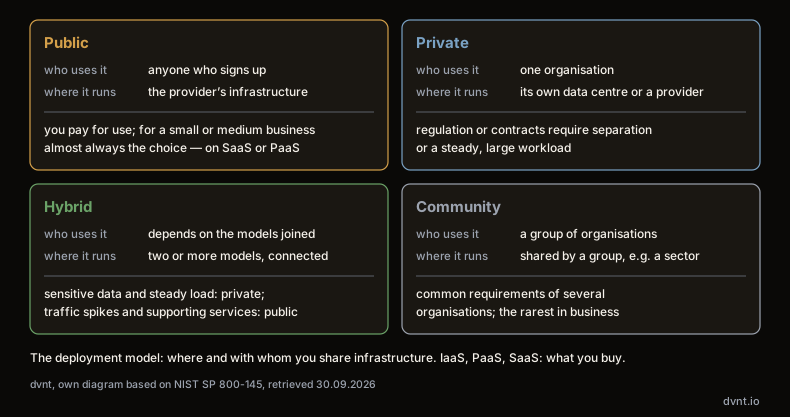
The second distinction isn't about what you buy, but where and with whom you share the infrastructure. NIST describes four deployment models.
Public cloud — a provider's infrastructure, made available to anyone. Think AWS, Microsoft Azure and Google Cloud, but also smaller virtual-server providers. You pay for use, you don't buy hardware, and you share the physical resources with other customers (in logically separated environments).
Private cloud — infrastructure dedicated to a single organisation. It can sit in that organisation's own data centre or at a provider's, but it isn't shared with anyone else. It gives full control, at the cost of someone having to maintain it — and elasticity stops at the hardware you bought.
Hybrid cloud — a combination of two or more models that stay separate but are connected so data and applications can move between them. A typical arrangement: sensitive data and steady load in a private cloud, traffic spikes and supporting services in the public one.
Community cloud — infrastructure shared by a group of organisations with common requirements, such as institutions in a single sector. In business, it's the one you'll encounter least often.
Public or private? For a small or medium-sized business the answer is almost always public — and usually on SaaS or PaaS. Private cloud makes sense when regulation or contracts require physical separation of data, or when a steady, large workload makes owning your own infrastructure cheaper than renting it.
How Polish businesses use the cloud
Hard data on what businesses actually use comes from Eurostat's survey on ICT use in enterprises. The latest wave covers 2025 and enterprises with at least 10 employees (Eurostat, isoc_cicce_use).
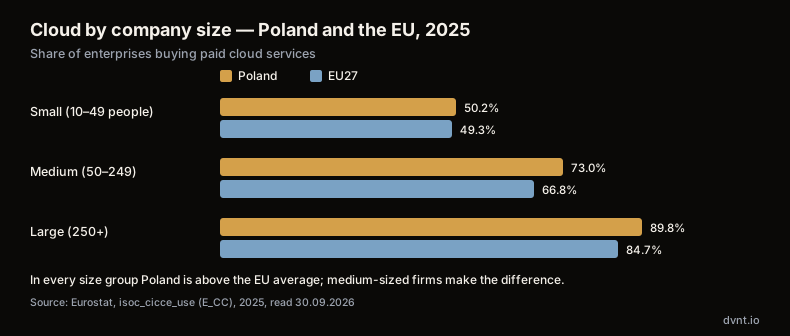
The overall result is good for Poland: 54.7% of Polish enterprises bought paid cloud services, against 52.7% across the EU as a whole. Adoption scales with company size — in Poland from 50.2% among small enterprises (10–49 employees) to 73.0% among medium-sized ones (50–249) and 89.8% among large ones (250+).
What's more interesting is what businesses use the cloud for. Poland is ahead of the EU in the number of firms using the cloud at all, but lags behind for almost every specific use:
use case | Poland | EU27 |
|---|---|---|
37.2% | 44.9% | |
office software | 27.1% | 37.8% |
file storage | 21.1% | 37.7% |
database hosting | 8.8% | 24.0% |
computing power for own applications | 5.4% | 14.9% |
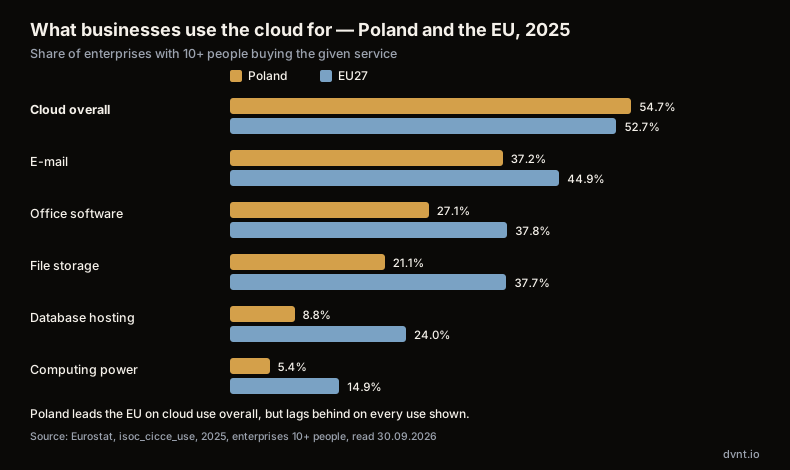
The numbers point to a clear pattern: Polish businesses entered the cloud mainly through SaaS — e-mail and office software — and much less often moved their own systems there. In Poland, database hosting in the cloud and computing power for own applications are each bought by only about a third as many firms as the EU average.
One caveat when reading these figures: Eurostat measures the share of enterprises that buy a given service, not how intensively they use it. A business with a single cloud mailbox counts the same as one that has moved everything there. We deliberately leave out one category from the survey — platforms for building and deploying applications: for Poland the result is more than twice the EU figure, which, given every other category, looks like a change of method in this wave rather than a real lead.
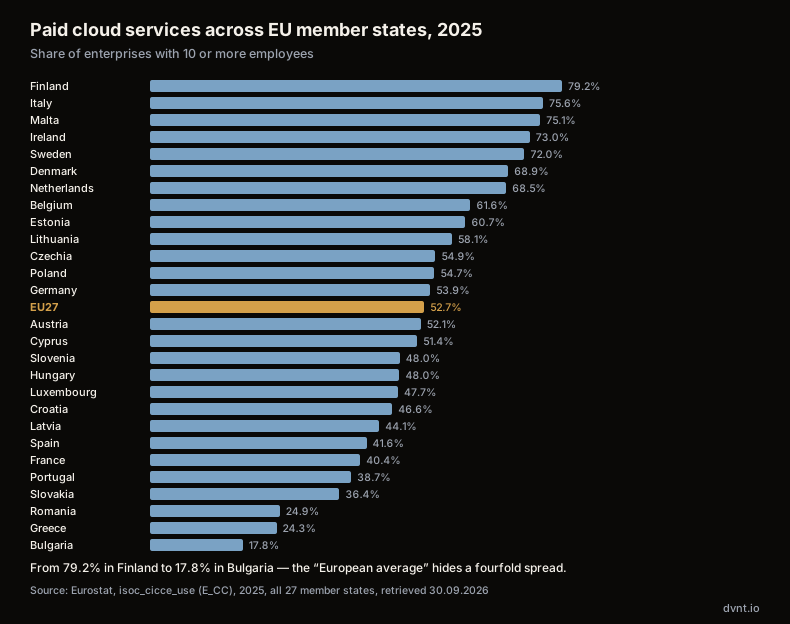
The gap between member states is wide, too — from 79.2% of enterprises in Finland, the highest share in the EU, to 17.8% in Bulgaria, the lowest. Poland, at 54.7%, sits slightly above the EU average of 52.7%.
When cloud computing makes sense for a business, and when it doesn't
The cloud isn't cheaper or more secure by definition. It's more convenient in some situations, and more expensive in others.
It makes sense when:
- load varies — a seasonal shop, a campaign, a system used heavily for a few days a month. You pay for the peak only while it lasts;
- you have no administrator — SaaS and PaaS take updates, security patches and hardware replacement off the business's plate;
- you need it fast — a new environment in minutes instead of weeks of procurement;
- the team works from multiple locations — network access is a feature of the model, not an add-on.
It needs caution when:
- load is steady and large — a monthly bill, added up over years, can outstrip the cost of owning the hardware;
- you depend on a single provider — the more platform-specific services you use, the harder and more expensive it is to leave. It's worth knowing from the outset in what format you'd get your data back;
- regulation or contracts require data to stay in a specific place — at that point choosing a region and a provider stops being a purely technical decision.
We can show this with our own example. This site doesn't run on a managed platform — it runs on a rented virtual private server with Coolify, which is to say, on IaaS, on top of which we've built a layer that looks a lot like PaaS. The bill, and three things that go wrong in a setup like that, are covered in our article on self-hosting Next.js and Payload. We chose it deliberately: steady load, full control over the database and the costs. But that decision has a price worth knowing before you make it — every layer except the hardware stayed on our side. We found that out when a container restart wiped the files uploaded to one of our collections, because a container's filesystem is ephemeral and nobody had configured a persistent volume for that collection. On a PaaS platform that mistake wouldn't have happened; on IaaS, it's our responsibility, exactly as the diagram above shows.
If you're weighing up buying ready-made software in the cloud against building your own, that's a separate decision — we cover it in the custom software article.
Where to start moving your business to the cloud
If a business is only just getting started, Eurostat's data suggests a natural order: begin with the services most Polish businesses have already moved, then — if there's a reason to — your own systems.
1. Write down what you have. A list of the systems the business uses: e-mail, documents, accounting, sales, stock, the website, in-house systems. Next to each one, note two facts: who uses it and what data it holds. Without that list you can't judge either the cost or the risk.
2. Start with SaaS where the choice is obvious. E-mail, office software and shared files are the categories Polish businesses adopt first — and the categories where moving to a ready-made service carries the least risk. They don't require process changes, only data migration and staff training.
3. Classify your data. Personal data belonging to customers and staff, financial data, trade secrets — each of those groups has different requirements for where it's stored and what the contract with the provider needs to say. That classification decides whether any provider will do, or whether you need a specific region or specific certifications.
4. Plan your exit before you sign. Ask in what format, and within what time, the provider will hand your data back if you end the contract. It sounds pessimistic, but it's the question that decides whether you can switch provider in three years, or whether you're stuck because moving is too expensive.
5. Only move your own systems for a reason. A database or application moved to the cloud "because everyone does it" often costs more than it did on your own server, while the same performance problems remain. Good reasons include variable load, no one to maintain a server, or a genuine need to spin up new environments quickly.
Cloud data security
"Is the cloud secure?" comes up in every conversation about moving company systems there — and it's the wrong question. Large providers protect their infrastructure better than most businesses would manage in their own server room. But the customer is always left holding the data, the accounts and the access, plus the contract with the provider, where the data is stored, and a plan for when something goes wrong. That's a topic for its own article: cloud data security — who's responsible for what, and what to ask your provider.
What's next
If you want to understand the SaaS model itself — the one most businesses run on without ever thinking about it — start with our guide to SaaS. If you're thinking about building your own product in that model, take a look at our micro-SaaS ideas.
Frequently asked questions about cloud computing
What is cloud computing, in plain terms?
It's using someone else's servers, storage and software over the internet instead of maintaining your own. You order resources yourself, whenever you need them, and pay for what you actually use. NIST's definition adds five characteristics to that: self-service, network access, a shared pool of resources, rapid elasticity and measured usage.
How does IaaS differ from PaaS and SaaS?
In how many layers the provider maintains. With IaaS you get servers and storage, and maintain the operating system, database and application yourself. With PaaS the provider also maintains the system and runtime, and you deploy the application. With SaaS you use a ready-made program. In all three models, data, accounts and access stay with the customer.
Public or private cloud — which should you choose?
For most small and medium-sized businesses, public cloud — usually on SaaS or PaaS: it needs no hardware purchase and no administrator. Private cloud makes sense when regulation or contracts require physical separation of data, or when a steady, large workload makes owning your own infrastructure cheaper than renting it.
How many businesses in Poland use the cloud?
According to Eurostat, 54.7% of Polish enterprises with at least 10 employees bought paid cloud services in 2025, against 52.7% across the EU. Polish businesses use the cloud mainly for e-mail (37.2%) and office software (27.1%); database hosting is bought by about a quarter as many firms as buy e-mail (8.8%) and computing power by about a seventh (5.4%).
Is cloud computing secure?
Large providers' infrastructure is usually better protected than a company's own server room, but security in the cloud is split: the provider is responsible for its own infrastructure, and the customer is always responsible for data, accounts and access. On top of that come the data processing agreement, the choice of where the data is stored, and a plan for when something fails.
Related articles
Cloud and security
SLA — what it is and what to check in an SLA with a cloud provider
SLA meaning: how much downtime fits in 99.9%, how AWS, Microsoft and Google SLAs compare, SLO, RPO, RTO and 10 things to check before signing.
Cloud and security
On premise — what it means and when your own server beats the cloud
On premise, your own server: the full cost beyond hardware, the end of Windows Server 2016 support, and when the cloud or VPS wins instead.
Cloud and security
Cloud security: who's responsible for what, and what to ask your provider
Cloud security and cloud data security explained: shared responsibility, GDPR data processing agreements, US data transfers, NIS2 and your cloud exit strategy.
SaaS and your own product
Multi-tenant — what it is and how to choose a SaaS architecture for many customers
Multi-tenant SaaS: single tenant vs multi-tenant, the silo/pool/bridge models, Row Level Security, GDPR and choosing a model for an MVP.
Automation and integrations
API — what is it? REST API, webhooks and OpenAPI explained for business
API explained with NBP, KSeF and VIES as examples: REST API, webhooks, OpenAPI, API keys and integration security for business.
Artificial intelligence
RAG AI — how AI answers from your company's own documents
RAG AI lets a language model answer from your company documents. How it works, what breaks the answers, what it costs in PLN and how to start safely.
Building a system and not sure where to host it?
Tell us what has to run and what data it will hold. We will advise whether a ready cloud service is enough or you need a system of your own — and where to keep it. If an off-the-shelf SaaS will do, we will say so plainly.