
Cloud and security18 min read3406 wordsRedakcja dvnt
On premise — what it means and when your own server beats the cloud
On premise, your own server: the full cost beyond hardware, the end of Windows Server 2016 support, and when the cloud or VPS wins instead.
On premise is the model where a company buys its own servers, puts them on its own site and runs them itself — instead of renting computing power and software in the cloud. For a decade the story was that this model was fading out. Yet in 2026 many companies are facing the question again from scratch: some because support for their server is ending, others because their cloud bill grew faster than they expected.
This article takes no side. It is a decision aid: what a server in your own building really costs, when on-premise wins, when it loses, and whether there is something in between. Every figure has a source, and where a figure depends on your own company, we show how to calculate it instead of inventing one. What IaaS, PaaS and SaaS actually mean is covered separately in our article on cloud computing — here we assume you already know those terms.
On premise — what it means
The English phrase on premises (often shortened in everyday use to on premise) literally means "at the site" — on the organisation's own property. In IT it means infrastructure that the organisation owns and runs itself: the server sits in its building, belongs to it, and the people responsible for keeping it running are its own staff or a service company it hired directly.
Interestingly, the most-cited industry definitions don't define the term head-on. NIST's definition of the cloud (SP 800-145) and the ISO/IEC 17788 standard use the phrase "on or off premises" only inside another definition — that of the private cloud, which according to NIST "may exist on or off premises" (NIST SP 800-145).
The most useful description comes from IBM, contrasting on-premise with the cloud: "traditional on-premises IT, where a company owns and maintains physical data centers and servers to access computing power, data storage and other resources" (IBM, What is cloud computing?). Two verbs matter here: owns and maintains.
That definition also implies the key difference from the cloud: on-premise means every layer — power and cooling, hardware and operating system, right up to the application and the data — is on your side. In the cloud, the provider takes over part of that stack. Exactly how much depends on the model, which the diagram in our cloud-computing article lays out.
The full cost of your own server
Most "on premise vs cloud" comparisons go wrong in the same way: someone writes down the hardware's purchase price on the server side and a full monthly bill on the cloud side. But the purchase price is only the first of several line items. Here are the ones you actually need to calculate.
Depreciation: how a server lands in your costs
A server is a fixed asset, so — unless it qualifies for an immediate low-value write-off — it enters your costs through depreciation, not as a single write-off. Annex No. 1 to the Corporate Income Tax Act (ustawa o CIT), the "schedule of annual depreciation rates", sets for the fixed-asset classification group KŚT 487 "computer sets" a rate of 30% a year (item 04 of the annex; CIT Act, consolidated text Dz.U. 2026 item 554). A note for anyone checking this against the 2016 KŚT classification: the annex uses its own number 487, not 491.
At 30%, straight-line depreciation puts a server's value into costs in a little over three years. That matters for any comparison with the cloud: a cloud bill is a cost from day one, a server's cost is spread over several years.
For cheaper hardware the Act offers a simpler route. Under Art. 16d(1), taxpayers "may refrain from making depreciation write-offs on assets (…) whose initial value (…) does not exceed PLN 10,000" (our translation) — such an expense can be booked in costs at once. The personal income tax (PIT) rules contain an analogous annex, but we have not checked its wording — if your business is taxed under PIT, confirm the rate with your accountant.
On-premise licensing: Windows Server and SQL Server
The second line item, often bigger than the hardware itself, is licensing. Using Microsoft's software as the example — a common choice in company server rooms — shows how on-premise licensing works and why it is hard to estimate "by eye".
Windows Server 2025 is licensed per processor core, with minimum thresholds. Microsoft's licensing rules require "a minimum of 8 core licenses per physical processor and a minimum of 16 core licenses per server" (Microsoft Licensing, Windows Server 2025). On top of that come access licences: "Each user or device that accesses licensed servers requires a Windows Server CAL".
Microsoft quotes list prices in US dollars: USD 1,176 for the Standard edition and USD 6,771 for Datacenter, in both cases for a 16-core pack, with the caveat that prices may differ by country (Microsoft, Windows Server pricing). What you pay in Poland is set by your reseller. What doesn't change by market is the licensing mechanism: the difference between editions is about virtualisation — Standard grants the right to run two operating-system environments (physical or virtual), Datacenter an unlimited number. If you're planning several virtual machines on one server, that distinction decides the cost. A pay-as-you-go billing option also exists: USD 33.58 per core per month.
SQL Server 2022, if your application depends on it, has its own rules: a core-based licence requires "a minimum of four Licenses per Physical Processor" (Microsoft Licensing, SQL Server), and the cheaper "server + CAL" model is available only for the Standard edition. List prices: USD 3,945 for a 2-core pack of the Standard edition, USD 15,123 for a 2-core pack of Enterprise, and in the server + CAL model USD 989 per server and USD 230 per CAL (Microsoft, SQL Server 2022 pricing).
We don't add these amounts up into a "typical server", because the result depends on how many cores, users and virtual machines you plan for. One rule worth remembering: with core-based licensing, a more powerful processor bought "for headroom" also raises your software bill.
Service: what you're actually buying in a support contract
Servers break, and the question is how fast someone fixes it. Vendors sell this as a separate service. Dell's description of ProSupport for Infrastructure (version 17, July 2026) distinguishes two main tiers. In the 4-hour tier, "a technician typically arrives on-site within 4 hours after completion of troubleshooting and isolating the issue". In the next-business-day tier, a technician is dispatched to arrive by the next business day (Dell ProSupport for Infrastructure, service description).
Three things in this wording are worth reading carefully. First, the 4-hour clock starts after diagnosis, not after you report the fault. Second, the word "typically" is not a guarantee. Third, in Europe, on-site service is available within up to 150 km of the nearest Dell logistics location, and for non-standard parts Dell defaults to next-business-day. If your company is far from a large city, check this before you buy.
Power, space and people
Three final line items have no universal price, but you can't leave them out.
- Power and cooling. A server runs around the clock, and the room it sits in usually needs air conditioning, which also draws power. Your server's rated power, multiplied by hours and your electricity tariff, gives you an annual cost.
- Space and backup power. A dedicated room, a UPS with batteries that need replacing every few years, controlled physical access.
- People. Someone has to install updates, watch backups and respond to incidents — including on weekends. That's either a staff position (or a share of one) or a contract with an outside company. Either way, it's a fixed cost, independent of whether anything actually broke that month.
The cloud doesn't remove this work entirely, but in PaaS and SaaS models it takes over a large part of it.
The deadline that will force the decision: Windows Server 2016
For many companies, "on-premise or cloud" isn't a theoretical question — it has a specific date attached. Extended support for Windows Server 2016 ends on 12 January 2027 (Microsoft Lifecycle, Windows Server 2016). That's the last stage of the product's lifecycle in which Microsoft still issues security patches under standard support. A server still running that OS after that date stops receiving patches for newly discovered vulnerabilities under this support programme.
For comparison: Windows Server 2025 has mainstream support until 13 November 2029 and extended support until 14 November 2034 (Microsoft Lifecycle, Windows Server 2025). Buying a licence for the new OS today buys you roughly eight years of support.
A server bought together with that OS will by then have been in service for up to a decade. A company has three paths: upgrade the OS on the current hardware (if the hardware and licences allow it), buy a new server with the new OS, or move the workload elsewhere. Whether and on what terms you can buy extended updates for an older OS is something to check with Microsoft or your licensing reseller — either way, that only postpones the deadline.

When on-premise wins
A steady, large and predictable load. The cloud bills by usage, which is an advantage when demand swings and a disadvantage when load is steady: you pay the provider's margin for flexibility you never use. The larger and steadier the scale, the more visible this cost becomes.
Data-location requirements. When a contract, an industry rule or a company policy requires data to physically stay in a specific place, your own server gives certainty without having to negotiate it with a provider.
No dependence on a single vendor. Your own hardware won't change its price list overnight and won't discontinue a service your system depends on.
The most cited example of the first case is 37signals, the company behind Basecamp and the HEY email service. Here are the figures the company itself published, in posts by co-founder David Heinemeier Hansson:
- February 2023: "We spent $3.2m on cloud in 2022", about $1m of it on S3 file storage. The plan was to buy hardware "in the region of $600,000", depreciated "over a conservative five years", saving $7m over five years without growing the ops team (DHH, 21.02.2023);
- September 2023: cloud spend excluding S3 fell from around $180,000 to under $80,000 a month, and "our ops team stayed the same" (DHH, 15.09.2023);
- October 2024: down from the original $3.2m a year to $1.3m in 2024, with roughly $700,000 of Dell hardware; the savings forecast was now "well over ten million dollars over five years" (DHH, 17.10.2024);
- March 2025: the last piece was S3, on which the company was spending "just shy of $1.5 million/year"; it was to be replaced by an 18 PB Pure Storage array for about $1.5m plus under a million for service over five years (DHH, 26.03.2025). The migration itself was described in January 2026 by company engineer Jeremy Daer: data moved in under 10 days and "there was no downtime" (37signals, 08.01.2026).
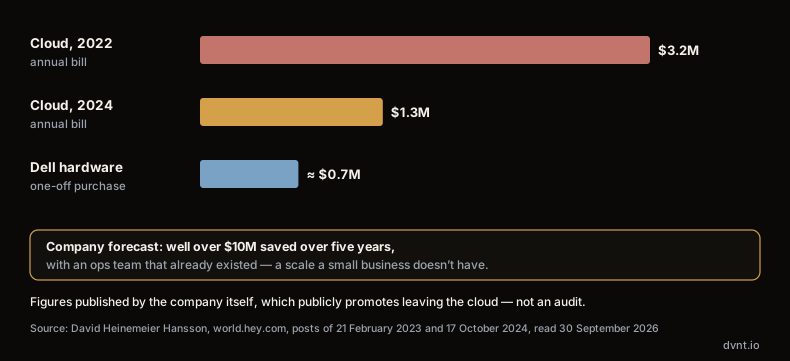
Two caveats matter here. First, these are numbers the company itself published, and it publicly promotes leaving the cloud — this isn't an audit. Even the amount of data being moved varies between posts: "almost 10 petabytes" in 2024, "nearly 6 PB" in 2025, "five petabytes" in the 2026 migration write-up. Second, and more importantly: this is a company spending millions of dollars a year on infrastructure, with its own ops team that already existed. At a small company's scale, the saving can be smaller than the cost of the person who would have to look after the hardware. The lesson from 37signals is a method — count both sides honestly — not a conclusion that everyone should leave the cloud.
When on-premise loses
Variable load. A server is bought for the peak. If the peak lasts two weeks a year — a retail season, a year-end accounting close — the hardware sits largely idle the rest of the time, while it still depreciates, draws power and needs servicing.
No administrator. This is the most common reason an on-premise server in a small company becomes a risk. A server without updates, with a backup nobody has ever tried to restore, works fine — until the first disk failure or the first attack.
Backups and an off-site location. A backup kept in the same building as the server doesn't protect against fire, flooding or theft. A second location is another cost and another thing to maintain; many cloud services have it built in. How to build a sensible backup system is covered in our article on backup and recovery.
High-profile "cloud exit" stories suggest a mass trend, but analysts are more cautious. According to IDC, "only 8-9% of companies plan full workload repatriation" (IDC blog, D. Saroff, 28.10.2024, based on its Server and Storage Workloads Survey). That's a survey finding, not a census, and it's about plans rather than completed migrations. It does show, though, that a full return to your own server room is the exception — companies more often bring selected systems back and leave the rest in the cloud.
The third way: VPS and self-hosting
The "on premise vs cloud" conversation often skips the middle ground that is, for many small and medium companies, the most sensible choice: a rented virtual private server (VPS) at a hosting provider, on which the company runs its own applications. Hardware, power, connectivity and physical security belong to the provider — you don't buy a server, air conditioning or a service contract. But the operating system, updates, backups and everything that runs on it stay on your side, just as with on-premise.
Formally this is IaaS, one of the cloud models; in practice the responsibility looks like owning your own server. This site itself runs this way — on an OVH VPS with Coolify; in the comparison below, Hetzner's price list stands in for the VPS. We compared the bill for our own stack (Next.js and Payload CMS, a three-person team, 2 TB of monthly transfer, vendor price lists read on 5 October 2026, excluding VAT): a managed platform — Vercel with a MongoDB Atlas database — costs about 271 USD a month, while a Hetzner CPX32 VPS (4 vCPU, 8 GB RAM, 160 GB NVMe) running Coolify costs 35.99 EUR a month including an IPv4 address (Hetzner Cloud pricing; the CPX31 we priced earlier is now offered only in US locations). The full bill and the assumptions behind it are in our article on self-hosting Next.js and Payload.
That's a large gap, but fairness requires showing the other side. After moving to our own server, we took over backups, security patches and uptime monitoring ourselves. And we had three production incidents that a managed platform wouldn't have had:
- Memory and lost files. Image processing used so much memory that the system killed the application process. We also discovered that one file collection had no persistent volume configured — 11 uploaded files disappeared after the container restarted.
- A full disk. The rendered-page cache grew to 89 GB because bots kept requesting non-existent URLs, and every response was written to disk as a file.
- A build starved the database. Building a new version of the application on the same server took resources away from the database. The fix: build in an external CI system, plus 4 GB of swap.
All three came from the same thing: on your own server, every layer above the hardware is yours. The honest conversion is this: multiply the monthly maintenance hours by what an hour of a developer's time actually costs you, and subtract that from the difference in subscriptions before you call what is left a saving. In other words, a VPS pays off when someone on the team already has those skills and spreads them across several projects rather than devoting them to one. How to catch outages nobody would otherwise notice is covered in our article on website monitoring.
Polish companies and the cloud: what they actually use
Do Polish companies stay on-premise? Eurostat doesn't measure how many companies have their own servers — it measures how many buy paid cloud services, and which ones (Eurostat, isoc_cicce_use, enterprises with at least 10 employees, excluding the financial sector, 2025 data).
Overall, Poland comes out slightly above the average: 54.71% of Polish firms bought paid cloud services in 2025, against 52.74% in the EU. The picture changes when you look at infrastructure: cloud database hosting was bought by 8.8% of Polish firms against 24.0% in the EU, and computing power by 5.37% against 14.86%. Cloud file storage: 21.12% against 37.73%.
Our reading of this — not Eurostat's — is that Polish companies entered the cloud mainly through ready-made services such as e-mail and office suites, while databases and in-house applications are moved to the cloud far less often. Where those workloads actually run instead — on a server in the building, on a VPS, or at a software vendor — the survey doesn't say. The full table and its methodological caveats are in our article on cloud computing, which carries the full table.
How to decide: on-premise, VPS or the cloud
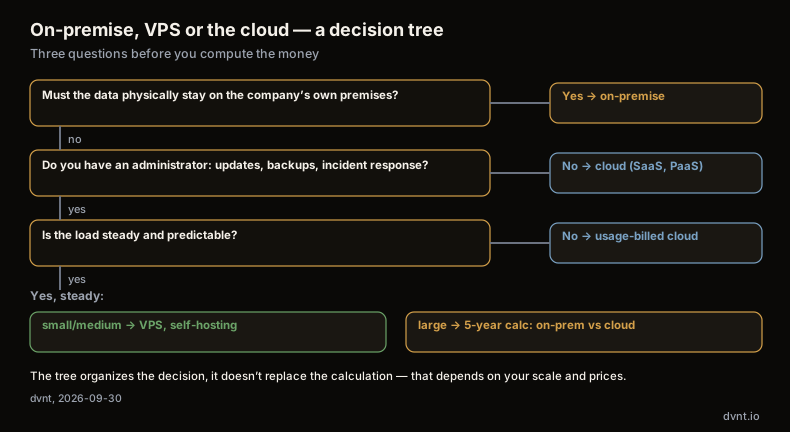
Start with questions, then calculate.
Questions that narrow the choice
- Is the load steady or variable? Steady and large favours your own infrastructure or a VPS; variable favours usage-billed cloud.
- Do you have someone to maintain a server? A person or a company with a defined scope: updates, backups, incident response. Without that, on-premise and VPS are a risk, not a saving.
- Does the data have to stay in a specific place? If so, check whether the EU region of a cloud provider satisfies the requirement, or whether it truly needs a server in your own building. What stays on your side in the cloud is covered in our article on cloud data security.
- What does an hour of downtime cost, and who fixes it? On the on-premise side, the answer comes from your service contract and your administrator; on the cloud side, from the provider's SLA — worth reading closely for what it actually guarantees. The maintenance cost calculator can help estimate the cost of downtime itself.
- What software has to run? An application that requires Windows Server and SQL Server means licences regardless of location — in the cloud you pay for them too, just bundled into the subscription.
- What deadline is chasing you? The end of OS support, the end of a vendor contract, the end of a hardware warranty.
The five-year calculation: how to do it
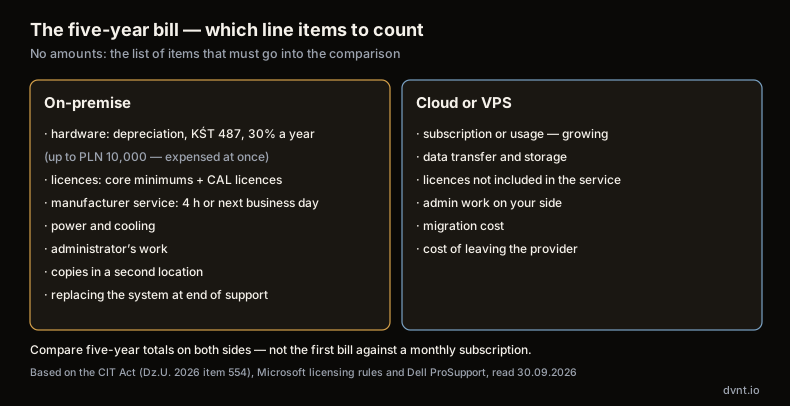
If two or three options remain after these questions, compare them over a five-year horizon — the same "conservative five years" over which 37signals depreciated its hardware. The amounts depend on your own company, so here are the line items to put in a spreadsheet.
On the on-premise side:
- hardware purchase (server, storage, network, UPS) — spread per the depreciation rate (KŚT 487, 30% a year), or expensed immediately if it does not exceed PLN 10,000;
- OS and database licences — accounting for core minimums and a CAL for every user or device;
- a vendor service contract for the full period (not just the warranty window);
- power and cooling — wattage times hours times your tariff;
- administrator time — hours per month times rate, even if it's your own employee;
- off-site backups;
- hardware or OS replacement before the period ends, if a support deadline falls inside it.
On the cloud or VPS side:
- subscription or usage — with a realistic growth rate, not today's bill multiplied by 60;
- data transfer and storage — line items that tend to grow faster than the rest;
- licences, if not included in the service;
- administrative work that stays on your side — similar to on-premise for a VPS, minimal for SaaS;
- the cost of eventually migrating away from the provider.
Two rules: count people's time on both sides, including an employee who's "on payroll anyway", and run a pessimistic scenario — more traffic, a failure in year three. An option that only wins in the optimistic scenario doesn't win.
If that calculation requires knowledge of your systems you don't have on hand, that's exactly the case for technology consulting: an outside review of what the company has, what it costs, and what's worth moving before a deadline or an outage forces the decision.
What's next
What the cloud service models are and how Polish companies actually use the cloud is covered in our article on cloud computing. The software-as-a-service model itself is covered in our guide to SaaS, and if you're weighing ready-made software against building your own, see our article on custom software.
Frequently asked questions about on-premise
What does on premise mean?
On premise (more precisely, on premises) means "at the site" — at the company's own location. In IT it's the model where a company owns and runs its own servers and software in its own building instead of renting them in the cloud. The company itself is then responsible for every layer: hardware, power, operating system, applications, backups and data.
Is on-premise or the cloud cheaper?
It depends on the load and on who maintains the server. With a steady, large load and an existing maintenance team, your own infrastructure can come out cheaper — 37signals reports cutting its spend from $3.2m in 2022 to $1.3m in 2024. With a variable load and no administrator, the cloud usually wins. A fair comparison needs a five-year calculation that includes licences, service, power and people's time on both sides.
Is on-premise more secure than the cloud?
Not by definition. Your own server gives you full control over where data is stored, but it also shifts the entire responsibility onto the company: updates, off-site backups, physical security and incident response. A server without an administrator and without tested backups is less secure than a well-configured cloud service, where the customer still keeps responsibility for data, accounts and access.
What should I do about a server running Windows Server 2016?
Extended support for Windows Server 2016 ends on 12 January 2027. Before then, decide whether to upgrade the OS on your current hardware, buy a new server with Windows Server 2025 (extended support until 14 November 2034), or move the workload to a VPS or the cloud. Each path requires costing out licences, hardware and migration work.
Is a VPS the cloud?
Formally, yes — a rented virtual private server is an IaaS, infrastructure-as-a-service, model. The provider supplies the hardware, power and connectivity. In practice the responsibility looks like owning your own server: you maintain the operating system, updates, backups and applications yourself. That makes a VPS a middle ground between on-premise and a managed cloud — cheap as a subscription, but demanding real administration skills.
Related articles
Cloud and security
SLA — what it is and what to check in an SLA with a cloud provider
SLA meaning: how much downtime fits in 99.9%, how AWS, Microsoft and Google SLAs compare, SLO, RPO, RTO and 10 things to check before signing.
Cloud and security
Cloud computing — what it is and how IaaS, PaaS and SaaS differ
Cloud computing by the NIST definition: five traits, IaaS, PaaS and SaaS, public, private and hybrid cloud, and how Polish businesses actually use the cloud.
Cloud and security
Cloud security: who's responsible for what, and what to ask your provider
Cloud security and cloud data security explained: shared responsibility, GDPR data processing agreements, US data transfers, NIS2 and your cloud exit strategy.
SaaS and your own product
Multi-tenant — what it is and how to choose a SaaS architecture for many customers
Multi-tenant SaaS: single tenant vs multi-tenant, the silo/pool/bridge models, Row Level Security, GDPR and choosing a model for an MVP.
Automation and integrations
API — what is it? REST API, webhooks and OpenAPI explained for business
API explained with NBP, KSeF and VIES as examples: REST API, webhooks, OpenAPI, API keys and integration security for business.
Artificial intelligence
RAG AI — how AI answers from your company's own documents
RAG AI lets a language model answer from your company documents. How it works, what breaks the answers, what it costs in PLN and how to start safely.
Building a system and not sure where to host it?
Tell us what has to run and what data it will hold. We will advise whether a ready cloud service is enough or you need a system of your own — and where to keep it. If an off-the-shelf SaaS will do, we will say so plainly.