
Web and mobile apps13 min read2537 wordsRedakcja dvnt
Progressive web app (PWA): what it is, how it works and when it replaces a native app
What a PWA is, how the manifest and service worker work, installing it on Android and iPhone, push notifications since iOS 16.4, and what a PWA still cannot do.
A PWA is a website that behaves like an app in three places: it has an icon on your phone's home screen, it works without a signal, and it can send notifications. That sounds like a way to get an app without a store, without two codebases and without Apple and Google reviewing every version — and often it is.
There's one condition, though, that gets lost in most conversations about PWAs. In all three of those places, what's possible is decided by the device's browser, not by whoever builds the app. On Android, Chrome does almost everything a PWA needs. On the iPhone, every browser builds home-screen apps on Apple's WebKit engine, and WebKit doesn't support part of that list — and has no plans to. So whether a PWA is enough comes down to the iPhone, not Android, and this article shows exactly where that line runs.
If you're still deciding whether you need an app at all — a website, a PWA or a store app — start with our article on what a mobile app is and when it makes sense for a business. Here we assume a PWA is already on the table and check what it can actually do.
What is a PWA (progressive web app)
PWA stands for progressive web app — a website built so it can be installed on a device and used like an app. It opens from an icon, without a browser address bar, can work without an internet connection and can receive notifications. Underneath, though, it's still a website: it has a URL, it updates the moment a new version is pushed to the server, and it never goes through a store.
It's worth telling a PWA apart from two neighbouring terms. A native app is written separately for each operating system, in Apple's and Google's own tools, and reaches users through a store. A hybrid app is usually a website wrapped in a native "shell" — a browser window built into an app — and is also distributed through a store. Cross-platform apps such as React Native or Flutter are a different thing again: one codebase, but native interface elements. We compare all these routes, including their store costs, in our article on mobile apps.
A PWA differs from all three in that there's nothing to install from a store. That's an advantage — no version review, no account fees, no waiting for approval — and it's also the source of every limit described below.
How a PWA works: manifest and service worker
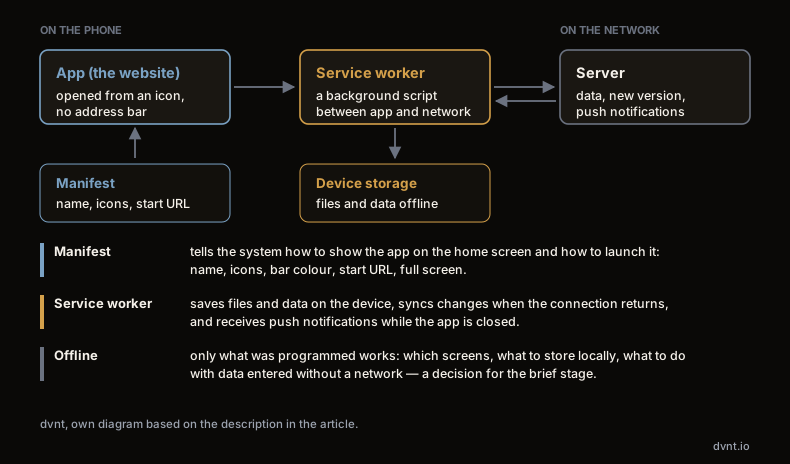
Technically, a PWA is an ordinary website with two extras. You don't need to read the code behind them, but it helps to know what each one does, because they decide what a PWA can and can't do.
A manifest is a small file describing the app: its name, icons in several sizes, the colour of the bar, the URL it should open from, and how it displays — full-screen, for example, without any browser chrome. It's the manifest that tells the system how to show the PWA on the home screen and how to launch it.
A service worker is a script that runs in the background, between the app and the network. It can save the files and data an app needs on the device, so the app opens without a signal, and then sync changes once the connection comes back. It also receives push notifications when the app isn't open. Both major platforms support it — Safari on the iPhone has since iOS 11.3 (WebKit, 2018).
Working offline doesn't happen by itself, though. A service worker does exactly what it's told: which screens should work without a network, what to save locally, and what to do with data entered while offline. That's a design decision worth making with your contractor at the brief stage, not discovering after launch.
Installation: Android, and "Add to Home Screen" on iPhone
This is where the platforms start to diverge. On Android, Chrome offers to install the app itself once a site meets the criteria: it runs over HTTPS, has a manifest with a name, icons and a start URL, and the user has spent a moment on it (web.dev, Install criteria). Since version 108, Chrome on Android no longer requires a service worker for this (Chrome for Developers).
On the iPhone, no prompt appears at all. Installation is manual: in Safari, you open the Share menu and choose "Add to Home Screen" (Apple, iPhone User Guide). Users have to know they can do this — and telling them is your job: a short set of instructions on the site or in the first email to a customer.
In iOS 26, announced in June 2025, Apple changed one thing in the PWA's favour. Every site added to the home screen now opens as a web app by default, rather than as a browser tab; users can turn this off (WebKit, WWDC25). Installation itself, though, is still a step someone has to take deliberately.
| Android — Chrome | iPhone — Safari | |
|---|---|---|
| Installation | Android — Chromeyes — the browser offers it automatically | iPhone — Safarimanually: Share → Add to Home Screen |
| Push notifications | Android — Chromeyes — since Chrome 42 | iPhone — Safarisince iOS 16.4, only from the home screen |
| Offline work | Android — Chromeyes — service worker | iPhone — Safariyes — since iOS 11.3 |
| Web Bluetooth | Android — Chromeyes | iPhone — Safarino — WebKit opposes it |
| Web NFC | Android — Chromeyes — since Chrome 89 | iPhone — Safarino — WebKit opposes it |
| App store | Android — ChromeGoogle Play via TWA | iPhone — SafariApp Store: not as a bare website (4.2) |
CONCLUSIONSince iOS 26, a site added to the home screen opens as an app by default.
Push notifications on iPhone
For years, the lack of notifications on iPhone was the main argument against PWAs. That changed in 2023: since iOS and iPadOS 16.4, web apps can send push notifications (WebKit, 16 February 2023). On Android, Chrome has supported push notifications since version 42, back in 2015.
On iPhone, though, there's a condition that changes the maths. Notifications only work for an app added to the home screen — not for a site open in the browser. Before a user gets their first notification, they first have to install the PWA manually, then agree to notifications. Some people will skip one of those two steps.
That leads to a practical rule. If notifications are a nice-to-have — a reminder about an appointment, an order-status update that could also go by email — a PWA on iPhone is enough. If they're the core of the product, and most of your users carry iPhones, test with a small group before committing to a PWA: check how many of them get through installation and consent.
The EU episode: when Apple announced removing PWAs in the European Union
There's also a reason to think of a PWA on iPhone as a dependency on a single company. In early 2024, adapting iOS to the EU's Digital Markets Act (DMA), Apple announced it would remove home-screen web apps in the European Union — telling developers directly that "to comply with the DMA's requirements, we had to remove the Home Screen web apps feature in the EU."
After a wave of criticism, the decision was reversed. In an updated version of the same notice, Apple said it would keep offering the feature in the EU after all, and that it would return with iOS 17.4 in early March 2024 (Apple, page archived 5 March 2024). In the same notice, Apple noted that home-screen apps are still built directly on WebKit and its security architecture — including in the EU, where other browsers can now use their own engines.
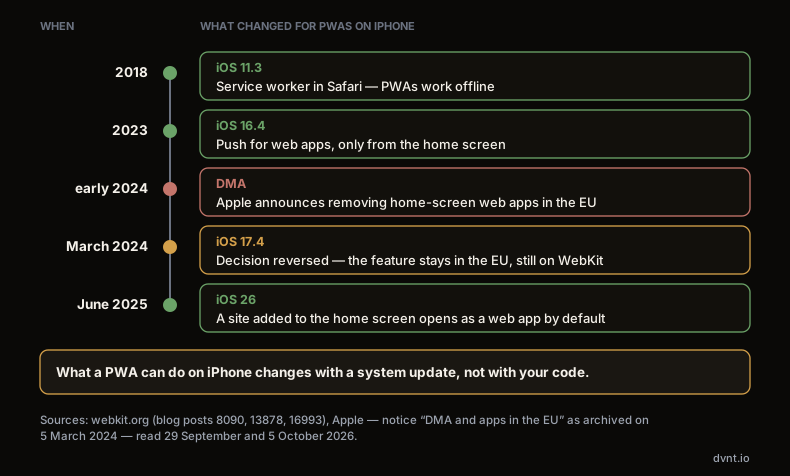
The lesson for a business is simple. A PWA works on iPhone because Apple allows it to, and the scope of that permission can change with a single system update. That's not a reason to avoid PWAs — but it is a reason not to build on it anything your business can't run without, and to have a plan in case the rules change.
A PWA in an app store
Sometimes a PWA still needs to reach a store — because customers look for apps there, or a client requires it. On Android there's an official route: Trusted Web Activity, Google's technique for opening a PWA inside a store app without a browser bar. It requires proof that the app and the website belong to the same owner (a Digital Asset Links file on the server), and the package for Google Play can be built with Bubblewrap (Chrome for Developers, Trusted Web Activity).
There's no equivalent route in the App Store. Apple's guidelines say plainly that an app should include features, content and an interface that go "beyond a repackaged website" (App Store Review Guidelines, 4.2). Simply wrapping a PWA for iOS usually won't pass review — and if you add native features on top, you're already building a hybrid app, with a review for every version and the costs we cover in our article on building mobile apps.
When a PWA makes sense for a business
The capability matrix above points to a few patterns where a PWA works well — and a few where it loses from the start.
A tool for your own staff. Field technicians, warehouse staff, sales reps. This is the best case for a PWA: there are dozens of users, not tens of thousands, so installation on iPhone can be walked through in a short guide or a training session. Offline working solves the problem of patchy signal, and an update reaches everyone the moment it's deployed, without waiting for a store review. The limit: if the tool needs to talk to a printer, a scanner or a set of scales over Bluetooth, it won't do that on iPhone.
A portal for regular customers. A B2B customer who orders weekly, checks an order's status or downloads documents comes back regularly — and for them, an icon on the home screen is a convenience, not an obstacle. Status notifications can be a nice-to-have, since the same information can go by email.
A product for a broad audience that needs to be discovered. Here a PWA usually loses. Someone who doesn't know you yet searches for an app in a store, rather than installing a website from the Share menu. If discovery through the App Store and Google Play is part of your plan to reach customers, you need a store app.
In-app payments and subscriptions. If your business model depends on in-app payments on iPhone, a PWA isn't the right route — that path runs through the store and its rules.
What a PWA changes in your budget and timeline
The biggest saving with a PWA isn't in the hourly rate; it's in the number of things you have to do twice, or not at all. There's one codebase instead of two apps, one release instead of two store reviews, and no developer account to maintain. Every fix reaches users the moment it's pushed to the server, rather than after hours or days of review.
The second difference is less obvious. A store app still needs a server holding data and an interface to talk to it. Under the rules we use to plan projects, building the API for a mobile app alone adds three to six weeks. A PWA uses the same back end as a website or web app, so that line simply doesn't appear — as long as the PWA replaces a store app rather than sitting alongside one.
We don't quote figures here, because the difference depends on scope, not on technology. What makes up the price of an app, and how to read a quote, is covered in our article on app development cost. A fair comparison between a PWA and a native app is always the same scope of features, priced both ways — and a check that every feature in that scope sits on the "yes" side of the matrix above.
Questions to ask a contractor proposing a PWA
A PWA is often pitched as "a cheaper app", and often rightly so. Five questions let you check whether a contractor is thinking of it as an app, or as a website with an icon.
- Which screens will work without a signal, and what happens to data entered offline? A good answer names specific screens and says when the data will be sent. "It'll work offline", with no detail, means nobody has designed that yet.
- How will an iPhone user find out they can add the app to their home screen? Since Safari doesn't prompt for this, someone has to prepare instructions or an on-screen hint — and that should be part of the project's scope.
- Which iOS and Android versions will you test on? Notifications have worked on iPhone since iOS 16.4, and the way apps open from the home screen changed in iOS 26. Testing on one of the contractor's own phones isn't enough.
- How will an update reach users who already have the app installed? A service worker stores files on the device, so a poorly configured one can keep serving an old version for a long time. Your contractor should know how to control this.
- Do any of the requested features need Bluetooth, NFC or a store? If so, and the app has to run on iPhone, it's better to hear that before signing than at handover.
What a PWA won't do
The most important limits concern the iPhone and access to hardware. WebKit, Safari's engine, formally opposes two technologies that work on Android: Web Bluetooth — connecting a website to devices over Bluetooth, available in Chrome on Android — and Web NFC — reading proximity tags, available in Chrome on Android since version 89. WebKit cites privacy, security and independence from specific hardware as its reasons (WebKit, standards positions). If your app needs to connect to a label printer, a scanner or a set of scales, or read NFC tags in a warehouse, a PWA on iPhone won't do that.
For some other technologies, WebKit hasn't taken a position. One example is background sync, which lets a data upload finish once an app has been closed — on iPhone, you can't rely on it. In practice, that means data entered offline is sent once the user reopens the app, not silently in the background.
Then there's everything else a store provides: visibility in App Store search, in-app payments, and the trust some users place in a "real app". If any of those matters to you, a PWA isn't the right route, whatever it costs.
PWA, native or hybrid — how to choose
After this list, the choice usually comes down to two questions. First, do you have to be in a store — because it's a distribution channel, a client requirement, or you need in-app payments? If so, you need a native or cross-platform app. Second, do you need offline working, device features and notifications, with users coming back daily? If so, a PWA, with the caveats in this article. If not, a well-built web app in the browser is enough, and it's also the fastest route to a first version of your product.
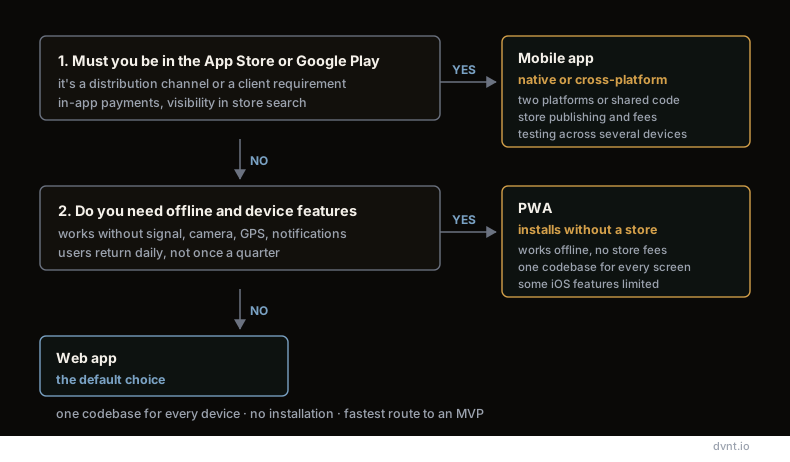
If you're choosing between a PWA and a native app, add one more check to these questions: what share of your users carry iPhones, and whether the feature that matters most to you sits on the "yes" side of the matrix above. If it does, a PWA gives you one codebase, review-free updates and no account fees. If it doesn't, it's better to know before you build than after.
Not sure which one fits your case? Quiz: website, web app or mobile app walks through a few questions about your customers, budget and how the tool will be used — and ends with a specific recommendation instead of "it depends".
Frequently asked questions
Does a PWA work on iPhone?
Yes. On iPhone, a PWA is added manually: in Safari, open the Share menu, then choose "Add to Home Screen". Since iOS 26, a site added this way opens as an app by default. Offline mode works, and since iOS 16.4 so do push notifications. Web Bluetooth and Web NFC don't work, though.
Can a PWA send push notifications?
Yes. On Android in Chrome since 2015, on iPhone since iOS 16.4 — but only once the user has added the app to their home screen and agreed to notifications. A site simply open in Safari won't send them.
Can a PWA be published in Google Play or the App Store?
To Google Play, yes — via Trusted Web Activity, Google's official technique, with proof that the app and the website share the same owner. To the App Store, no: Apple's guidelines require more than a repackaged website, so simply wrapping a PWA usually won't pass review.
How does a PWA differ from a native app?
A native app is written separately for iOS and Android and installed from a store; it has full access to the phone's features. A PWA is a website you install from the browser, without a store and without a version review — but what it can do is set by the browser, and on iPhone that is narrower than on Android.
Does a PWA work offline?
It can, if it's been designed that way. Offline working is handled by a service worker, which saves the files and data an app needs on the device. Which screens should work without a network, and what to do with data entered offline, has to be agreed with your contractor at the brief stage.
Related articles
Costs and working with a vendor
How to make an app for your business: six stages and what you decide at each one
How to make an app for your business with a contractor: brief, prototype, sprint development, UAT and go-live. How long each stage takes and where you decide.
Web and mobile apps
How to make a mobile app for your business — from choosing a platform to publishing it
How to make a mobile app for a business: Android vs iOS in Poland, native or cross-platform, a DUNS number, closed testing and app review.
Web and mobile apps
Custom software or off-the-shelf — how to decide in a company
Off-the-shelf or custom software is decided one function at a time. Four questions, a five-year TCO with our own prices, and vendor lock-in both ways.
Web and mobile apps
Web application — what it is, its types and when you need one
A web application is not just a bigger website. The real difference, the types of web application, what they cost and when they are worth building.
Costs and working with a vendor
How to choose a software development company — checks, contract and rights to the code
How to choose a software development company in Poland: reading reviews and rankings, checking KRS filings, fixed price vs time and material, and code rights.
Web and mobile apps
Flutter vs React Native — which to choose for a business app, and when to stay native
Flutter vs React Native: how they differ, what they cost in Polish quotes, what Apple and Google force you to update every year, and when native is better.
An app from the store or a PWA?
Tell us who will use it and what they need on their phone. We will advise whether a PWA is enough or you need an app in the App Store and Google Play. If a PWA will do, we will say so plainly.