
Web and mobile apps18 min read3503 wordsRedakcja dvnt
Flutter vs React Native — which to choose for a business app, and when to stay native
Flutter vs React Native: how they differ, what they cost in Polish quotes, what Apple and Google force you to update every year, and when native is better.
Flutter vs React Native is, in 2026, a choice between two mature technologies that cost about the same in Polish quotes, and the difference shows up later, in who keeps the app up to date. What decides which one serves your company better is not a benchmark but the team that will update the app for years: Apple and Google raise their store requirements regularly, and both frameworks change underneath. This article is for a business owner or product manager who is commissioning an app for iOS and Android and has quotes in different technologies on the table — or a single quote with Flutter and the question of whether that is a good choice. If you do not yet know whether you need an app at all, start with what a mobile app is and when it makes sense for a company.
dvnt builds native apps for iOS (Swift) and Android (Kotlin), and cross-platform apps in React Native with Expo. We do not build Flutter apps. Where Flutter is the better choice, we say so plainly, in a section of its own. Below: what the two technologies are today, what they cost in Polish quotes and what those numbers do not tell you, what costs money every year whatever the technology, when to choose React Native, when Flutter, when a native app, and what to ask a contractor. Documentation, store requirements and data are as of 29 October 2026.
What is Flutter and what is React Native — and how they really differ
The difference that matters to the buyer fits in one sentence: React Native borrows the interface elements from the phone's operating system, while Flutter draws its own. The rest — the language, the tooling, who is behind the project — either follows from that or depends on the team that will write your app.
What is React Native. React Native is a framework in which the app is written in JavaScript or TypeScript, in the same component model as React on websites. The code does not draw the interface itself, though. The React Native documentation says that "at runtime, React Native creates the corresponding Android and iOS views for those components", and concludes from this that such apps "look, feel, and perform like any other apps" (the framework authors' words, not a measurement).
Older comparisons talk about a "bridge" between JavaScript and native code that was supposed to slow apps down. That argument is out of date. In version 0.76 of 23 October 2024 the New Architecture became the default, and its authors write that they "fully removed React Native's dependency on the bridge, replacing it with direct, efficient communication between JavaScript and native code". Version 0.82 of 8 October 2025 runs only on the New Architecture — the settings meant to switch it off are ignored.
The project's host has changed too. Since 24 February 2026, React and React Native belong to the React Foundation at the Linux Foundation: Meta contributed the project to the foundation, and the initial Platinum Members include Amazon, Callstack, Expo, Huawei, Meta, Microsoft, Software Mansion and Vercel. The line "React Native is a Meta framework", which still turns up in comparisons, describes the situation before February 2026.
What is Flutter. Flutter is an open-source framework that its website describes as “Supported by Google, open to everyone”. Apps are written in the Dart programming language. Flutter does not use the system's controls: according to its architectural overview, "rather than being translated into the equivalent OS widgets, Flutter user interfaces are built, laid out, composited, and painted by Flutter itself". For release, the app is compiled directly to machine code, and when the target is the browser, to JavaScript or WebAssembly.
The drawing is done by the Impeller engine. Since version 3.27, released in December 2024, it is the default on iOS and on Android from API level 29, and on iOS it is the only supported engine. Comparisons that say Flutter draws with the Skia engine describe the state before that change. From one codebase Flutter builds apps for phones, for the browser and for desktop on Windows, macOS and Linux — the current list is in the supported platforms documentation.
You will not find an answer here to which framework is faster. The documentation describes mechanisms, not comparison results, and tests published on blogs measure particular screens on particular phones. For a typical business app — forms, lists, sign-in, payments, notifications — we do not treat it as a selection criterion.
Flutter vs React Native cost — in Polish quotes, and what those numbers don't tell you
In the Polish quotes collected in our report, there is no price difference between React Native and Flutter: the median is PLN 40,000 net for both. The figures come from the dvnt report Mobile application costs in Poland — 2026 edition, built from public price lists, benchmarks and offer aggregators from March to May 2026 (net amounts, licensed CC BY 4.0). The median and the range are calculated from the amounts given in the price lists, and n is the number of price-list items:
- Flutter: median PLN 40,000, half of the amounts between PLN 15,000 and PLN 100,000 (n=13);
- React Native: median PLN 40,000, half of the amounts between PLN 25,000 and PLN 50,000 (n=18);
- native app (Swift and Kotlin): median PLN 100,000, half of the amounts between PLN 50,000 and PLN 325,000 (n=14).
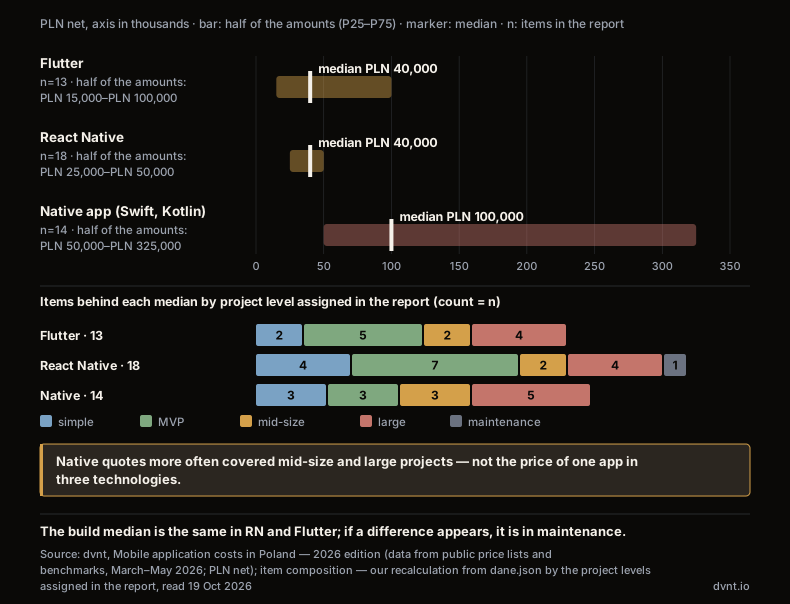
These numbers are not the price of the same app quoted three times. They are medians of different projects. The report assigns each item a project level, and by our recalculation native quotes more often covered mid-size and large projects: 8 of 14 native items, against 3 MVPs. In React Native the proportion is the reverse: mid-size and large projects are 6 of 18 items, MVPs 7. In Flutter, mid-size and large are 6 of 13, MVPs 5. The PLN 100,000 median for a native app is therefore not "the price of being native", and the sentence "native costs two and a half times more" does not follow from this data. Within a single project level there are between two and seven items per technology — too few to compare the price of the same scope in three technologies.
One thing is certain: a native app is two separate codebases, one for iOS and one for Android, while React Native and Flutter are one. How much that changes your quote depends on the scope and on how much of the app needs code written separately for each system anyway; we come back to that in the native section.
The report also gives rates: based on the price lists of Polish contractors, including ITLight and Poldevs, it estimates the rate of a senior Flutter or React Native developer in 2026 at about PLN 150–180 net per hour — one rate for both technologies. How the price of an app is built up and how to read a quote is covered in the article on how much it costs to build an app.
The conclusion for the buyer: at build time, React Native and Flutter cost about the same in Polish quotes. If a difference does appear, it comes later — when the app has to be adapted every year to new store requirements.
The cost that is not in the quote — every year Apple and Google raise the bar
An app that nobody updates eventually loses the ability to ship a fix in the store or to reach new users — and that applies equally to a native app, a React Native app and a Flutter app. The requirements are published, with dates — two already apply, two are coming:
- Apple: since 28 April 2026, apps uploaded to App Store Connect must be built with Xcode 26 or later, using an SDK for iOS 26 (or iPadOS, tvOS, visionOS or watchOS 26 respectively) — Apple Developer, Upcoming requirements. Apple has also announced the next step: starting April 2027, iOS and iPadOS apps must be built with the iOS 27 and iPadOS 27 SDK or later (Apple Developer News, 9 September 2026; no exact day has been given).
- Google Play, API level: since 31 August 2026, new apps and app updates must target Android 16 (API level 36) or higher, and existing apps must target Android 15 (API level 35) or higher to remain available to new users on devices running a newer Android. Developers who needed more time could request an extension until 1 November 2026. The requirement does not apply to permanently private apps restricted to users in a specific organisation and intended for internal distribution only — Android Developers, Target API level requirements.
- Google Play, 16 KB memory pages: from 1 February 2027, app updates that do not support 16 KB memory page sizes cannot be released. The requirement concerns apps with native code, including third-party libraries and SDKs that contain it; an app written only in Java or Kotlin, including all its libraries, already supports it — Android Developers, Support 16 KB page sizes. Whether the framework version and the libraries in your app meet it is something the contractor has to check; the answer cannot be given in advance for every project.
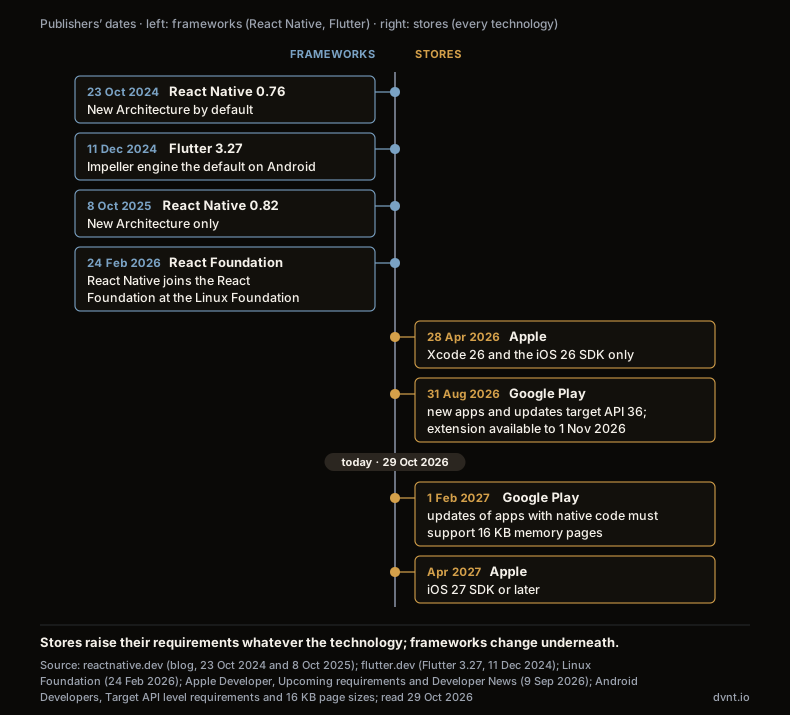
Underneath, the frameworks themselves change. React Native 0.82 no longer starts the old architecture, and its authors had announced earlier that modules would have to support the new one. In our assessment, an app written several years ago on the old architecture will not move to a current version without checking every native library it uses — and a library whose author has not kept up blocks the whole update. In the same period Flutter replaced the engine that draws the interface; on iOS there is no going back to the previous one. The team has to test changes like these on your own app, even if nothing changes for the user.
The store calendar applies to every technology. The difference, as we see it, is who has to keep up. In a native app, your team. In React Native and Flutter, your team, the framework's authors and the authors of every library the app uses. How many days a year such an update takes depends on the number of libraries and on how long it has been put off; we will not give a single number that would fit every app. That is why the question "who will update this for the next three years" weighs more than "which framework is faster". A postponed update is a textbook case of what we describe in the article on technical debt: every further year of delay raises the cost of catching up.
When to choose React Native — a team and a website in React, Expo as the foundation
Choose React Native when your team or your website vendor works in React and TypeScript, and the app should behave the way users know it from their own phone. Three situations where it works best:
- One language on the web and in the app. A website or dashboard in React and an app in React Native can be run by the same team and share part of their code, for example data types and validation logic.
- A look that feels like the system. React Native uses the Android and iOS views, so buttons, lists and scrolling behave the way users of each system are used to.
- Quick fixes between store releases — more on that below, together with the limit Apple sets.
React Native and Expo. The React Native documentation recommends that a new app start with a framework, and it points to Expo: "Expo is a production-grade React Native Framework." Expo provides the EAS Update service: according to the Expo documentation, an app can update its own non-native pieces — JavaScript, styling and images — over the air, between store releases. A change to native code or native dependencies needs a new version of the app, built and submitted to the store.
The limit is set by Apple. Guideline 2.5.2 of the App Store Review Guidelines says that apps may not "download, install, or execute code which introduces or changes features or functionality of the app, including other apps". So EAS Update is a route to a quick fix, not to a new feature that bypasses review. Where exactly the line between the two runs is for Apple to judge.
When an app needs something the framework does not have, you do not have to abandon React Native. The Expo Modules API "allows you to write Swift and Kotlin to add new capabilities to your app with native modules and views".
How we do it. We build React Native apps on Expo, in TypeScript, with EAS for building and submitting to the stores; where needed, we add modules in Swift and Kotlin. The code is in the client's repository from the first sprint, and the technology decision — native, React Native, or React Native with native modules — is written down with its reasoning after the Discovery phase. The scope and the way we work together are described on the page about mobile apps for companies.
When Flutter is the better choice — and why we say so although we don't build it
Flutter is the better choice in four situations — and we say so plainly, even though we do not build it ourselves.
- The interface should be identical and unique on iOS and Android. A brand with its own controls, unusual elements, elaborate animation. Flutter draws every element itself instead of using the system's controls, so the look does not depend on differences between iOS and Android — that follows directly from its architecture.
- The same app should also run on desktop and in the browser. Flutter builds apps for phones, for Windows, macOS and Linux, and for the browser from one codebase. If a tool for employees should run on a laptop in the office and on a phone in the field with an identical interface, that is a strong argument.
- Your team, or the vendor who will stay with you, works in Dart. The criterion from the previous sections works both ways: the technology should fit the people who will maintain it. A team that knows Flutter will build a better app in Flutter than in a technology it is still learning.
- You already have a working Flutter app. In our assessment, rewriting a working app in React Native rarely pays off: you pay a second time for the same thing, and you still have to keep up with the store calendar.
In these situations, look for a contractor who works in Flutter — we have no such team and will not pretend to. If a quote mentions FlutterFlow, that is a low-code tool for building Flutter apps, so a different decision: you are choosing a platform with its limitations, not just a framework. When low-code is enough and when it is not is covered in the article on low-code and no-code.
Native app development — when to stay with Swift and Kotlin
A native app is two separate apps, written in the languages and tools of the system makers: for iOS in Swift, usually with the interface in SwiftUI, and for Android in Kotlin, with the interface in Jetpack Compose. Google has been developing Android as a "Kotlin-first" platform since 2019, and Jetpack Compose is available only in Kotlin, not in Java. A native app has direct access to everything the system offers, with no framework layer in between.
Stay native in three situations:
- The app lives off system features outside its own screen. Home-screen widgets, watch complications, Live Activities, Control Center toggles. Apple states it plainly: "You build widgets using SwiftUI." In a React Native or Flutter app, such an extension is also written in Swift, as separate code. One widget is an add-on; when there are many such elements and they are the core of the product, two native codebases are simpler than a framework with a growing list of exceptions.
- The app makes heavy use of hardware or specific system services. Camera with machine learning, augmented reality, audio processing, HealthKit, managing company phones through MDM — these are the criteria we ourselves use when choosing native code.
- Your company already has iOS and Android teams. If the people who will maintain the app write Swift and Kotlin, there is no reason to add a third technology for them.
There is also a middle road, which we often choose. Both frameworks have official bridges to native code: React Native through the Expo Modules API, Flutter through platform channels, where on Android you write in Kotlin or Java and on iOS in Swift or Objective-C. A few features that need native code are then a module to write, not a reason to build two separate apps.
When is native overkill? In our view, when the app is a typical business tool: forms, lists, sign-in, payments, notifications. One shared codebase handles that scope well, while two separate ones mean twice the work on every change and on every update the stores require. How to get from an idea to publication — developer accounts, the DUNS number, testing before release — is in the guide on how to make a mobile app for your business.
Kotlin Multiplatform and the hybrid app — two names that will show up in quotes
Kotlin Multiplatform is a third way: shared app logic in Kotlin for Android and iOS, with the interface either shared or built separately, natively, for each system. A shared interface comes from Compose Multiplatform. In May 2025 JetBrains announced that Compose Multiplatform for iOS is stable and production-ready, with compatibility guarantees for the major APIs. So if you are weighing Kotlin Multiplatform vs Flutter, the key question is the same as with React Native: what the team that stays with the app works in. It is a natural path for companies that already have Kotlin developers. We do not offer it.
A hybrid app usually means a website running in a native "window" (a WebView), not an app in React Native or Flutter. Neither framework works that way: React Native uses the system's views, Flutter draws its own. In quotes, though, the word "hybrid" is sometimes used for both — in our report's dataset, one of the contractors prices a "hybrid React Native" app. If you see it, ask which technology stands behind it. What a PWA is, and when a website installed on the phone is enough instead of a store app, is covered in the article on progressive web apps.
Five questions to ask a contractor before you sign off on a technology
A good quote answers these questions before you ask them; if a contractor cannot answer them, the technology is the least of your problems.
- Who will raise the framework version, the Apple SDK and the Google API level, how often, and is that in the maintenance contract? The dates from the calendar above will arrive whether or not anyone planned for them. The contract should say who watches the deadlines and how quickly an update reaches the stores.
- Which features need native code, and who will write it? Widgets, a watch app, hardware integrations. In React Native and Flutter these are separate modules in Swift and Kotlin — the contractor should name them and have people who will write them.
- How do you ship a fix — only through the store, or also with an over-the-air update? If a quote promises updates without the store, ask how the contractor reads Apple's guideline 2.5.2 and what will be done with a new feature.
- Is the code in our repository from day one? An app whose code sits with the contractor ties you to them at every update. How to vet a contractor and what to put in the contract is covered in the article on how to choose a software development company.
- Is the technology decision written down with its reasoning? A short architecture decision record (ADR): what was chosen, what the alternatives were, and why. The next team — yours or another contractor's — will know what assumptions the app stands on.
Where to start
Before you compare quotes, answer three questions, in this order. First: who will maintain the app for the next three years, and in what language do they work? Second: which features touch the system outside the app's screen — widgets, a watch, the camera, device management? Third: should the interface look like the system or be identical and unique on every device, and should the app share code with a website in React? Only with those answers compare React Native, Flutter and native quotes.
Pick the column with most of your answers · question one weighs the most
| Question | React Native | Flutter | Native |
|---|---|---|---|
| Who will maintain the app and what they work in | React Nativethe team knows React and TypeScript | Flutterthe team knows Dart and Flutter | NativeSwift and Kotlin teams are in place |
| System features outside the screen: widgets, watch, MDM, camera with ML, AR | React Nativea few — as native modules (Expo Modules API) | Fluttera few — through platform channels | Nativemany, or they are the core of the product |
| Interface | React Nativeshould look like the system | Flutteridentical and unique on every platform, including desktop and browser | Nativelike the system, polished separately for iOS and Android |
| Shared code with a React website | React Nativeyes — one language on the web and in the app | Flutternot a criterion | Nativenot a criterion |
If the answers point to Flutter, look for a team that works in it. If they point to React Native or a native app, we will gladly help turn them into a scope and a maintenance plan. The remaining decisions in building an app — from choosing a contractor to maintenance — are collected in the guide on web and mobile apps for companies.
Frequently asked questions about React Native, Flutter and native apps
What is Flutter?
Flutter is an open-source framework supported by Google, in which one app is written in Dart and released for phones running iOS and Android, for the browser, and for desktop on Windows, macOS and Linux. Unlike React Native, it does not use the system's controls: it draws every interface element itself, and for release the app is compiled to machine code.
What is React Native, and what is Expo?
React Native is a framework in which an iOS and Android app is written in JavaScript or TypeScript and creates the system's own views at runtime. Since 24 February 2026 the project has belonged to the React Foundation at the Linux Foundation. Expo is a framework built on React Native that the React Native documentation recommends for starting a new app; among other things it provides builds for the stores and over-the-air updates of the JavaScript layer between releases.
Flutter or React Native — which is cheaper?
In the Polish quotes collected in the dvnt report "Mobile application costs in Poland — 2026 edition" (March–May 2026, PLN net), the median is PLN 40,000 for both Flutter (n=13) and React Native (n=18). These are medians of different projects, not the same app priced twice, and the samples are small. A larger difference comes from maintenance: who adapts the app to the yearly Apple and Google requirements, and how quickly.
What is a native app, and when is it worth building one?
A native app is two separate apps: for iOS in Swift (usually with SwiftUI) and for Android in Kotlin (with Jetpack Compose). It is worth building when the app lives off system features outside its own screen — widgets, watch complications, Live Activities, which Apple says to build in SwiftUI — when it makes heavy use of hardware, or when the company already has iOS and Android teams. For a typical business app with forms, lists and payments, one shared codebase is usually enough.
Can a React Native or Flutter app be rewritten as native later?
It can, but it means building a new app, not switching technology. Before it comes to that, check whether a native module is enough: React Native lets you add code in Swift and Kotlin through the Expo Modules API, and Flutter does the same through platform channels. A few native features are usually a module to write, not a reason to rewrite the whole thing.
Can a React Native app be updated without the App Store?
Partly. The EAS Update service from Expo can update JavaScript, styling and images between store releases, but a change to native code needs a new version of the app. Apple's guideline 2.5.2 prohibits downloading code that introduces or changes the features of the app, so a new feature goes through App Store review. Where the line between a fix and a new feature runs is for Apple to judge.
Related articles
Costs and working with a vendor
Software audit and application audit — what the diagnosis checks, what the report contains and how long it takes
Software audit of an app or SaaS: what it checks, what the report should contain, how long it takes and how to read the result. How it differs from code review.
Costs and working with a vendor
How to choose a software development company — checks, contract and rights to the code
How to choose a software development company in Poland: reading reviews and rankings, checking KRS filings, fixed price vs time and material, and code rights.
Web and mobile apps
Progressive web app (PWA): what it is, how it works and when it replaces a native app
What a PWA is, how the manifest and service worker work, installing it on Android and iPhone, push notifications since iOS 16.4, and what a PWA still cannot do.
Costs and working with a vendor
How to make an app for your business: six stages and what you decide at each one
How to make an app for your business with a contractor: brief, prototype, sprint development, UAT and go-live. How long each stage takes and where you decide.
Web and mobile apps
How to make a mobile app for your business — from choosing a platform to publishing it
How to make a mobile app for a business: Android vs iOS in Poland, native or cross-platform, a DUNS number, closed testing and app review.
Web and mobile apps
Custom software or off-the-shelf — how to decide in a company
Off-the-shelf or custom software is decided one function at a time. Four questions, a five-year TCO with our own prices, and vendor lock-in both ways.
Not sure what to build your app in?
We will help you work out which features need native code and who will maintain the app in the years ahead. And if Flutter is the better choice for you, we will say so plainly.